Sophos EDR
Overview
Sophos EDR monitors, detects and mitigates threats on endpoints. This EDR reduces the attack surface and prevents attacks by using anti-exploit, anti-ransomware, and advanced control technologies.
This setup guide shows how to forward user assets from Sophos EDR to Sekoia.io.
- Vendor: Sophos
- Product: Sophos EDR
- Supported environment: Cloud
Configure
Create Sophos EDR credentials
Warning
If you have a "Partner" or "Organization" entity, you need to do the following procedure on every tenant attached to it. Please find more information in the official documentation.
In the Sophos Central Admin console:
- On the left panel, go to
Global Settingsand selectAPI Credentials Management. - Click on
Add Credentialto create a credential dedicated to Sekoia.io. - Give it a name, select the role
Service Principal ReadOnlyand click onAdd. - In the
API credential Summary, copy theClient IDand theClient Secret. It will be used later in Sekoia.io to retrieve the assets.
Create your asset connector
To start getting your Sophos assets into Sekoia.io, you need to create an asset connector on the Assets page. To do so, follow these steps:
-
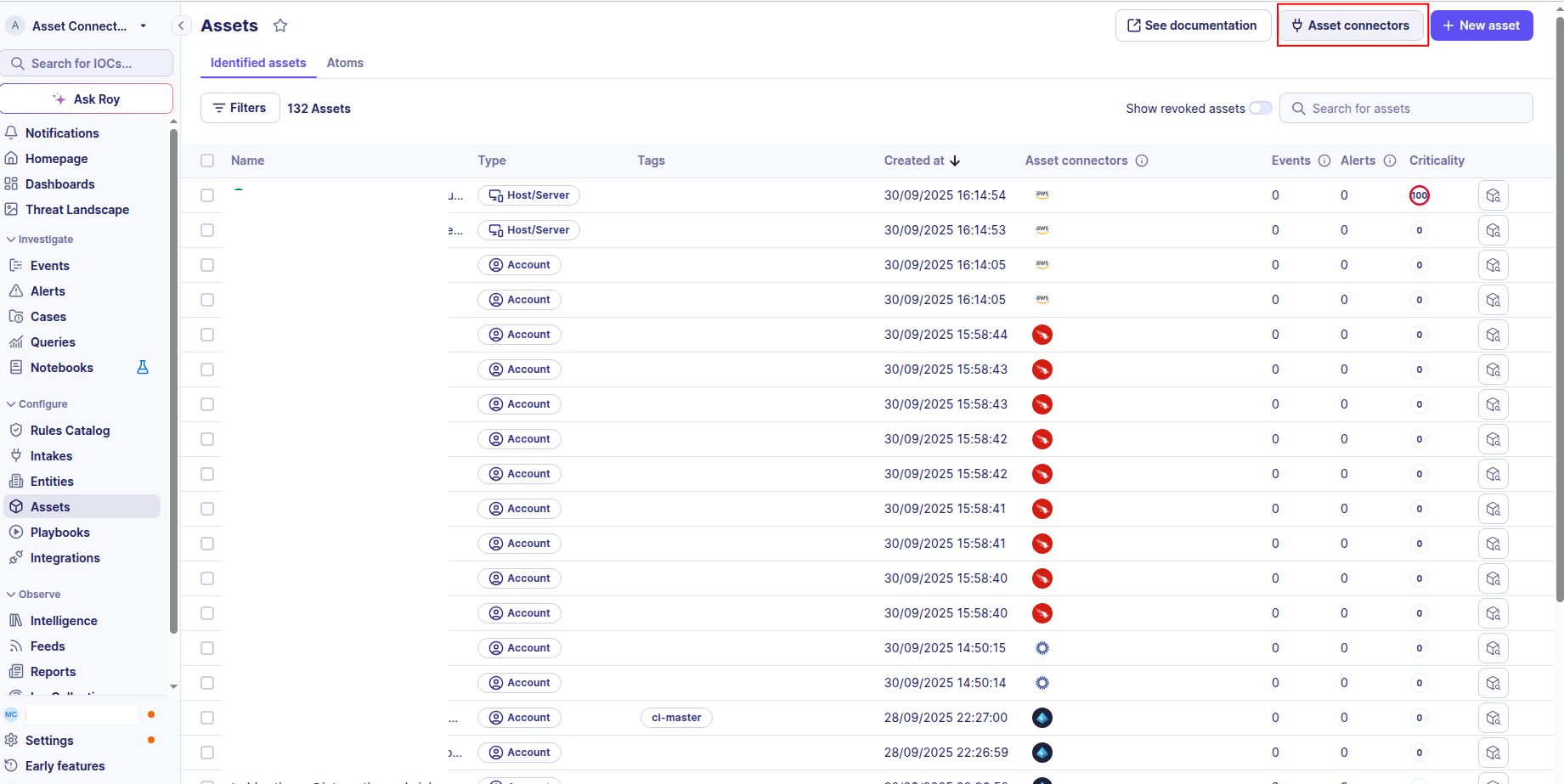
Click the Asset connectors button to create a new connector.
-
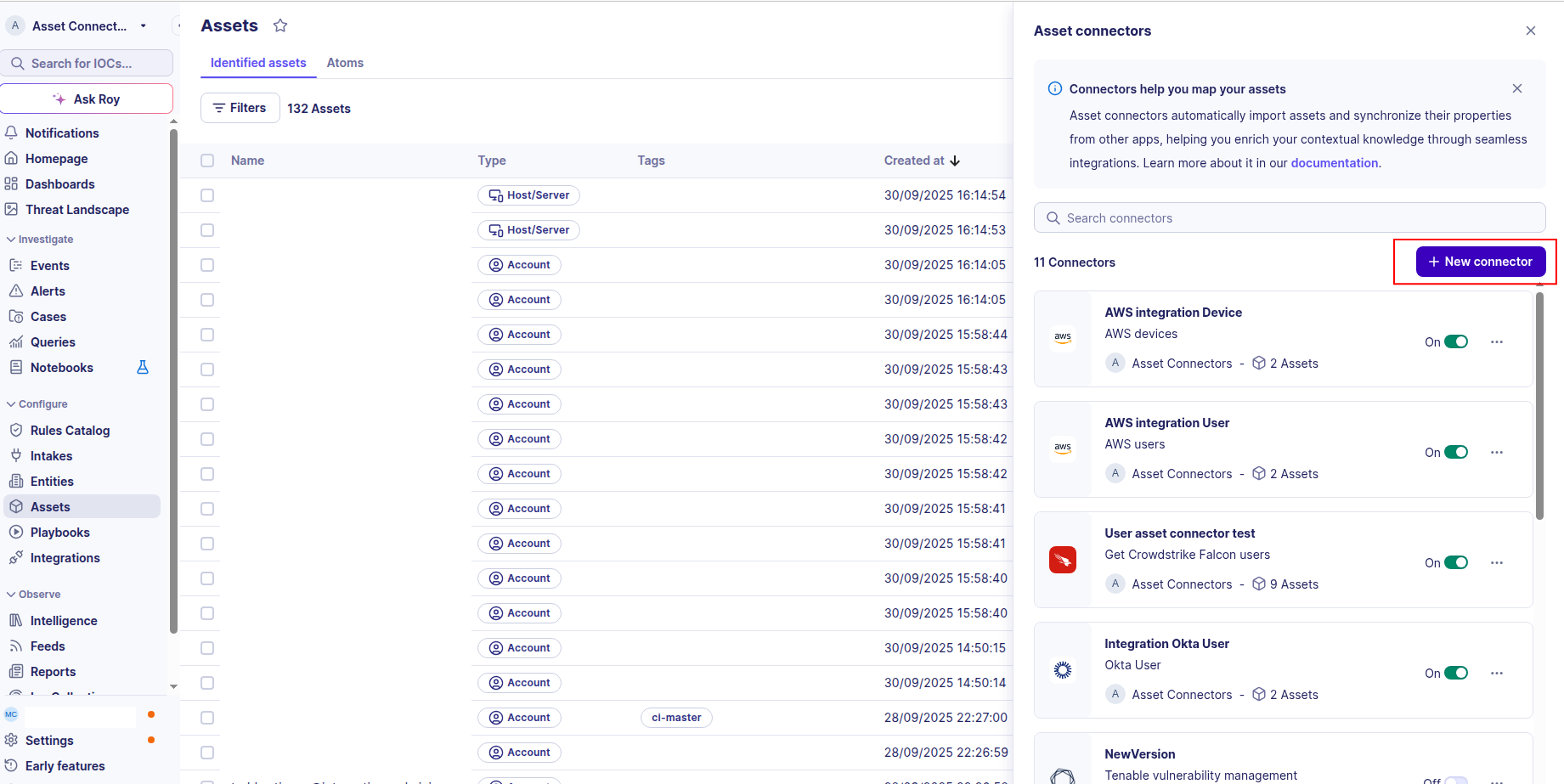
Click the + New connector button.
-
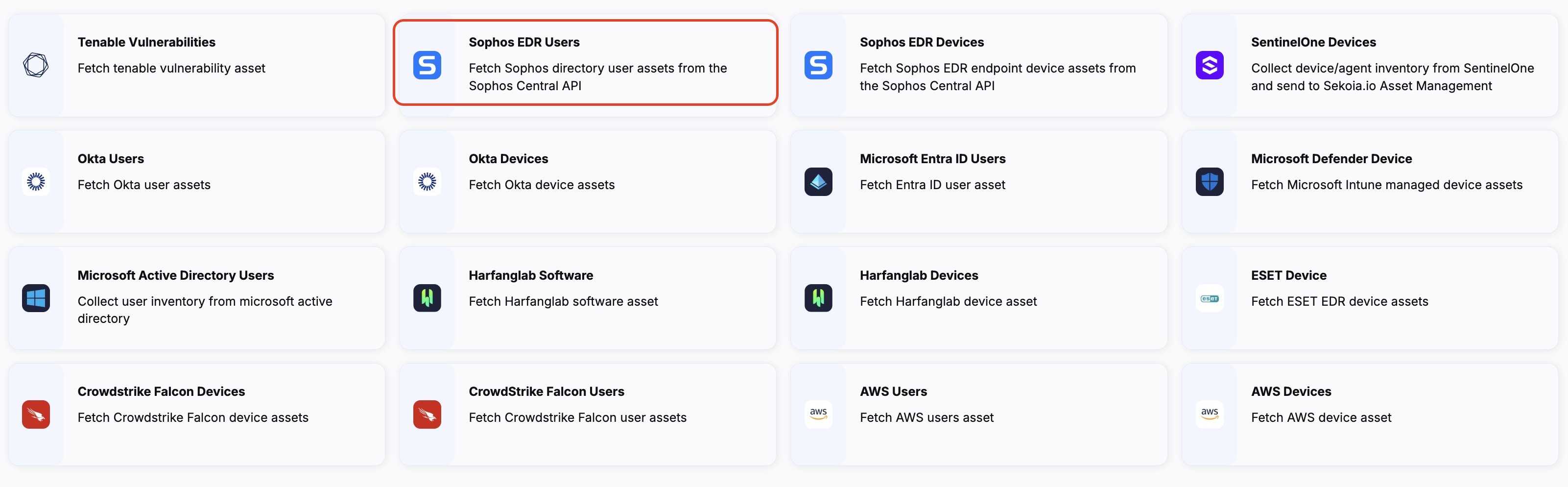
Choose Sophos EDR users, give it a name, and fill the required fields in the account field:
- Account name: The name of the Sophos EDR account you want to connect to.
- Client ID: The client ID of the API credential you created in the Sophos Central Admin console.
- Client Secret: The client secret of the API credential you created in the Sophos Central Admin console.
- API Host: The API host URL of your Sophos EDR instance (default:
https://api.central.sophos.com). - OAuth2 authorization URL: The Sophos OAuth2 token endpoint (default:
https://id.sophos.com/api/v2/oauth2/token).
-
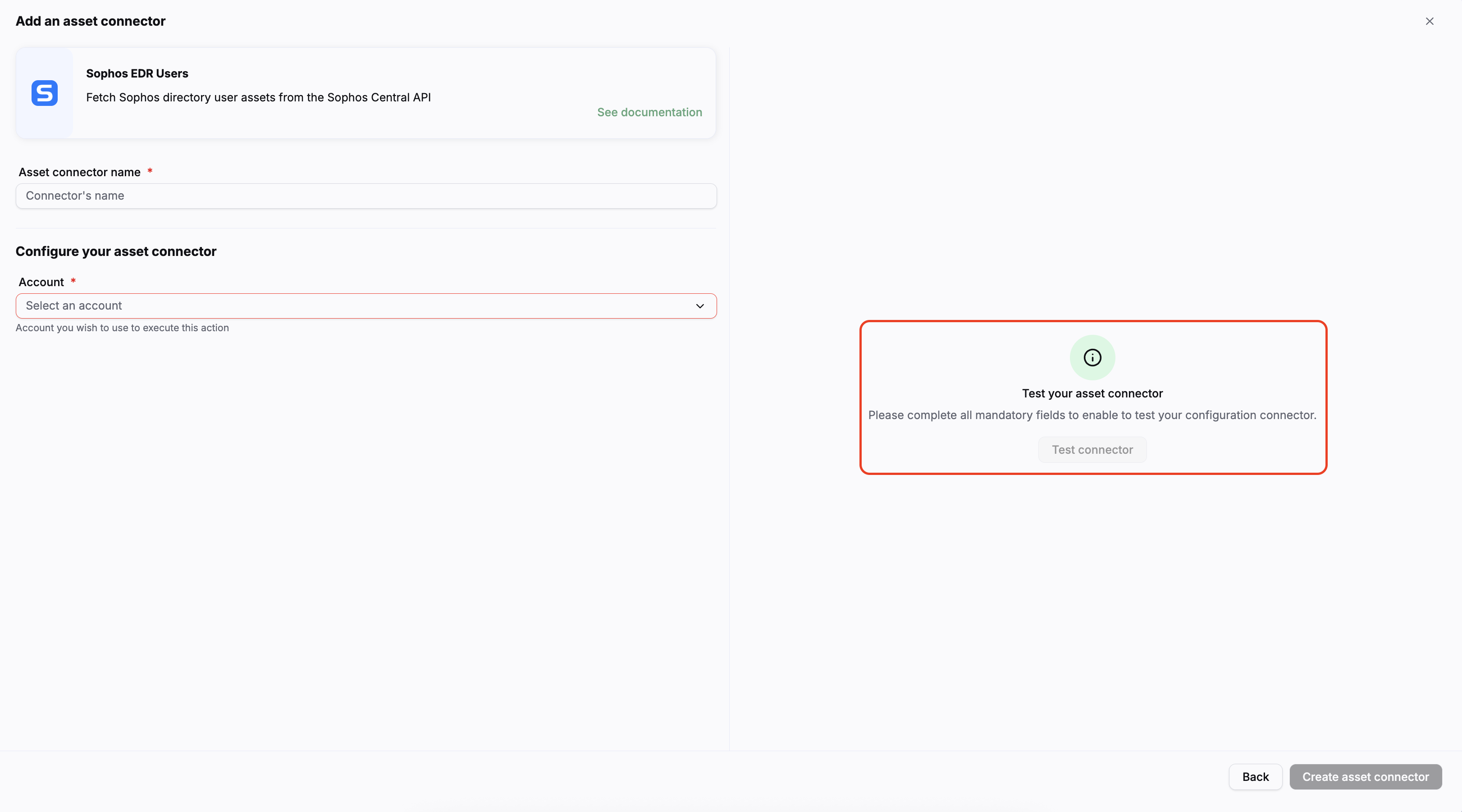
Test the connection by clicking the Test connector button.
-
Click the Create asset connector button.
OCSF Mapping for Sophos EDR Users
OCSF Class: User Inventory Info
Class UID: 5003
OCSF Version: 1.6.0
Information Collected
The Sophos EDR Users fetch comprehensive information and transform it into the OCSF (Open Cybersecurity Schema Framework) format for standardized security monitoring and asset management.
API Response Examples
Named user with email
A Sophos directory user with full name and email address
{
  "id": "00000000-0000-0000-0000-000000000001",
  "name": "Jane Doe",
  "firstName": "Jane",
  "lastName": "Doe",
  "email": "jane.doe@example.com",
  "exchangeLogin": "",
  "groups": { "total": 0, "itemsCount": 0, "items": [] },
  "tenant": { "id": "00000000-0000-0000-0000-000000000010" },
  "source": { "type": "custom" },
  "createdAt": "2023-06-16T15:00:56.473Z",
  "updatedAt": "2023-06-16T15:00:56.870Z"
}
Windows local account
A Sophos directory user representing a Windows local account (DOMAIN\username)
{
  "id": "00000000-0000-0000-0000-000000000002",
  "name": "DESKTOP-ABC1234\\jdoe",
  "groups": { "total": 0, "itemsCount": 0, "items": [] },
  "tenant": { "id": "00000000-0000-0000-0000-000000000010" },
  "source": { "type": "custom" },
  "createdAt": "2025-12-10T12:49:12.371Z",
  "updatedAt": "2025-12-11T12:22:37.223Z"
}
User with groups
A Sophos directory user that belongs to one or more groups
{
  "id": "00000000-0000-0000-0000-000000000003",
  "name": "John Smith",
  "email": "john.smith@example.onmicrosoft.com",
  "groups": {
    "total": 1,
    "itemsCount": 1,
    "items": [
      {
        "id": "00000000-0000-0000-0000-000000000020",
        "name": "example.onmicrosoft.com",
        "displayName": "example.onmicrosoft.com"
      }
    ]
  },
  "tenant": { "id": "00000000-0000-0000-0000-000000000010" },
  "source": { "type": "custom" },
  "createdAt": "2023-11-20T09:46:38.886Z"
}
Data Mapping Table
The following table shows how source data is mapped to OCSF model fields:
| Source Field | OCSF Field Path | Description | Data Type | Logic |
|---|---|---|---|---|
static: 2 |
activity_id |
OCSF activity ID – always 2 for Collect | integer |
- |
static: Collect |
activity_name |
OCSF activity name | string |
- |
static: Discovery |
category_name |
OCSF category name | string |
- |
static: 5 |
category_uid |
OCSF category UID | integer |
- |
static: User Inventory Info |
class_name |
OCSF class name | string |
- |
static: 5003 |
class_uid |
OCSF class UID | integer |
- |
static: 500302 |
type_uid |
OCSF type UID | integer |
- |
static: User Inventory Info: Collect |
type_name |
OCSF type name | string |
- |
static: Informational |
severity |
Event severity | string |
- |
static: 1 |
severity_id |
OCSF severity ID | integer |
- |
static: Sophos EDR |
metadata.product.name |
Source product name | string |
- |
static: N/A |
metadata.product.version |
Product version | string |
- |
static: 1.6.0 |
metadata.version |
OCSF schema version | string |
- |
updatedAt (fallback: createdAt, then now) |
time |
OCSF event timestamp | timestamp |
Parse ISO-8601 timestamp; convert to Unix epoch float |
id |
user.uid |
Unique Sophos user identifier → OCSF user.uid | string |
Direct mapping |
name |
user.name |
Display name of the user | string |
Direct mapping |
firstName + lastName |
user.full_name |
Full name constructed from first and last name fields | string |
Concatenate firstName and lastName with a space when either is present |
email |
user.email_addr |
Primary email address of the user | string |
Direct mapping; omitted when null or empty |
static: User |
user.type_id / user.type |
OCSF user type classification | integer / string |
All Sophos directory users are classified as UserTypeId.USER (1) |
name (presence of backslash and absence of email) |
user.account.type_id / user.account.type |
Account type inferred from the name format | integer / string |
If name contains '\' and email is absent → AccountTypeId.WINDOWS_ACCOUNT (2) Otherwise → AccountTypeId.UNKNOWN (0) |
groups.items[].id + groups.items[].name |
user.groups[] |
Groups the user belongs to | array |
Map each group item to an OCSF Group object (uid=id, name=name) |
tenant.id |
user.org.uid / user.org.name |
Sophos tenant → OCSF organization | string |
Tenant ID is used for both uid and name of the Organization object |
updatedAt (or createdAt) per user |
context.known_users[id] |
Incremental collection checkpoint for change detection | string |
A full id→timestamp snapshot is persisted at the end of each run. On the next run, users whose timestamp matches the cache are skipped (change-detection). |
OCSF Model Structure
Named user with email – OCSF output
Transformed OCSF UserOCSFModel for a user with firstName/lastName/email
{
  "activity_id": 2,
  "activity_name": "Collect",
  "category_name": "Discovery",
  "category_uid": 5,
  "class_name": "User Inventory Info",
  "class_uid": 5003,
  "type_name": "User Inventory Info: Collect",
  "type_uid": 500302,
  "severity": "Informational",
  "severity_id": 1,
  "time": 1686927656.87,
  "metadata": {
    "product": { "name": "Sophos EDR", "version": "N/A" },
    "version": "1.6.0"
  },
  "user": {
    "uid": "00000000-0000-0000-0000-000000000001",
    "name": "Jane Doe",
    "full_name": "Jane Doe",
    "email_addr": "jane.doe@example.com",
    "type_id": 1,
    "type": "User",
    "account": {
      "name": "Jane Doe",
      "type_id": 0,
      "type": "Unknown",
      "uid": "00000000-0000-0000-0000-000000000001"
    },
    "groups": null,
    "org": {
      "uid": "00000000-0000-0000-0000-000000000010",
      "name": "00000000-0000-0000-0000-000000000010"
    }
  }
}