Sekoia API documentation
Getting Started with the Sekoia API
The Sekoia REST API lets you access platform data, trigger actions, and build integrations or automations on top of Sekoia. The GUI itself is built on this API, so anything you can do in the interface, you can do via the API.
With the API you can, among other things:
- retrieve and manage alerts, cases and detection rules
- search events and query telemetry
- manage assets, intakes and playbooks
All endpoints exchange JSON over HTTPS and are authenticated with an API key sent as a Bearer token. The full list of endpoints is available in the API Reference.
Step 1: Find your base URL
The base URL depends on the region where your Sekoia subscription is hosted.
| Region | Base URL |
|---|---|
| FRA1 (default) | https://api.sekoia.io |
| FRA2 | https://app.fra2.sekoia.io/api |
| MCO1 | https://app.mco1.sekoia.io/api |
| UAE1 | https://app.uae1.sekoia.io/api |
| USA1 | https://app.usa1.sekoia.io/api |
| SGP1 | https://app.sgp1.sekoia.io/api |
If you are unsure of your region, look at the URL you use to access the Sekoia.io application. For example, if you log in via https://app.mco1.sekoia.io/, your API base URL is https://app.mco1.sekoia.io/api.
Step 2: Create an API key
All API requests are authenticated with an API key.
Note
Only users with admin roles can create API keys.
Tip
Start with read-only permissions. You can always create a second key with write permissions when you need to perform write operations.
To create a key:
-
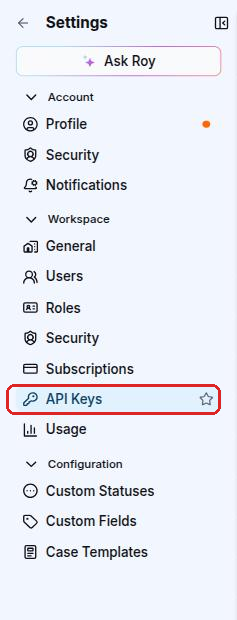
In Sekoia, go to Settings > Workspace > API Keys.
-
Click + API key.
- Give your key a name and a description.
- Set an expiration date (30 days, 180 days, 365 days, or custom up to 1 year).
- Select the permissions your key needs.
- Click Save and copy the key immediately. It will only be shown once.
Step 3: Make your first API call
To verify that your key works, retrieve your user profile. This endpoint requires no special permissions beyond a valid key.
export SEKOIA_API_KEY="your_api_key_here"

curl -X GET https://api.sekoia.io/v1/me \
  -H "Authorization: Bearer $SEKOIA_API_KEY"
A successful response looks like this:
{
  "uuid": "2a4b6c8d-...",
  "email": "you@example.com",
  "firstname": "Jane",
  "lastname": "Doe"
}
If you can see your email and UUID, your setup is working.
Troubleshooting
| Status code | Meaning | What to do |
|---|---|---|
401 Unauthorized |
The API key is missing, expired, or invalid. | Check that the key is correctly copied and has not expired. |
403 Forbidden |
The key does not have the required permission for this endpoint. | Edit the key and add the missing permission, or create a new key with the right permissions. |
429 Too Many Requests |
You have exceeded the rate limit. | Wait before retrying. Add a delay between requests in your scripts. |
Next steps
- Search for rules: filter and retrieve detection rules from your catalog
- Create a SIGMA rule: create a detection rule programmatically
- Search events: run an asynchronous event search and retrieve results
- Filtering: filter and paginate API results with
match[<field>], date ranges and cursors
Filtering
Many API methods accept filtering and matching parameters. A client can request specific content from the Sekoia API by specifying a set of filters.
Match
The match[<field>] field parameter can be used to filter documents given the value of a specific field. A filter parameter can be specified any number of times, where all filter fields are handed together.
It should be noted that each field must not occur more than once. Multiple values of a match parameter are separated by a comma (U+002C COMMA, “,”) without any spaces. If multiple values are present, the match is treated as a logical OR.
Examples of match parameters
# list alerts triggered on entity entity1 or entity2
/alerts?match[entity_name]=entity1,entity2

# list alerts triggered on entity1 with rule named rule1 or rule2
/alerts?match[entity_name]=entity1&match[rule_name]=rule1,rule2
Date ranges
The date[field] parameter can be used to filter documents given a date range on a specific field. The value of the parameter must be two dates separated by a comma (U+002C COMMA, ",") without any spaces. The first date is the start date and the second date is the end date.
Example of date range parameter: date[created_at]=2025-09-22T01:20:00.000Z,2025-09-22T23:59:59.999Z.
Pagination
Many Sekoia API endpoints return large collections (alerts, assets, rules, events, intelligence objects, …). These endpoints are paginated. Depending on the product area, two main styles are used:
-
Offset / page-based pagination (most XDR and Operations Center endpoints)
- Use the
limitquery parameter to control how many items are returned in a single response. - Use either a
pageparameter (starting atpage=1) or anoffsetparameter (starting atoffset=0) as documented in each endpoint. - If you do not specify a
limit, many endpoints default to 100 items per page. - Each endpoint may define its own maximum allowed
limit(commonly 100 or 1000); requesting more will either be rejected or silently capped by the API.
- Use the
-
Cursor-based pagination (Intelligence Center feeds)
- Endpoints such as
GET /v2/inthreat/collections/{feed_id}/objectsuse a cursor. - The request accepts a
limitparameter. It returns STIX objects in anitemsfield and a pagination cursor innext_cursor. - To fetch the next page, pass the cursor back using the
cursorquery parameter:cursor={next_cursor}. - By default, these endpoints return 100 objects per request, and you can increase this up to 2000 objects with
limit. - You can safely stop when
itemsis empty or when fewer thanlimititems are returned.
- Endpoints such as
For both styles, the safest way to iterate over a complete collection is to loop until the API returns fewer items than requested, rather than assuming a fixed number of pages.
Example – iterating 1,000 items across pages (offset/page-based)
The example below illustrates how to retrieve up to 1,000 items using limit=100 and a page parameter, stopping early if fewer results are returned:
import requests

API_KEY = "YOUR_API_KEY"
BASE_URL = "https://api.sekoia.io/v1"

def list_items():
    headers = {"Authorization": f"Bearer {API_KEY}"}
    endpoint = f"{BASE_URL}/sic/conf/rules-catalog/rules"

    all_items = []
    limit = 100
    max_items = 1000

    page = 1
    while len(all_items) < max_items:
        params = {"limit": limit, "page": page}
        response = requests.get(endpoint, headers=headers, params=params)
        response.raise_for_status()

        data = response.json()
        items = data.get("items", data)

        all_items.extend(items)

        # Stop if the API returned less than requested (no more pages)
        if len(items) < limit:
            break

        page += 1

    return all_items[:max_items]

if __name__ == "__main__":
    results = list_items()
    print(f"Fetched {len(results)} items")
For cursor-based endpoints, the same pattern applies, but you replace the page/offset parameter with a cursor parameter and update it with the next_cursor value returned by the API on each iteration.