ESET EDR
Reveal module — This feature requires the Reveal add-on module.
Overview
ESET Vulnerability & Patch Management continuously scans managed endpoints for known vulnerabilities across the operating system, installed applications and packages, correlating them with CVE data and available patches to help teams prioritize and remediate exposures.
This setup guide shows how to forward vulnerability assets from ESET to Sekoia.io.
- Vendor: ESET
- Product: ESET PROTECT / ESET Vulnerability & Patch Management
- Supported environment: Cloud
Note
This asset connector requires ESET Vulnerability & Patch Management to be enabled on your ESET account. Without it, the ESET vulnerability API returns no data.
Configure
Create a dedicated API user account
We recommend creating a dedicated API user to separate your regular account from API activities.
Note
Only the Root or Superuser can create a user with access to API endpoints. API access rights cannot be granted to the ESET Business Account Superuser, ESET MSP Administrator 2 Root user, and ESET PROTECT Hub Superuser accounts.
For ESET Business Account and ESET MSP Administrator 2
-
Log in as a Superuser (or Root) to your
ESET Business AccountorESET MSP Administrator 2. -
Navigate to User management and create a new user with the desired level of access rights.
-
Under the Access Rights section, enable the toggle next to Integrations.
-
Click Create to apply the changes.
-
The new user receives an invitation email and must finish the account creation process.
For ESET PROTECT Hub
-
Log in as a Superuser to your
ESET PROTECT Hubaccount. -
Navigate to Users and add a new user.
-
Set the desired level of permissions for the user.
-
Under the Permissions section, enable the toggle next to Integrations.
-
Click Next and then Create to apply the changes.
-
The new user receives an invitation email and must finish the account creation process.
-
The new user must log in to ESET PROTECT Hub at least once before using the API services.
Note
If you require custom permissions for the user, assign the required permission sets directly in ESET PROTECT. You can combine several permission sets if needed. Refer to the List of permissions chapter for details.
Create your asset connector
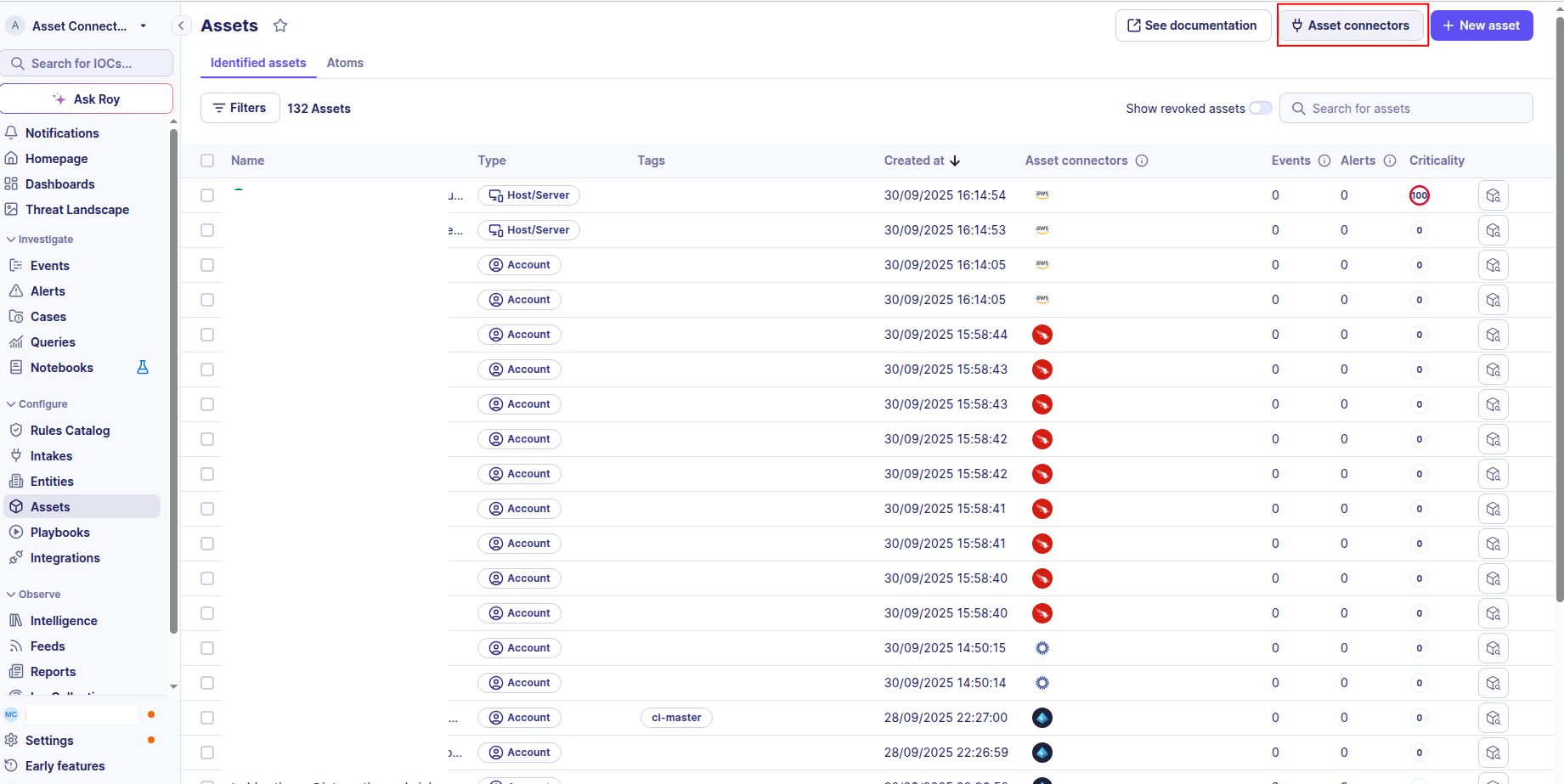
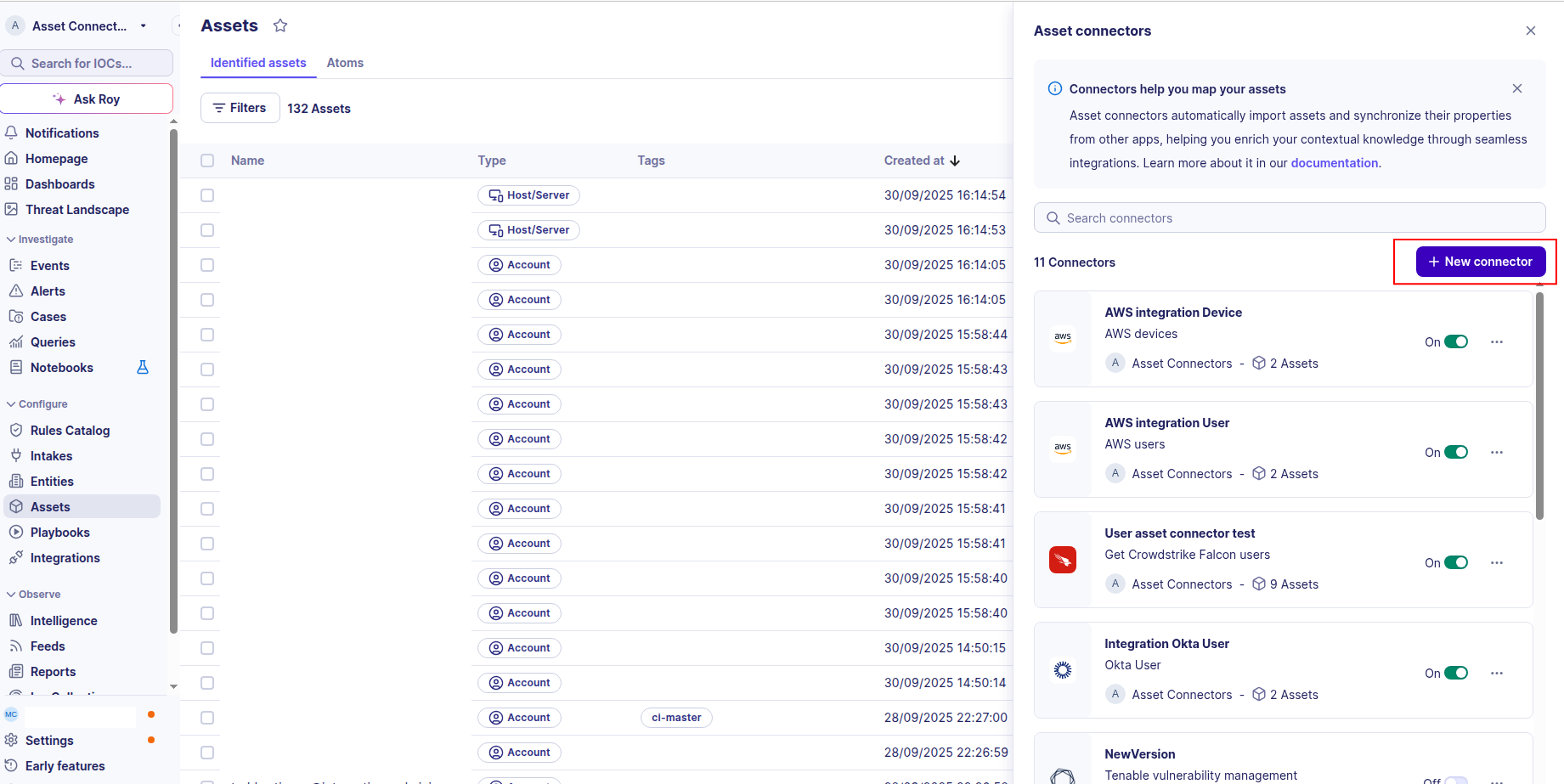
To start getting your ESET vulnerability assets into Sekoia.io, you need to create an asset connector on the Assets page. To do so, follow these steps:
-
Click the Asset connectors button to create a new connector.
-
Click the + New connector button.
-
Choose ESET Vulnerability, give it a name, and fill in the required fields:
- Username: The username (email) of the dedicated API user account you created.
- Password: The password of the dedicated API user account.
- Region: The region of your ESET account (e.g.,
EUorUS).
-
Test the connection by clicking the Test connector button.
-
Click the Create asset connector button.
Warning
- Ensure the dedicated API user has logged in to ESET PROTECT Hub at least once before configuring this connector.
- The API user must have the Integrations toggle enabled under their access rights/permissions.
- ESET Vulnerability & Patch Management must be enabled on the account for vulnerabilities to be returned.
OCSF Mapping for ESET Vulnerability
OCSF Class: Vulnerability Finding
Class UID: 2002
OCSF Version: 1.6.0
Information Collected
The ESET Vulnerability fetches comprehensive information and transforms it into the OCSF (Open Cybersecurity Schema Framework) format for standardized security monitoring and asset management.
API Response Examples
ESET Application Vulnerability Sample
A sample device vulnerability from the ESET GET /v1/device-vulnerabilities endpoint (application scope)
{
  "deviceUuid": "550e8400-e29b-41d4-a716-446655440000",
  "deviceGroupUuid": "group-uuid-1",
  "availablePatchUuids": ["patch-uuid-1"],
  "applicationVulnerability": {
    "application": {
      "developerDisplayName": "Mozilla",
      "displayName": "Firefox",
      "uuid": "app-uuid-1",
      "version": {
        "id": "128.0.0",
        "major": 128,
        "minor": 0,
        "name": "128.0",
        "patch": 0
      }
    },
    "cveNumber": "CVE-2026-1234",
    "firstDetectTime": "2026-05-20T09:00:00Z",
    "lastDetectTime": "2026-05-21T10:00:00Z",
    "patchAvailable": true,
    "riskScore": 75,
    "severity": "SEVERITY_LEVEL_HIGH",
    "vulnerabilityId": 1001
  }
}
ESET Operating System Vulnerability Sample
A sample OS-scope vulnerability from GET /v1/device-vulnerabilities
{
  "deviceUuid": "660e8400-e29b-41d4-a716-446655440111",
  "osVulnerability": {
    "osFamilyId": 1,
    "cveNumber": "CVE-2026-5678",
    "firstDetectTime": "2026-05-19T09:00:00Z",
    "lastDetectTime": "2026-05-20T08:00:00Z",
    "patchAvailable": false,
    "riskScore": 40,
    "severity": "SEVERITY_LEVEL_MEDIUM",
    "vulnerabilityId": 2002
  }
}
ESET Package Vulnerability Sample
A sample package-scope vulnerability from GET /v1/device-vulnerabilities (Linux package manager)
{
  "deviceUuid": "770e8400-e29b-41d4-a716-446655440222",
  "packageVulnerability": {
    "package": {
      "displayName": "openssl",
      "name": "openssl",
      "packageManagerType": "PACKAGE_MANAGER_TYPE_APT"
    },
    "cveNumber": "CVE-2026-9999",
    "firstDetectTime": "2026-05-18T09:00:00Z",
    "lastDetectTime": "2026-05-19T07:00:00Z",
    "patchAvailable": true,
    "riskScore": 20,
    "severity": "SEVERITY_LEVEL_LOW",
    "vulnerabilityId": 3003
  }
}
Data Mapping Table
The following table shows how source data is mapped to OCSF model fields:
| Source Field | OCSF Field Path | Description | Data Type | Logic |
|---|---|---|---|---|
applicationVulnerability / osVulnerability / packageVulnerability |
(variant selector) |
ESET vulnerability scope (application, operating system or package) | object |
Each variant present on an item is normalized to a common shape (title, cveNumber, severity, riskScore, firstDetectTime, lastDetectTime, vulnerabilityId) and mapped to its own OCSF finding. An item carrying several variants therefore produces several findings, each keyed by its own vulnerabilityId. |
deviceUuid + vulnerabilityId |
finding_info.uid |
Unique identifier of the vulnerability finding | string |
Composed as {deviceUuid}:{vulnerabilityId} to make each per-device finding unique |
application.displayName / package.displayName / cveNumber |
finding_info.title / vulnerabilities[].title |
Human-readable finding title | string |
Application scope uses the application display name; package scope uses the package display name; OS scope falls back to the CVE number. |
cveNumber |
vulnerabilities[].cve.uid |
CVE identifier of the vulnerability | string |
Direct mapping into the OCSF CVE object |
severity |
severity / severity_id / vulnerabilities[].severity |
OCSF severity derived from the ESET severity level | string / integer |
SEVERITY_LEVEL_UNSPECIFIED → Unknown/0; SEVERITY_LEVEL_DIAGNOSTIC → Informational/1; SEVERITY_LEVEL_INFORMATIONAL → Informational/1; SEVERITY_LEVEL_LOW → Low/2; SEVERITY_LEVEL_MEDIUM → Medium/3; SEVERITY_LEVEL_HIGH → High/4; unknown → Other/99. |
firstDetectTime |
finding_info.first_seen_time |
Epoch timestamp of first detection | timestamp (Unix epoch integer) |
ISO 8601 string parsed with dateutil.isoparse(), converted to .timestamp() |
lastDetectTime |
finding_info.last_seen_time / time |
Epoch timestamp of last detection | timestamp (Unix epoch integer) |
Parsed to epoch; also used as the top-level OCSF event time (falls back to now() if null) |
patchAvailable |
vulnerabilities[].is_fix_available |
Indicates a fix/patch is available | boolean |
Direct mapping — whether ESET reports an available patch for the vulnerability |
riskScore |
risk_score |
Risk score reported by ESET | integer |
ESET proprietary risk score (0-100), mapped to the OCSF finding risk_score as reported by the source |
deviceUuid |
device.uid / device.hostname |
Affected device reference | string |
The affected host UID. The hostname is enriched from a deviceUuid→hostname map built from /v1/devices; if the device is not found, the hostname falls back to the deviceUuid. |
static: ESET |
vulnerabilities[].vendor_name / metadata.product.name / finding_info.product.name |
Product/vendor name in OCSF metadata | string |
Static value |
static: 2 / Collect |
activity_id / activity_name |
OCSF activity classification | integer / string |
Vulnerability collection maps to OCSF activity Collect (2) |
static: 2 / Findings |
category_uid / category_name |
OCSF category classification | integer / string |
Static OCSF category for findings |
static: 2002 / Vulnerability Finding |
class_uid / class_name |
OCSF class classification | integer / string |
Static OCSF class for vulnerability findings |
static: 200202 / Vulnerability Finding: Collect |
type_uid / type_name |
OCSF type classification | integer / string |
Composed as class_uid * 100 + activity_id |
OCSF Model Structure
Transformed OCSF Vulnerability Finding Output
The OCSF VulnerabilityOCSFModel produced after transformation
{
  "activity_id": 2,
  "activity_name": "Collect",
  "category_name": "Findings",
  "category_uid": 2,
  "class_name": "Vulnerability Finding",
  "class_uid": 2002,
  "type_name": "Vulnerability Finding: Collect",
  "type_uid": 200202,
  "severity": "High",
  "severity_id": 4,
  "risk_score": 75,
  "time": 1779357600.0,
  "metadata": {
    "product": { "name": "ESET" },
    "version": "1.5.0"
  },
  "device": {
    "uid": "550e8400-e29b-41d4-a716-446655440000",
    "hostname": "DESKTOP-ABC123",
    "type": "Unknown",
    "type_id": 0
  },
  "finding_info": {
    "uid": "550e8400-e29b-41d4-a716-446655440000:1001",
    "title": "Firefox",
    "first_seen_time": 1747731600,
    "last_seen_time": 1747821600,
    "product": { "name": "ESET" }
  },
  "vulnerabilities": [
    {
      "title": "Firefox",
      "desc": "Mozilla Firefox",
      "cve": { "uid": "CVE-2026-1234" },
      "severity": "High",
      "vendor_name": "ESET",
      "is_fix_available": true
    }
  ]
}