Holm Security
Reveal module — This feature requires the Reveal add-on module.
Overview
Holm Security is a cloud-hosted vulnerability and attack surface management platform for system and network security. Its agent-managed devices provide rich operating system, state, and vulnerability metadata. This setup guide shows how to forward the device assets enrolled in Holm Security to Sekoia.io.
- Vendor: Holm Security
- Product: Holm Security System & Network Security
- Supported environment: Cloud
Note
This asset connector is currently in beta. Enable the reveal-beta-connectors feature flag to display it.
The asset connector calls GET /v2/devices and GET /v2/net-assets on the Holm Security API (https://se-api.holmsecurity.com), paginates through every agent-managed device, and transforms each record into an OCSF Device Inventory Info object.
Configure
How to create an API token
To connect Holm Security to Sekoia.io, you need an API token in the Holm Security web console. Follow these steps:
-
Sign in to the Holm Security console, open the main menu (hamburger icon ≡) on the left panel, and select API.
-
Enable the API.
-
Click Create API Token, give it a name, set the permission to Read, and enable scope for
Network assets,Web assets, andTags. -
Copy the token to a safe place and use it in Sekoia.io.
Warning
- The API token is displayed only once upon creation. Store it securely; if lost, you will need to generate a new one.
Create your asset
To start getting your Holm Security assets into Sekoia.io, you need to create an asset connector on the Assets page. To do so, follow these steps:
-
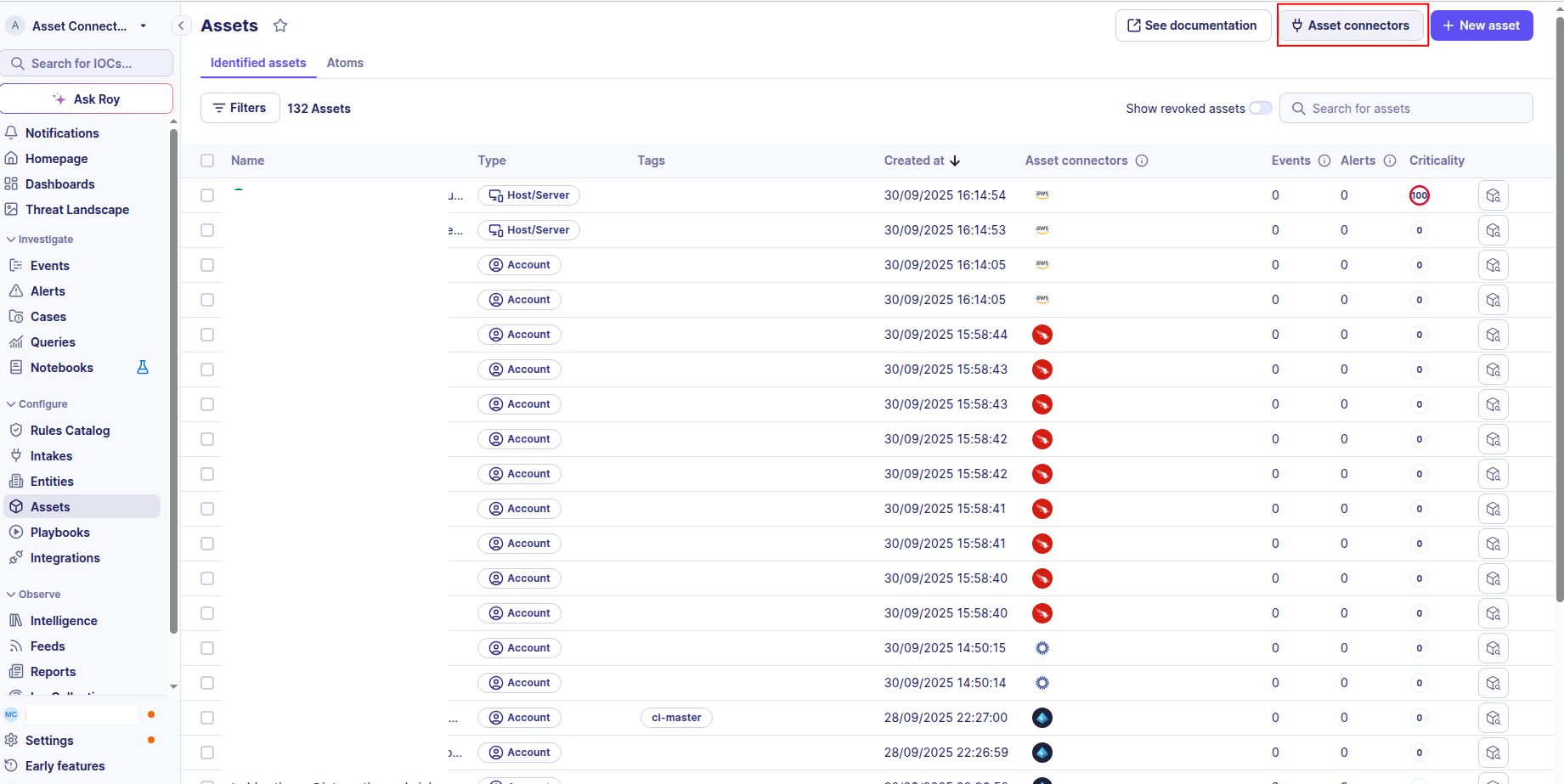
Click the Asset connectors button to create a new connector.
-
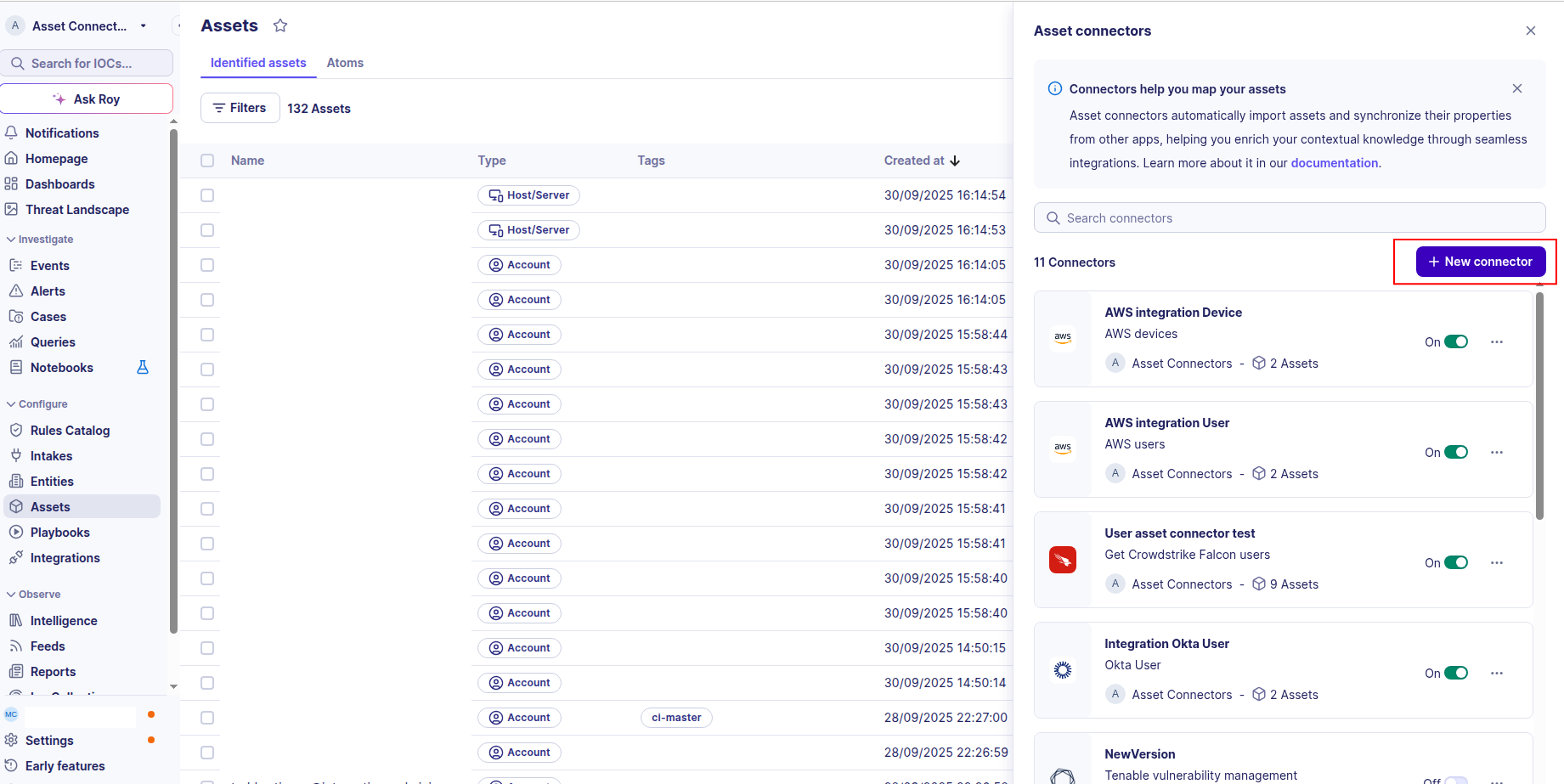
Click the + New connector button.
-
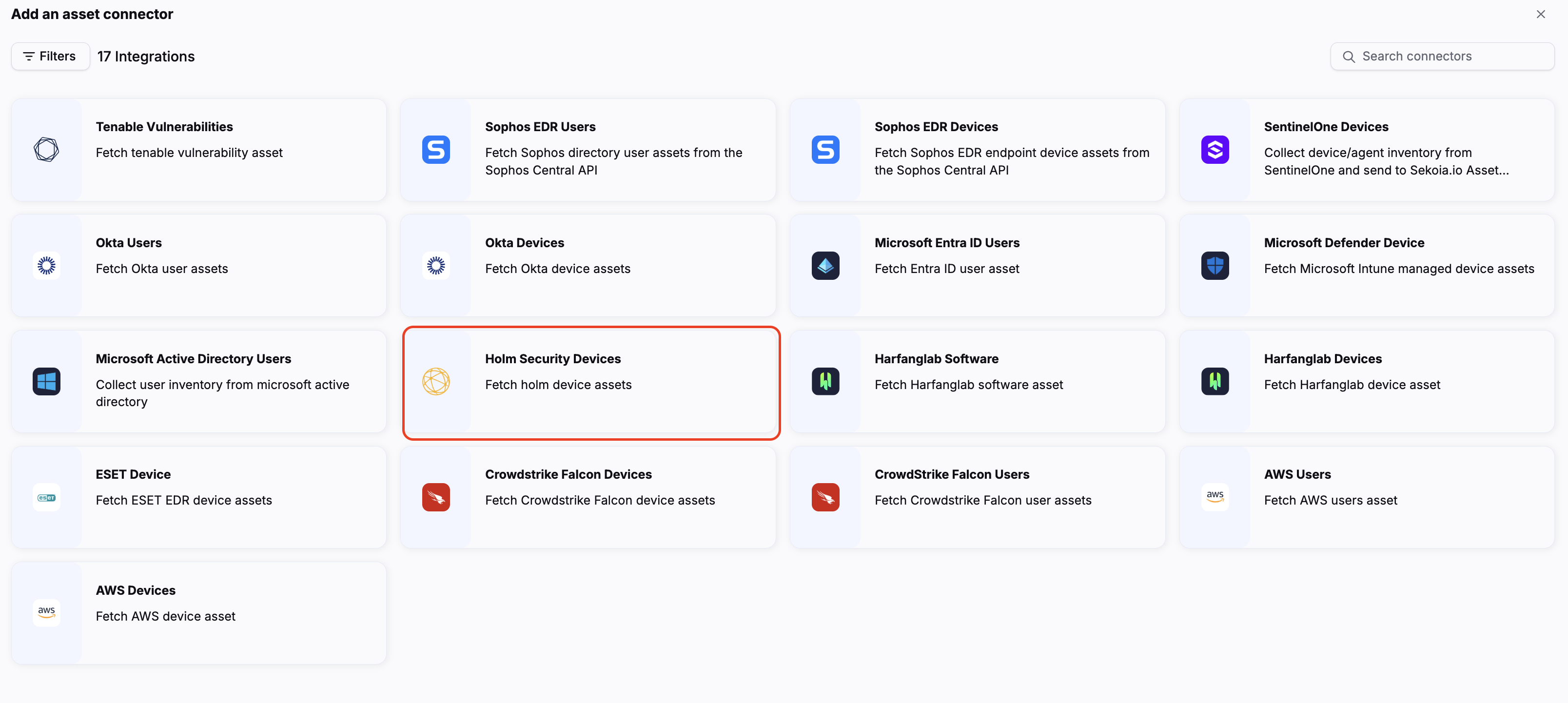
Choose Holm Security Devices, give it a name, and fill the required fields:
base_url: the base URL of the Holm Security API (defaulthttps://se-api.holmsecurity.com).api_token: the API token generated in the previous section.
-
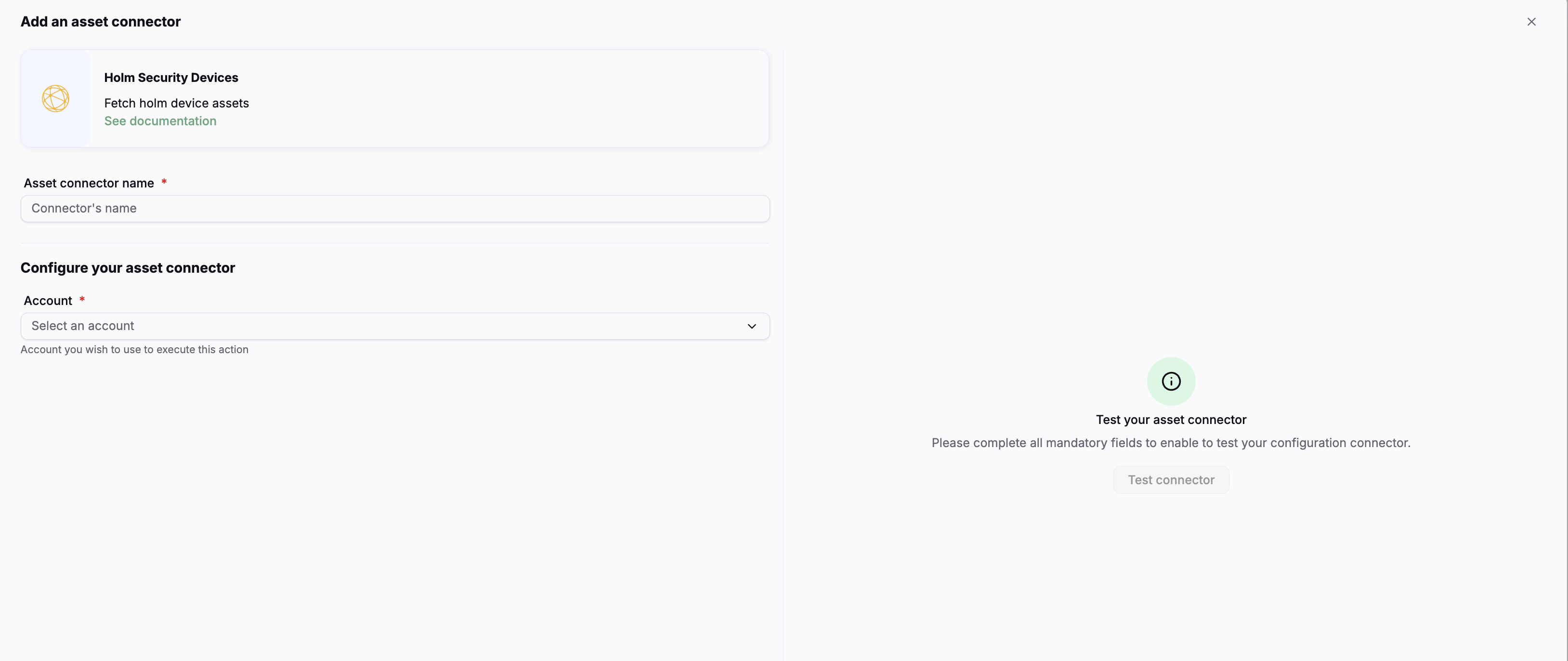
Test the connection by clicking the Test connector button.
-
Click the Create asset connector button.
OCSF Mapping for Holm Security Devices
OCSF Class: Device Inventory Info
Class UID: 5001
OCSF Version: 1.5.0
Information Collected
The Holm Security Devices fetches comprehensive information and transforms it into the OCSF (Open Cybersecurity Schema Framework) format for standardized security monitoring and asset management.
API Response Examples
Holm Security Device Sample
Single device record from GET /v2/devices.
{
  "uid": "0123456789abcdef0123456789abcdef",
  "device_name": "DESKTOP-EXAMPLE01",
  "hostname": "desktop-example01",
  "state": "active",
  "last_sync": "2026-07-01T20:30:36.712744Z",
  "os_is_server": false,
  "created": "2026-07-01T20:30:36.629532Z",
  "user_account": "SYSTEM",
  "emails": [],
  "network": {
    "ip_address": "192.0.2.10",
    "ip_address_v6": "2001:db8::10",
    "mac_address": "00:00:5E:00:53:00"
  },
  "internet_facing": false,
  "os_family": "windows",
  "os_name": "Microsoft Windows Server 2025 Datacenter",
  "os_version": "10.0.26100",
  "vuln_count": 0,
  "max_severity": null,
  "current_version": "1.3.2.0",
  "os_build": "26100"
}
Holm Security Network Asset Sample
Single scanned network asset from GET /v2/net-assets.
{
  "uuid": "00000000-0000-0000-0000-000000000000",
  "name": "host-example01.example.com",
  "hostname": "host-example01.example.com",
  "ip": "192.0.2.20",
  "ip_range": null,
  "type": "host",
  "operating_system": "Ubuntu 22.04",
  "details": "",
  "created": "2026-07-01T16:37:00.667844Z",
  "last_detected": "2026-07-03T08:47:33Z",
  "business_impact": "neutral",
  "hosts_personal_data": false,
  "auth_status": "not_configured",
  "vulnerabilities_count": 231,
  "risk_score": 100,
  "severity": {
    "critical": 19,
    "high": 32,
    "medium": 26,
    "low": 5,
    "info": 70
  },
  "tags": [
    {"uuid": "00000000-0000-0000-0000-00000000000a", "name": "Web servers"}
  ],
  "open_ports": [
    {"proto": "tcp", "port": 443}
  ]
}
Data Mapping Table
The following table shows how source data is mapped to OCSF model fields:
| Source Field | OCSF Field Path | Description | Data Type | Logic |
|---|---|---|---|---|
static: 2 |
activity_id |
OCSF activity ID | integer |
Always 2 for 'Collect' activity |
static: Collect |
activity_name |
OCSF activity name | string |
Always 'Collect' for asset inventory |
static: Discovery |
category_name |
OCSF category name | string |
Always 'Discovery' |
static: 5 |
category_uid |
OCSF category UID | integer |
Always 5 for Discovery category |
static: Device Inventory Info |
class_name |
OCSF class name | string |
Always 'Device Inventory Info' |
static: 5001 |
class_uid |
OCSF class UID | integer |
Always 5001 for Device Inventory Info |
static: 500102 |
type_uid |
OCSF type UID | integer |
Always 500102 for Device Inventory Info: Collect |
static: Device Inventory Info: Collect |
type_name |
OCSF type name | string |
Always 'Device Inventory Info: Collect' |
last_sync |
time |
OCSF event timestamp | timestamp |
Convert ISO 8601 last_sync to Unix epoch; fall back to created if last_sync is null |
static: Holm Security |
metadata.product.name |
Source product name | string |
Always 'Holm Security' |
static: v2 |
metadata.product.version |
Product version | string |
Holm Security API version used |
static: 1.5.0 |
metadata.version |
OCSF schema version | string |
Fixed OCSF schema version |
os_is_server |
device.type_id |
Device type ID | integer |
true -> 1 (Server), false -> 2 (Desktop), null -> 0 (Unknown) |
os_is_server |
device.type |
Device type | string |
true -> 'Server', false -> 'Desktop', null -> 'Unknown' |
uid |
device.uid |
Device unique identifier | string |
Direct mapping of Holm device unique ID |
device_name |
device.name |
Device name | string |
Direct mapping of device name |
hostname |
device.hostname |
Device hostname | string |
Direct mapping of hostname; empty string fallback if missing |
os_name |
device.os.name |
Operating system name | string |
Direct mapping of OS name |
os_family |
device.os.type |
Operating system type | string |
Normalize via OS_FAMILY_MAP to OCSF OSTypeStr; unknown families -> 'other' |
os_family |
device.os.type_id |
OCSF operating system type ID | integer |
Normalize via OS_FAMILY_MAP to OCSF OSTypeId; unknown families -> 99 |
network.ip_address |
device.ip |
Primary IP address | string |
Direct mapping of primary IPv4 address |
network.ip_address |
device.network_interfaces[0].ip |
Primary network interface IPv4 address | string |
Primary IPv4 interface; created only when ip_address is present |
network.mac_address |
device.network_interfaces[0].mac |
Primary network interface MAC address | string |
MAC address of the primary IPv4 interface |
hostname |
device.network_interfaces[0].hostname |
Network interface hostname | string |
Hostname attached to the primary IPv4 interface |
network.ip_address_v6 |
device.network_interfaces[1].ip |
Secondary network interface IPv6 address | string |
Secondary IPv6 interface; created only when ip_address_v6 is present |
created |
device.created_time |
Device creation timestamp | timestamp |
Convert ISO 8601 created to Unix epoch |
last_sync |
device.last_seen_time |
Device last seen timestamp | timestamp |
Convert ISO 8601 last_sync to Unix epoch |
max_severity |
device.risk_level |
Highest vulnerability severity found on the device | string |
Normalize via MAX_SEVERITY_MAP to OCSF RiskLevelStr; unknown values -> null |
max_severity |
device.risk_level_id |
OCSF risk level ID | integer |
Normalize via MAX_SEVERITY_MAP to OCSF RiskLevelId; unknown values -> null |
risk_score |
device.risk_score |
Device risk score | integer |
Direct mapping; omitted when 0 |
net_assets.uuid |
device.uid |
Network asset unique identifier | string |
Direct mapping of the network asset UUID |
net_assets.name |
device.name |
Network asset name | string |
Direct mapping of the asset name |
net_assets.hostname |
device.hostname |
Network asset hostname | string |
Direct mapping of hostname; empty string fallback if missing |
net_assets.type |
device.type / device.type_id |
Device type | string |
'host' -> 'Unknown' (0), 'network' -> 'Other' (99); Holm exposes no server/desktop signal for scanned assets |
net_assets.ip |
device.ip |
Network asset IP address | string |
Direct mapping of the asset IP address |
net_assets.operating_system |
device.os.name |
Operating system name | string |
Direct mapping of the free-form operating system label |
net_assets.operating_system |
device.os.type / device.os.type_id |
Operating system type | string |
Derived from known keywords via OS_NAME_KEYWORDS (e.g. 'Ubuntu 22.04' -> linux/200); unrecognized -> 'other' (99) |
net_assets.details |
device.desc |
Network asset description | string |
Direct mapping; omitted when empty |
net_assets.created |
device.created_time |
Network asset creation timestamp | timestamp |
Convert ISO 8601 created to Unix epoch |
net_assets.last_detected |
device.last_seen_time |
Network asset last detection timestamp | timestamp |
Convert ISO 8601 last_detected to Unix epoch |
net_assets.last_detected |
time |
OCSF event timestamp | timestamp |
Convert ISO 8601 last_detected to Unix epoch; fall back to created if last_detected is null |
net_assets.severity |
device.risk_level / device.risk_level_id |
Highest vulnerability severity found on the asset | string |
Most severe non-empty bucket of the severity breakdown (critical > high > medium > low > info); all empty -> null |
net_assets.risk_score |
device.risk_score |
Network asset risk score | integer |
Direct mapping; omitted when 0 |
static: false |
device.is_managed |
Whether the asset is agent-managed | boolean |
Always false: network assets are discovered by a scan, not by an agent |
OCSF Model Structure
Device Inventory Info: Collect
Transformed Holm Security device record to OCSF Device Inventory Info event
{
  "activity_id": 2,
  "activity_name": "Collect",
  "category_name": "Discovery",
  "category_uid": 5,
  "class_name": "Device Inventory Info",
  "class_uid": 5001,
  "type_name": "Device Inventory Info: Collect",
  "type_uid": 500102,
  "time": 1751401836.712744,
  "metadata": {
    "product": {
      "name": "Holm Security",
      "version": "v2"
    },
    "version": "1.5.0"
  },
  "device": {
    "uid": "0123456789abcdef0123456789abcdef",
    "name": "DESKTOP-EXAMPLE01",
    "hostname": "desktop-example01",
    "type": "Desktop",
    "type_id": 2,
    "ip": "192.0.2.10",
    "created_time": 1751401836.629532,
    "last_seen_time": 1751401836.712744,
    "os": {
      "name": "Microsoft Windows Server 2025 Datacenter",
      "type": "windows",
      "type_id": 100
    },
    "network_interfaces": [
      {
        "hostname": "desktop-example01",
        "ip": "192.0.2.10",
        "mac": "00:00:5E:00:53:00",
        "type": "Wired",
        "type_id": 1
      },
      {
        "ip": "2001:db8::10",
        "type": "Wired",
        "type_id": 1
      }
    ]
  }
}
Device Inventory Info: Collect (network asset)
Transformed Holm Security network asset to OCSF Device Inventory Info event
{
  "activity_id": 2,
  "activity_name": "Collect",
  "category_name": "Discovery",
  "category_uid": 5,
  "class_name": "Device Inventory Info",
  "class_uid": 5001,
  "type_name": "Device Inventory Info: Collect",
  "type_uid": 500102,
  "time": 1751532453.0,
  "metadata": {
    "product": {
      "name": "Holm Security",
      "version": "v2"
    },
    "version": "1.5.0"
  },
  "device": {
    "uid": "00000000-0000-0000-0000-000000000000",
    "name": "host-example01.example.com",
    "hostname": "host-example01.example.com",
    "type": "Unknown",
    "type_id": 0,
    "ip": "192.0.2.20",
    "created_time": 1751387820.667844,
    "last_seen_time": 1751532453.0,
    "is_managed": false,
    "vendor_name": "Holm Security",
    "risk_score": 100,
    "risk_level": "Critical",
    "risk_level_id": 4,
    "os": {
      "name": "Ubuntu 22.04",
      "type": "linux",
      "type_id": 200
    }
  }
}