Vulnerability enrichment
Reveal module. This feature requires the Reveal add-on module.
Vulnerability enrichment aggregates known CVE findings from connected vulnerability scanners and cloud or IaaS APIs and displays them on the related asset. Use it to review an asset's vulnerability findings, their technical characteristics, available exploitation information, and their relationship with the Asset Risk Score.
Open the Vulnerabilities tab
Open the asset context panel and select Vulnerabilities.
Use this interface path:
Asset context panel > Vulnerabilities
The asset context panel displays the asset's Risk score header and its investigation tabs. The Vulnerabilities tab can display the number of findings associated with the asset.
Different from Asset Risk Score
CVSS and Unified risk score describe individual vulnerability findings. The Asset Risk Score prioritizes the asset using exposure, recent activity, and criticality.
Filter and search findings
Use Filters to narrow the vulnerability list. When filters are active, Reveal displays them as filter chips. Select Clear filters to remove the active filters.
Use Search vulnerabilities... to search the vulnerability list by a supported value, such as a CVE ID or title.
Vulnerability list fields
| Field | Description |
|---|---|
| Status | Current state of the vulnerability finding. |
| CVE ID | Common Vulnerabilities and Exposures identifier assigned to a publicly known vulnerability. |
| Title | Short title of the vulnerability. |
| Severity (CVSS) | Technical severity score based on the Common Vulnerability Scoring System. |
| Exploitation | Exploitation information, when available. The interface can display Known exploited or -. |
| CWE | Common Weakness Enumeration category associated with the vulnerability. |
| Unified risk score | Score normalized to a 1 to 100 scale for consistency across vendors. |
A dash indicates that no value is available for the finding or source.
CVSS severity
CVSS rates the technical severity of a vulnerability on a 0 to 10 scale. The expanded finding displays the CVSS version used for the assessment, which can be CVSS 3.1 or CVSS 4.0 depending on the finding and assessment source.
The interface displays the following severity bands:
| Severity | CVSS range |
|---|---|
| Critical | 9.0 to 10.0 |
| High | 7.0 to 8.9 |
| Medium | 4.0 to 6.9 |
| Low | 0.1 to 3.9 |
| None | 0.0 |
Exploitation information
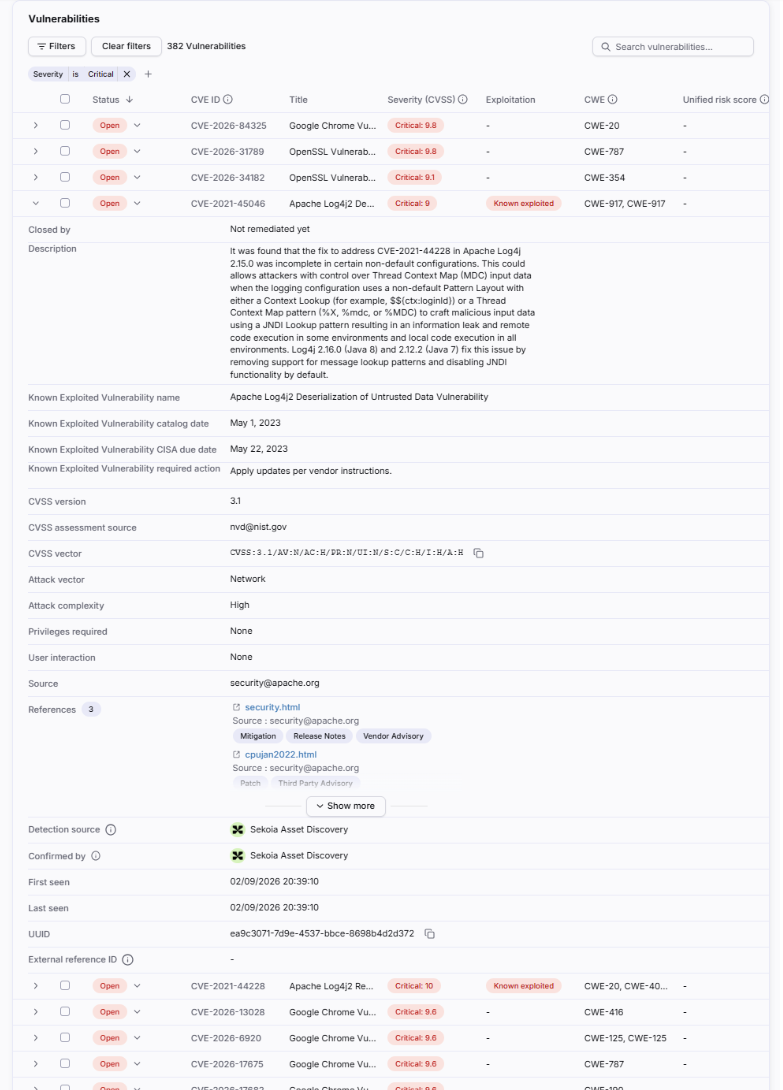
The Exploitation column can display Known exploited when the vulnerability has known exploitation information. The source of this status must be interpreted with the vulnerability details and the available source metadata.
When a finding is associated with the CISA Known Exploited Vulnerabilities catalog, the expanded view can include:
- Known Exploited Vulnerability name.
- Known Exploited Vulnerability catalog date.
- Known Exploited Vulnerability CISA due date.
- Known Exploited Vulnerability required action.
Unified risk score
The Unified risk score normalizes vulnerability scores from different sources to a 1 to 100 scale. It applies to an individual vulnerability and is not the same as CVSS or the Asset Risk Score.
| Severity | Unified risk score range |
|---|---|
| Critical | 76 to 100 |
| High | 51 to 75 |
| Medium | 26 to 50 |
| Low | 1 to 25 |
A finding can show - when no normalized score is available.
Expand a vulnerability
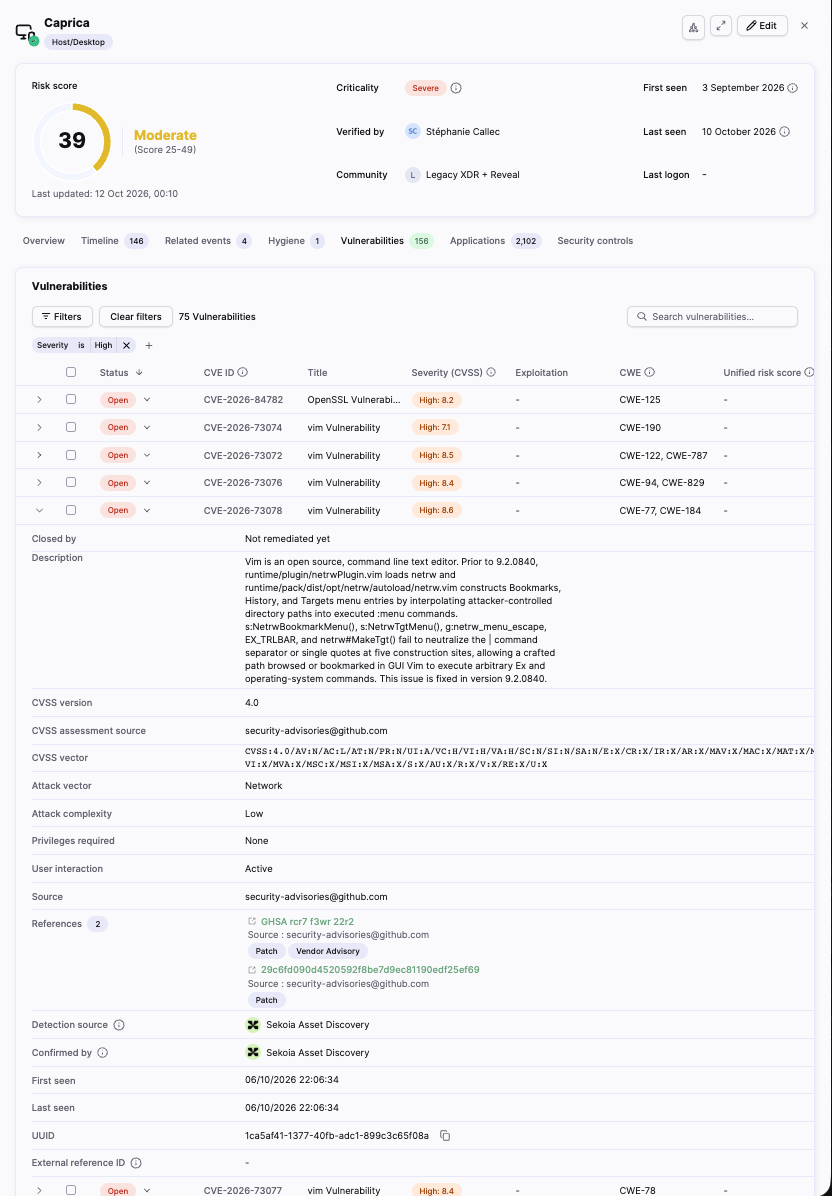
Expand a vulnerability row to inspect the available details:
| Field | Description |
|---|---|
| Closed by | User or process associated with closing the finding. |
| Description | Detailed explanation of the vulnerability. |
| Known Exploited Vulnerability name | Name from the CISA Known Exploited Vulnerabilities catalog, when available. |
| Known Exploited Vulnerability catalog date | Date the vulnerability was added to the CISA catalog, when available. |
| Known Exploited Vulnerability CISA due date | CISA remediation due date, when available. |
| Known Exploited Vulnerability required action | Remediation action specified by CISA, when available. |
| CVSS version | Version used for the assessment, such as 3.1 or 4.0. |
| CVSS assessment source | Source or identifier associated with the CVSS assessment. |
| CVSS vector | Vector representing the CVSS assessment metrics. |
| Attack vector | How the vulnerability can be exploited. |
| Attack complexity | Complexity required to exploit the vulnerability. |
| Privileges required | Privileges required before exploitation. |
| User interaction | Whether user interaction is required. |
| Source | Source that provided the vulnerability information. |
| References | External references related to the vulnerability. |
| Detection source | Source that detected the finding on the asset. |
| Confirmed by | Source or system that confirmed the finding. |
| First seen | Date and time when the finding was first observed. |
| Last seen | Date and time when the finding was most recently observed. |
| UUID | Unique identifier for the finding in Reveal. |
| External reference ID | Identifier from the external source, when available. |
References can include release notes, vendor advisories, issue tracking, third-party advisories, exploit information, and government resources. Select Show more when the interface hides additional references.
Vulnerability statuses
The table can display the following statuses:
- Open
- False positive
- Remediated
- Accepted risk, when available in the current workflow
A finding in an accepted risk, false positive, or remediated state no longer contributes to the Asset Risk Score exposure calculation from the relevant decision or resolution timestamp.
Relationship with the Asset Risk Score
Open, confirmed vulnerabilities can contribute to the asset's Exposure Score. The contribution is based on the vulnerability's CVSS severity.
The Unified risk score does not replace CVSS in the Asset Risk Score calculation. The final Asset Risk Score also includes recent activity and configured asset criticality.
For the calculation rules and investigation workflow, see Asset risk scoring and Interpret asset risk scores.
Data sources and limitations
Reveal maps vulnerability findings from connected scanners, cloud APIs, and IaaS APIs to the related asset. The source determines which fields are available and which assessment source appears in the expanded details.
The Source, CVSS assessment source, Detection source, and Confirmed by fields can refer to different systems. Do not interpret them as interchangeable.
If the Vulnerabilities tab is empty or a finding is missing, check the source configuration, synchronization status, asset matching, and product or version matching.
Related articles
Application inventory: Overview of the Applications tab and its relationship with vulnerability enrichment.
Asset risk scoring: How vulnerability exposure contributes to the asset-level Asset Risk Score.
Interpret asset risk scores: How to use the Asset Risk Score during an investigation.
Asset context panel, Reveal capabilities: Overview of Reveal-specific asset context and investigation tabs.