HarfangLab EDR
Reveal module — This feature requires the Reveal add-on module.
Overview
HarfangLab EDR is a European EDR for Windows, macOS, and Linux that delivers real-time telemetry, ATT&CK-mapped detections, and rapid response (host isolation, process kill, quarantine). This setup guide shows how to forward software assets — the list of applications installed on endpoints monitored by HarfangLab EDR — to Sekoia.io.
- Vendor: HarfangLab
- Product: HarfangLab EDR
- Supported environment: SaaS
Note
This asset connector is currently in beta. Enable the reveal-beta-connectors feature flag to display it.
Configure
How to create an API token
To connect HarfangLab to Sekoia.io, you need to generate an API token in your HarfangLab console. Follow these steps:
-
Click on Users under administration panel.
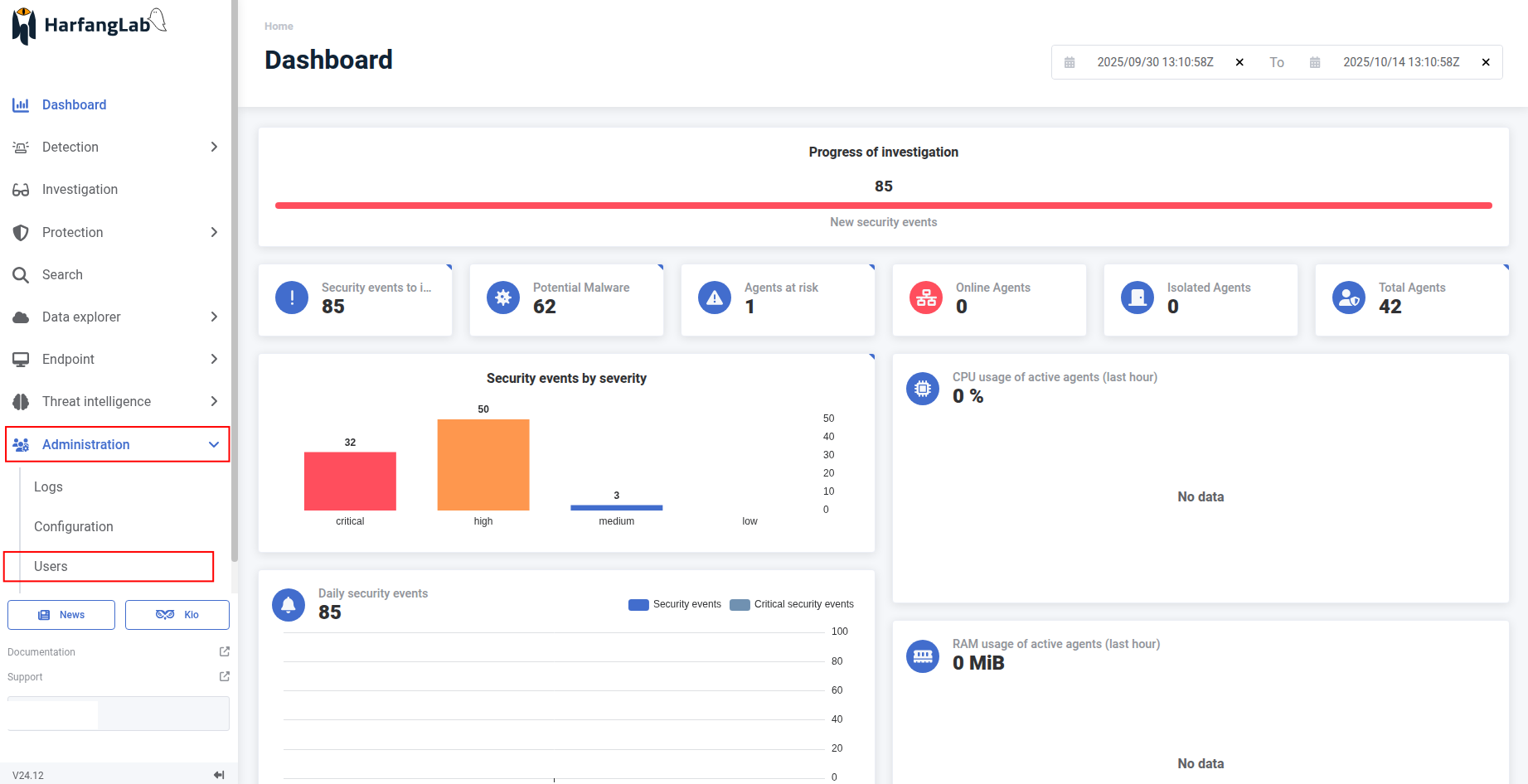
-
Click on the user you want.
-
Click Generate token to generate API token.
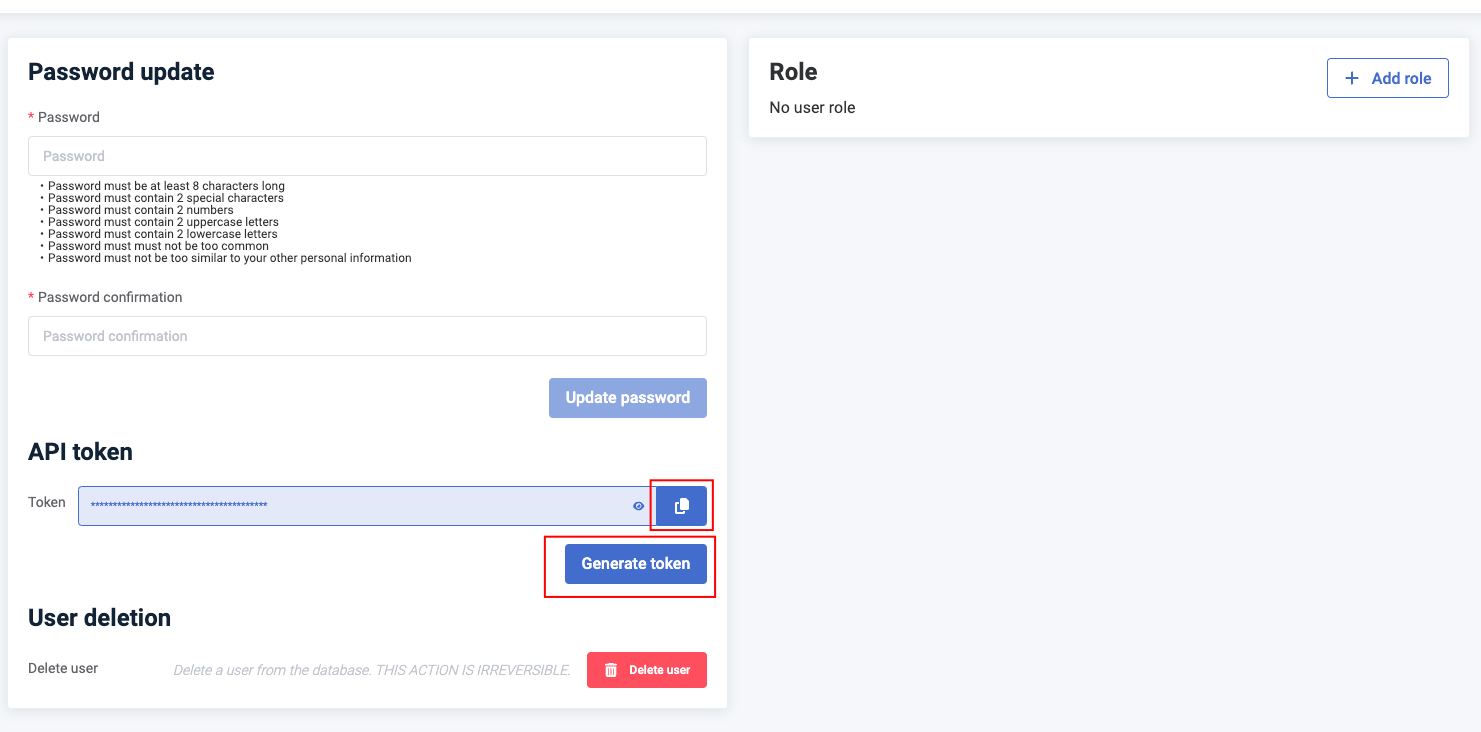
-
Copy the API key to a safe place and start using it in Sekoia.io.
Warning
- Ensure the user account exists before generating an API token.
- The API token is displayed only once at creation. Save it securely; if you lose it, you must generate a new one.
- When copying the API key, ensure you copy only the raw key value (excluding any
token_prefix if displayed).
Create your asset
To start getting your HarfangLab software assets into Sekoia.io, you need to create an asset connector on the Assets page. To do so, follow these steps:
-
Click the Asset connectors button to create a new connector.
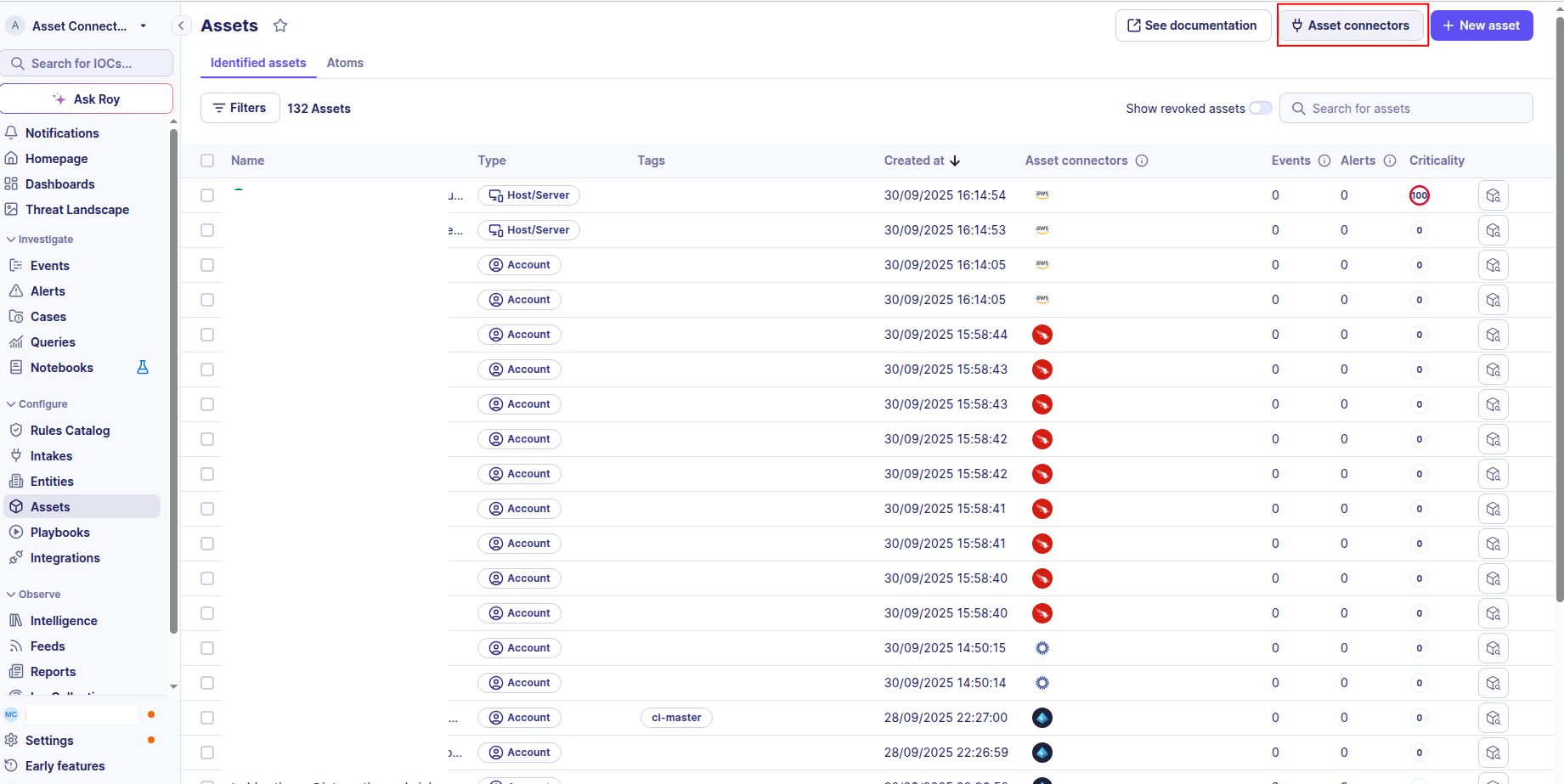
-
Click the + New connector button.
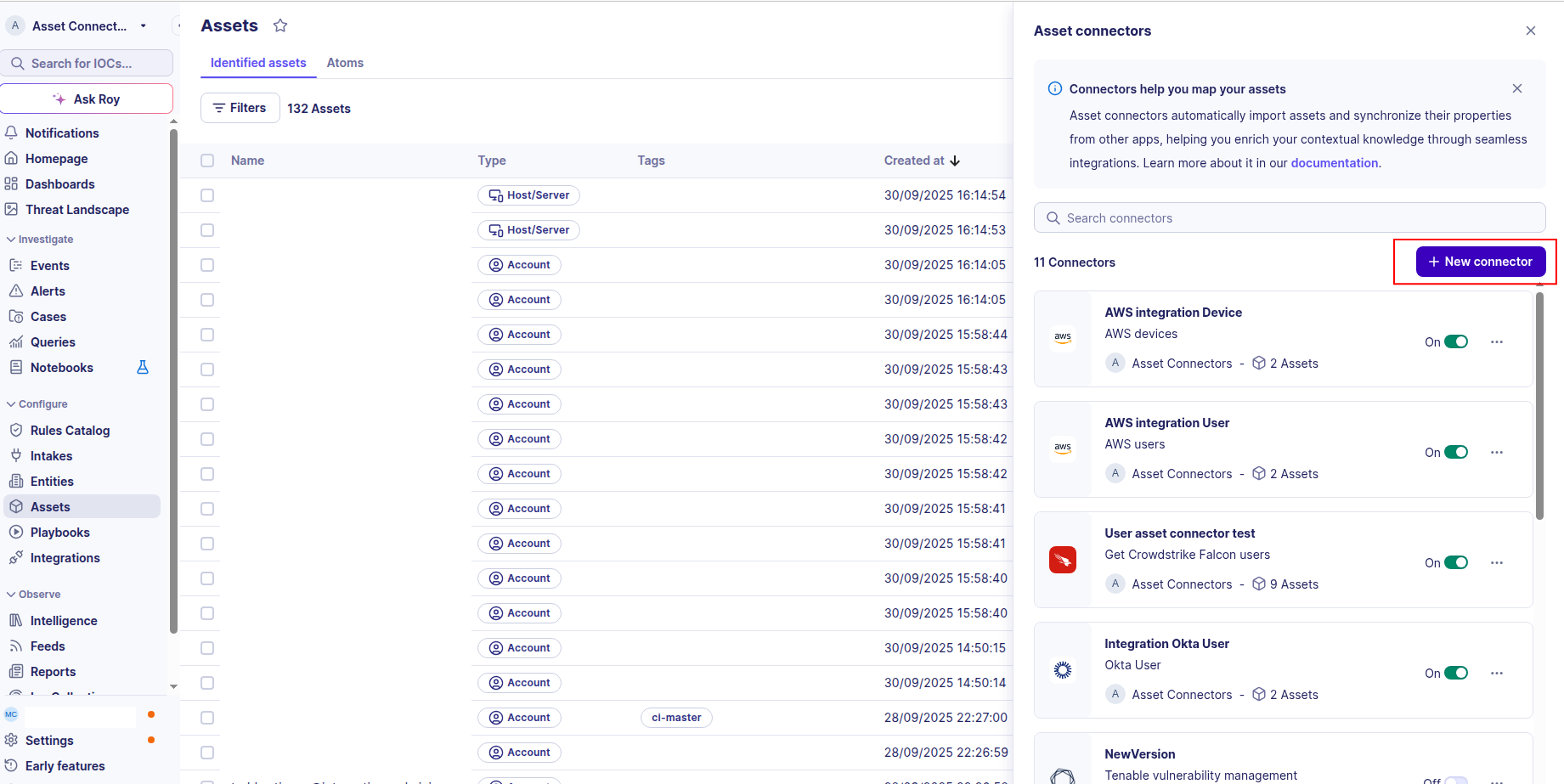
-
Choose HarfangLab Software Assets, give it a name, and fill the required fields:
- Name: A descriptive name for this connector.
- URL: The URL of your HarfangLab instance (including port if applicable, e.g.
https://your-harfanglab-instance.com:8443). - API Token: The API token generated in the previous step.
-
Test the connection by clicking the Test connector button.
-
Click the Create asset connector button.
Warning
- Make sure to include your port number in the
URLfield by appending it to the URL, for example:https://your-harfanglab-instance.com:8443.
OCSF Mapping for HarfangLab Software Assets
OCSF Class: Software Inventory Info
Class UID: 5020
OCSF Version: 1.6.0
Information Collected
The HarfangLab Software Assets connector fetches comprehensive information and transforms it into the OCSF (Open Cybersecurity Schema Framework) format for standardized security monitoring and asset management.
API Response Examples
HarfangLab Software Inventory Sample
Agent data sample from the HarfangLab API response (used to build the device context).
{
  "id": "3891597d-8696-4fc4-a260-b04880bdbd68",
  "hostname": "testhostaname1",
  "firstseen": "2025-06-11T00:15:06.454734Z",
  "lastseen": "2025-06-11T00:27:06.693963Z",
  "ostype": "windows",
  "osproducttype": "Windows 11 Enterprise Evaluation",
  "ipaddress": "1.2.2.5",
  "domainname": "TestGROUP"
}
HarfangLab Application Sample
Application data sample from GET /api/data/endpoint/Agent/<agent_uid>/applications/.
{
  "id": "0e8412d1-f81f-4739-b254-2879bb7bc5e5",
  "active": true,
  "installation_date": null,
  "first_seen": "2026-03-27T10:05:27.558496Z",
  "last_seen": "2026-03-27T10:06:59.416022Z",
  "first_version": "0.19051.7-0",
  "last_version": "0.19051.7-0",
  "installation_count": 1,
  "name": "YourPhone",
  "publisher": "Microsoft Corporation",
  "ostype": "windows",
  "cpe_prefix": null,
  "app_type": "uwp",
  "description": null
}
Data Mapping Table
The following table shows how source data is mapped to OCSF model fields:
| Source Field | OCSF Field Path | Description | Data Type | Logic |
|---|---|---|---|---|
static: 2 |
activity_id |
OCSF activity ID | integer |
Always 2 for 'Collect' activity |
static: Collect |
activity_name |
OCSF activity name | string |
Always 'Collect' for asset inventory |
static: Discovery |
category_name |
OCSF category name | string |
Always 'Discovery' |
static: 5 |
category_uid |
OCSF category UID | integer |
Always 5 for Discovery category |
static: Software Inventory Info |
class_name |
OCSF class name | string |
Always 'Software Inventory Info' |
static: 5020 |
class_uid |
OCSF class UID | integer |
Always 5020 for Software Inventory Info |
static: 502002 |
type_uid |
OCSF type UID | integer |
Always 502002 for Software Inventory Info: Collect |
static: Software Inventory Info: Collect |
type_name |
OCSF type name | string |
Always 'Software Inventory Info: Collect' for this event type |
agent.firstseen |
time |
OCSF event timestamp | timestamp |
Convert ISO 8601 to Unix epoch from the parent agent; use for OCSF event timestamp |
static: HarfangLab EDR |
metadata.product.name |
Source product name | string |
Always 'HarfangLab EDR' |
static: 24.12 |
metadata.product.version |
Product version | string |
Fixed HarfangLab product version |
static: 1.5.0 |
metadata.version |
OCSF schema version | string |
Fixed OCSF schema version |
static: 2 |
device.type_id |
Device type ID | integer |
Direct mapping of type to desktop type ID |
static: Desktop |
device.type |
OCSF device type | string |
Direct mapping of type to desktop type |
agent.id |
device.uid |
Device unique identifier | string |
Direct mapping of HarfangLab agent unique ID |
agent.osproducttype |
device.os.name |
Operating system name and version | string |
Direct mapping of OS product type (e.g., 'Windows 10 Professional', 'Ubuntu 20.04') |
agent.ostype |
device.os.type |
Operating system type | string |
Normalize ostype to OCSF OSTypeStr: WINDOWS→'Windows', LINUX→'Linux', MACOS→'macOS', OTHER→'Other', UNKNOWN→'Unknown' |
agent.ostype |
device.os.type_id |
OCSF operating system type ID | integer |
Map ostype to OCSF OSTypeId: WINDOWS→100, LINUX→200, MACOS→300, OTHER→99, UNKNOWN→0 |
agent.hostname |
device.hostname |
Device hostname | string |
Direct mapping of hostname |
agent.domainname |
device.domain |
Device domain or realm | string |
Direct mapping of domain name |
agent.ipaddress |
device.ip |
Device IP address | string |
Direct mapping of IP address |
agent.firstseen |
device.first_seen_time |
Device first seen timestamp | timestamp |
Convert ISO 8601 to Unix epoch |
agent.lastseen |
device.last_seen_time |
Device last seen timestamp | timestamp |
Convert ISO 8601 to Unix epoch |
application.name |
sbom.package.name |
Software package name | string |
Direct mapping of application name |
application.last_version \|\| application.first_version \|\| 'unknown' |
sbom.package.version |
Software package version | string |
Use last_version if available, fallback to first_version, then 'unknown' |
application.id |
sbom.package.uid |
Software package unique identifier | string |
Direct mapping of application unique ID |
application.cpe_prefix |
sbom.package.cpe_name |
Common Platform Enumeration name | string |
Direct mapping of CPE prefix if available; null otherwise |
application.app_type |
sbom.package.type |
Software package type | string |
Map app_type to OCSF PackageTypeStr: uwp/win32/macos/linux→'Application', os→'Operating System', unknown→'Unknown' |
application.app_type |
sbom.package.type_id |
OCSF software package type ID | integer |
Map app_type to OCSF PackageTypeId: uwp/win32/macos/linux→1 (APPLICATION), os→2 (OPERATINGSYSTEM), unknown→0 (UNKNOWN) |
OCSF Model Structure
Software Inventory Info: Collect
Transformed HarfangLab API response to an OCSF Software Inventory Info event
{
  "activity_id": 2,
  "activity_name": "Collect",
  "category_name": "Discovery",
  "category_uid": 5,
  "class_name": "Software Inventory Info",
  "class_uid": 5020,
  "type_name": "Software Inventory Info: Collect",
  "type_uid": 502002,
  "time": 1749316506,
  "metadata": {
    "product": {
      "name": "HarfangLab EDR",
      "version": "24.12"
    },
    "version": "1.5.0"
  },
  "device": {
    "uid": "3891597d-8696-4fc4-a260-b04880bdbd68",
    "hostname": "testhostaname1",
    "type": "Desktop",
    "type_id": 2,
    "ip": "1.2.2.5",
    "domain": "TestGROUP",
    "first_seen_time": 1749316506,
    "last_seen_time": 1749317226,
    "os": {
      "name": "Windows 11 Enterprise Evaluation",
      "type": "windows",
      "type_id": 100
    }
  },
  "sbom": {
    "package": {
      "name": "YourPhone",
      "version": "0.19051.7-0",
      "uid": "0e8412d1-f81f-4739-b254-2879bb7bc5e5",
      "type": "Application",
      "type_id": 1
    }
  }
}