Shodan and VirusTotal configuration
This use case describes how to activate Shodan playbook if an alert is coming from VirusTotal
There are 2 steps: 1- How to create a Shodan playbook 2- Combine Shodan playbook into VirusTotal
Prerequisites
- A Sekoia.io XDR licence
- The user that configures the Playbook should have a Role that contains:
- The SYMPHONY permissions
- An API Key with a Role that contains at least the following permission:
- View alerts
- View anomaly stats
- View anomaly dataset
- View event stats in asset listing
To create your API Key, follow this documentation.
Playbook configuration
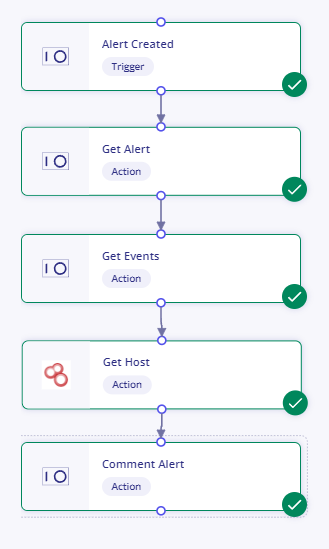
Create a comment on Sekoia.io alert from Shodan
-
Configure the
Alert Createdblock -
On the right panel, under the Module Configuration section, click on
+ Create new configuration - Complete the form with the following information:
- Name: ReadAlertContent
- Api_key: TO BE REPLACED BY YOUR Sekoia.io API KEY
- Base_url:
https://api.sekoia.io
-
Click on the
Savebutton -
Configure the
Get Eventsblock -
On the left panel, search for the
Get Eventsblock - Drag and drop it underneath the
Alert Createdblock
Copy data from previous block
- On the right panel, select the ReadAlertContent configuration previously created
- Select the Alert Created block and copy values in the following fields with copy icon on the right
- earliest_time = copy and pasting value of first_seen_at
- latest_time = copy and pasting value of last_seen_at
- query = copy value and pasting of short_id and pre-filling alert_short_ids:""
- Link the blocks Get Alert to Get Events
-
Configure the
Get hostShodan block -
On the left panel, search for the
Get hostblock - Drag and drop it underneath the
Get Eventsblock - On the right panel, complete the form with the following information:
- ip =
{{node.x.['events'][0]['destination.ip']}}replace x by the node ofGet Events(in code tab, searchGet Eventsand you will find the node number to be used)
- ip =
-
Link the blocks
ForeachtoGet host -
Configure the
Comment alertblock -
On the left panel, search for the
Comment alertblock - Drag and drop it underneath the
Get hostShodan block - On the right panel, complete the form with the following information:
- content =
{{node.x['data'][0]['location']['city']}}replace x by the node ofGet host(in code tab, searchGet hostand you will find the node number to be used) - uuid = copy value and pasting of
short_id(found inAlert Createdblock)
- content =
- Link the blocks
Get hosttoComment alert
Your playbook should look like the following:
Enrich Shodan with VirusTotal template
- Use Enhance network alerts with VirusTotal template
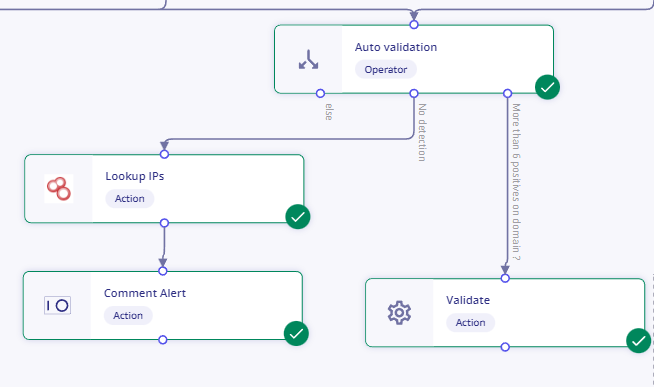
- Change part of the playbook and add the Shodan part (to enrich Lookup IPs)
- Lookup (Shodan) = add form and fill hostname (copy
UrlofScan Urlblock) - Comment Alert :
- content = copy
typeofLookupblock - uuid = copy
uuidofComment : Domain enrich by VTblock
- content = copy
Your playbook should look like the following: