Whois module configuration
This use case describes how to use Whois module in order to enrich an IP address, a domain name or a URL.
Prerequisites
- A Sekoia.io XDR licence
- The user that configures the Playbook should have a role that contains:
- An API Key with a role that contains at least the following permissions:
View alertsView anomaly statsView anomaly datasetView event stats in asset listing
Note
To create your API Key, follow this documentation.
Playbook configuration
You can find the configuration below:
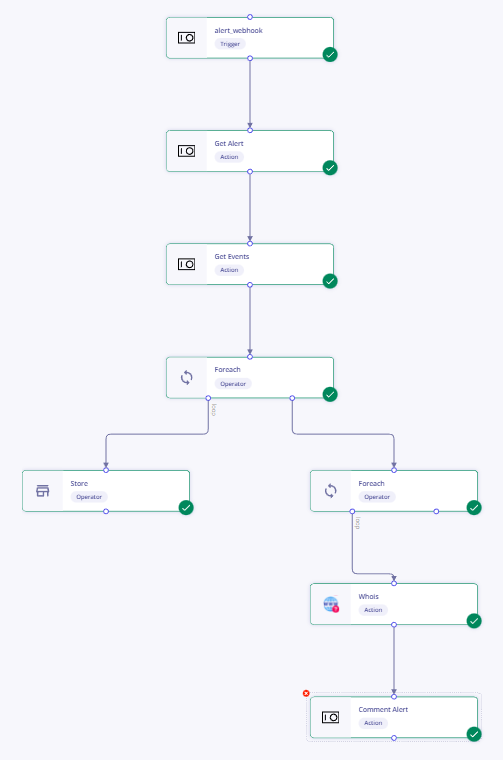
| Module | Configuration |
|---|---|
| Manual Trigger | configure module & trigger configuration |
| Get Alert | uuid = alert_uuid of the Manual Trigger module |
| Get Events | earliest_time = first_seen_at of the Get alert module, latest_time = last_seen_at of Get alert, query = short_id of Get alert |
| Foreach | items = Events of the Get Events module |
| Store | item, append, {{ node.x.default.value['source.ip'] }} x is the node number of the ForEach module (that can be found in the code tab) |
| Foreach | items = {{ store.item|unique|list }} |
| Whois | query = Node.x.Domain.Whois.raw x is the node number of the ForEach module (that can be found in the code tab) |
| Comment alert | content = Domain Name : {{ node.12['Domain']['Name'] }}, uuid = alert_uuid of Manual Trigger |