Microsoft Defender XDR (Microsoft 365 Defender)
Reveal module — This feature requires the Reveal add-on module.
Info
This article describes the vulnerability integration, which collects the vulnerabilities (CVEs) detected on your devices by Microsoft Defender Vulnerability Management. If you want to collect the inventory of your devices (hostname, OS, IP addresses, risk and exposure levels, Intune management data...) from Microsoft Defender for Endpoint, please read our dedicated article: Microsoft Defender for Endpoint Device.
Overview
Microsoft Defender Vulnerability Management, part of Microsoft Defender for Endpoint, continuously discovers and assesses vulnerabilities (CVEs) affecting the software installed on your onboarded devices. This connector retrieves the vulnerabilities detected on each device from the Microsoft Defender for Endpoint API, enriches them with device metadata and CVE details (description, CVSS score, exploit references), and sends them to Sekoia.io as vulnerability findings.
This setup guide shows how to forward vulnerability assets from Microsoft Defender for Endpoint to Sekoia.io.
- Vendor: Microsoft
- Product: Microsoft Defender for Endpoint / Microsoft Defender Vulnerability Management
- Supported environment: Cloud
Note
This asset connector requires devices onboarded to Microsoft Defender for Endpoint with Defender Vulnerability Management capabilities (included in Defender for Endpoint Plan 2 or available as an add-on). Without it, the vulnerability API returns no data.
Configure
How to create an app registration with proper permissions
To connect Microsoft Defender for Endpoint to Sekoia.io, you need to create an app registration with the necessary permissions to access vulnerability and device information. Follow these steps:
-
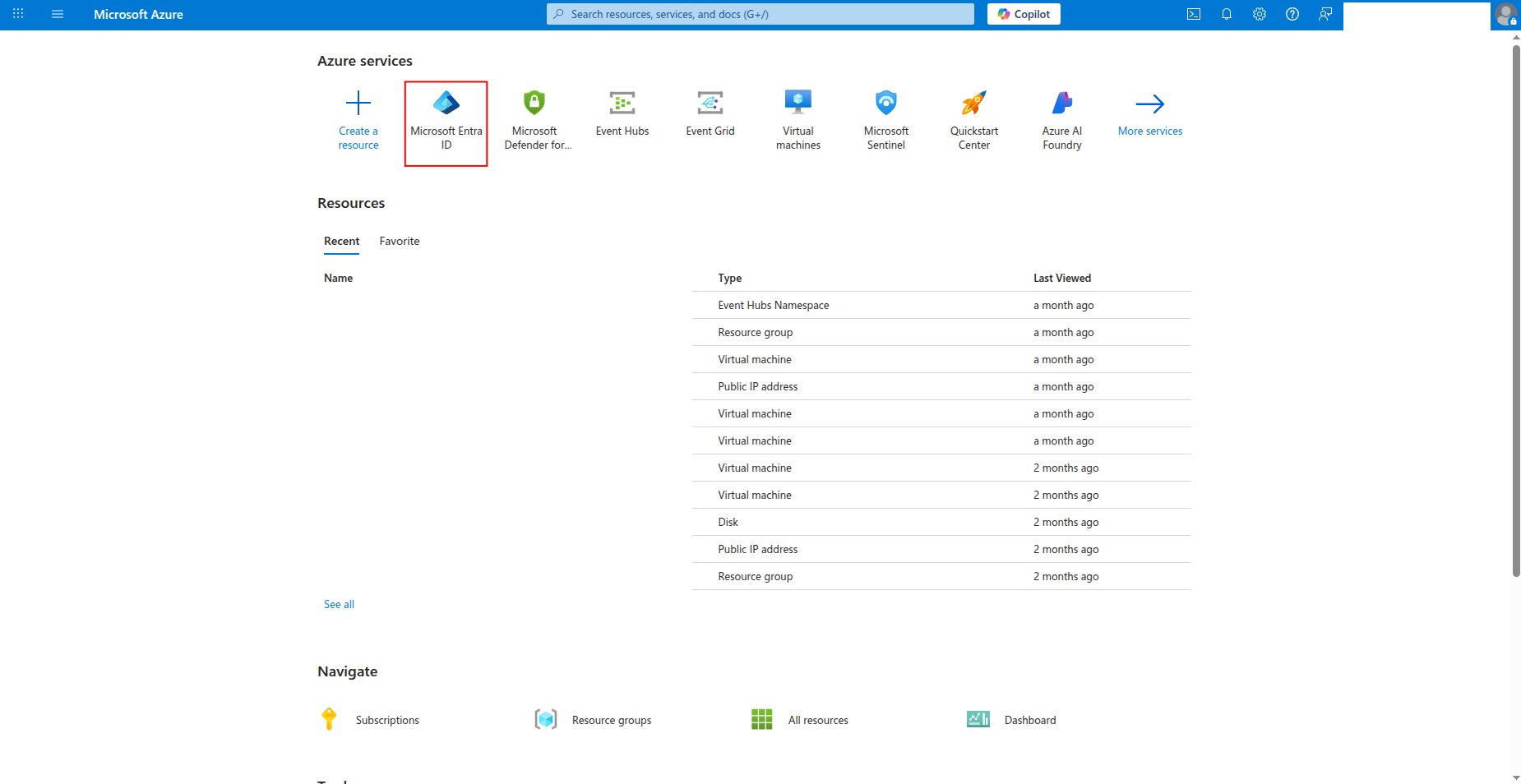
Sign in to the Azure portal and navigate to Microsoft Entra ID.
-
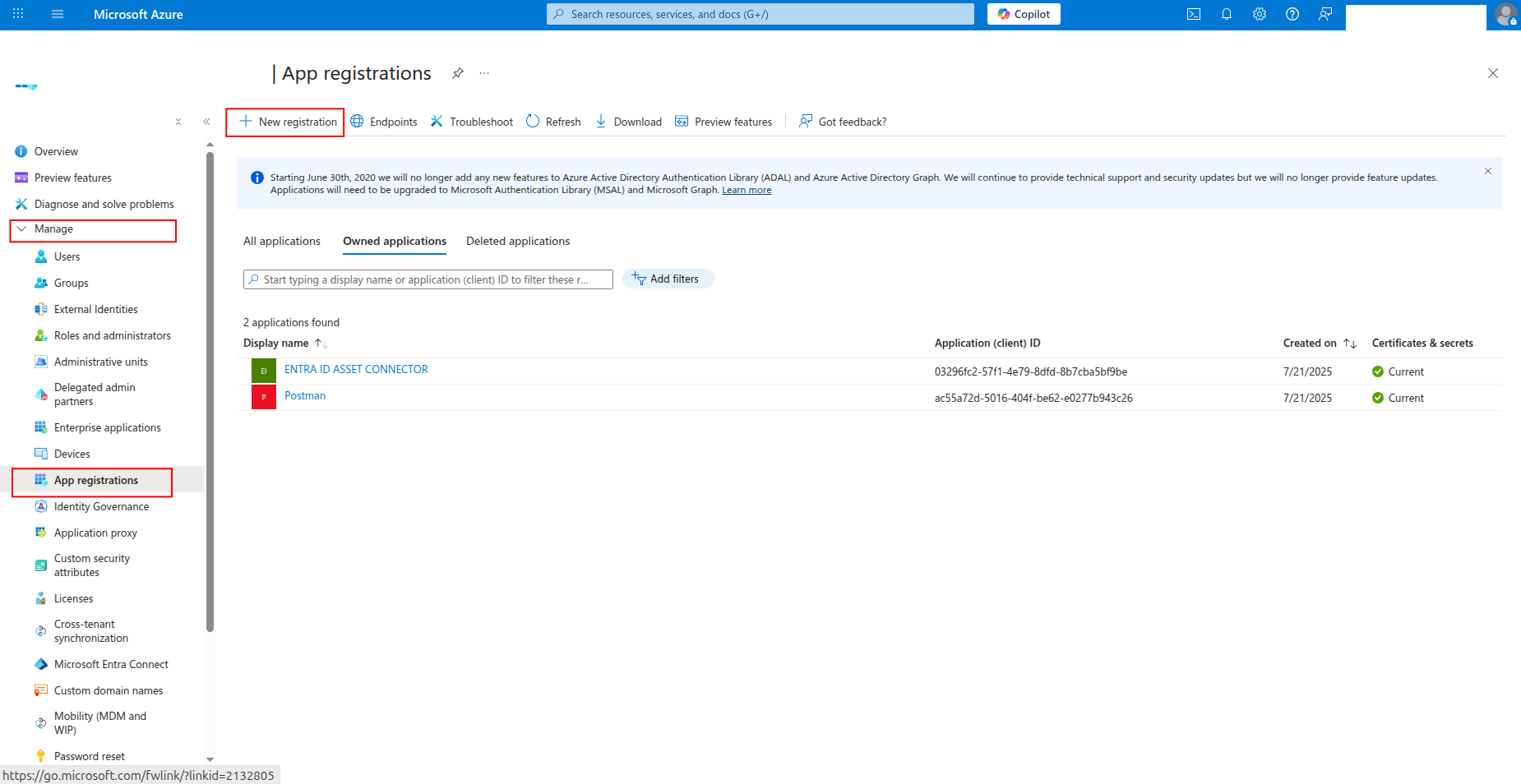
Click App registrations in the left navigation pane, then click New registration.
-
Enter a name for the application (e.g.,
sekoia-defender-reader) and click Register.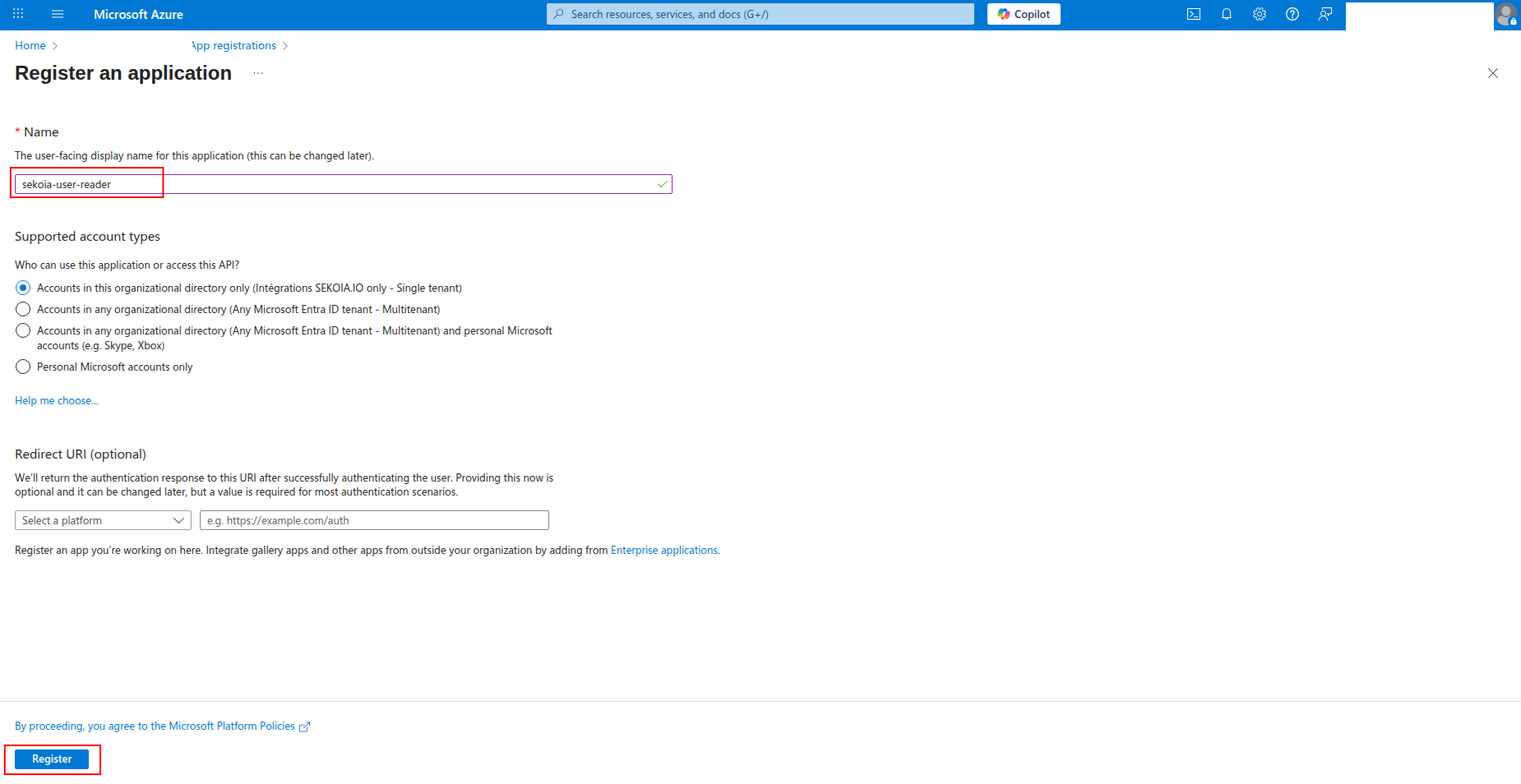
-
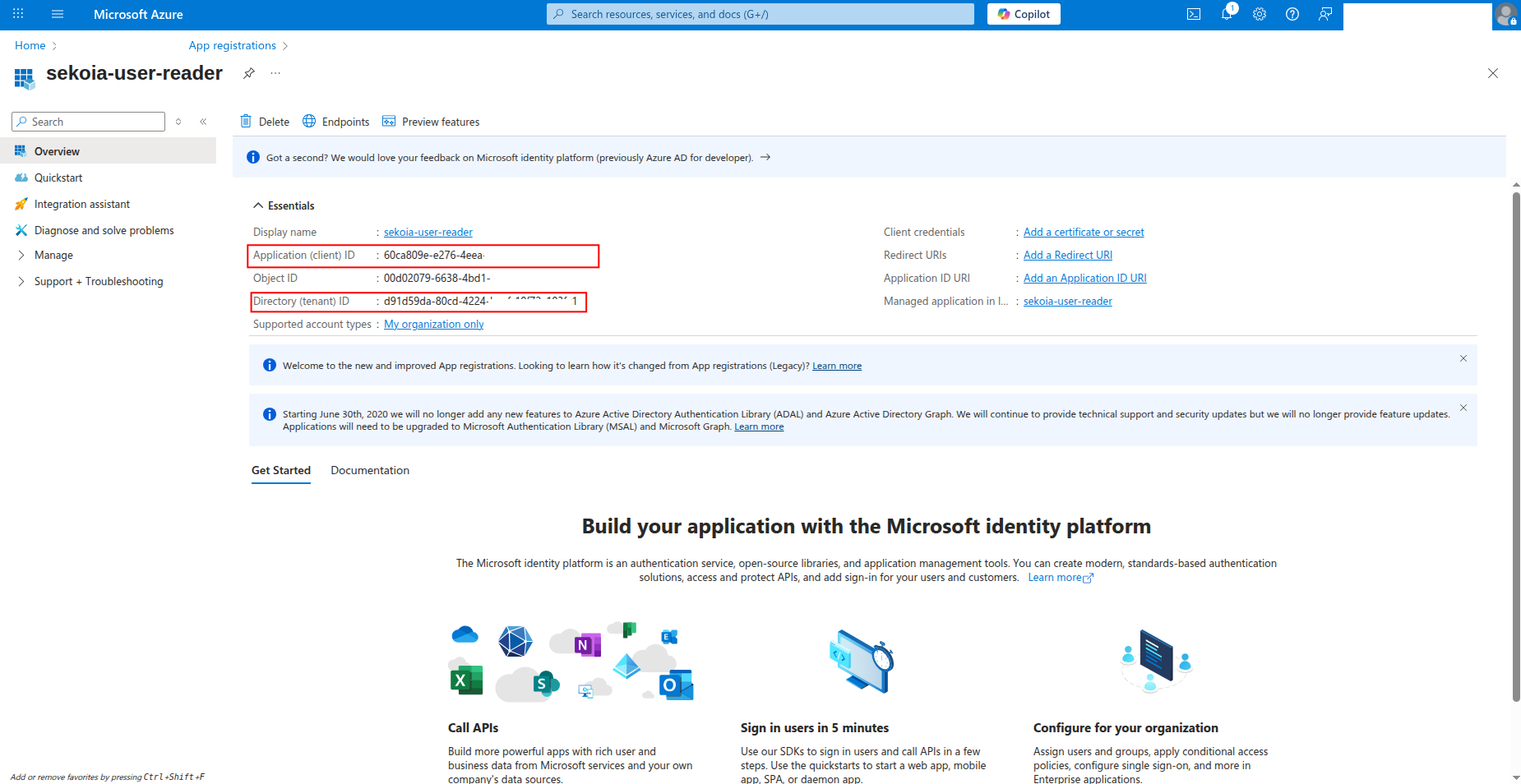
Copy the Application (client) ID and Directory (tenant) ID to a safe location. You'll need these values to configure the connector in Sekoia.io.
How to generate a client secret
After creating the app registration, you need to generate a client secret for authentication:
-
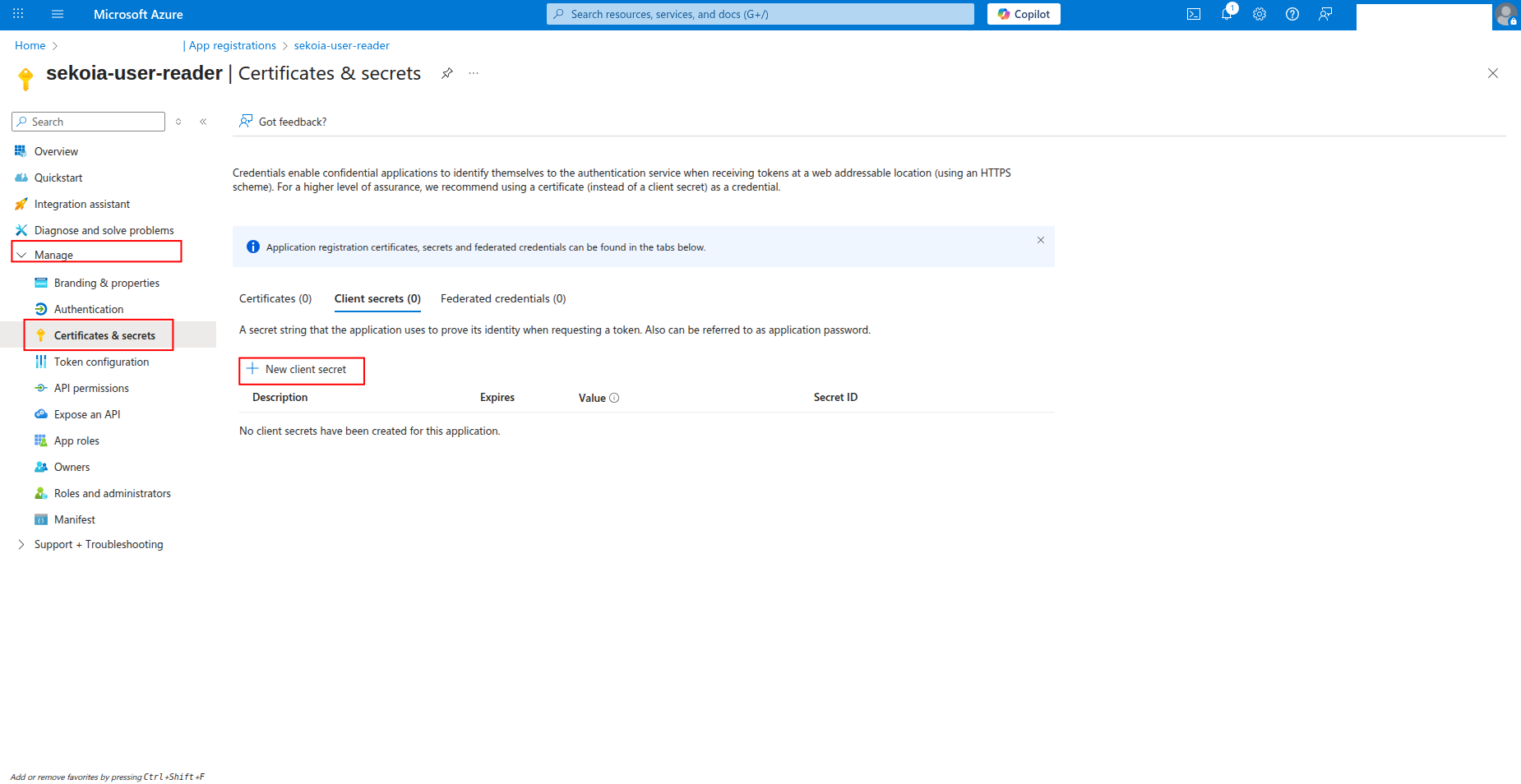
Click Certificates & secrets in the left navigation pane.
-
Click New client secret to generate a new secret.
-
Enter a description for the secret (e.g.,
sekoia-defender-secret) and select an expiration period, then click Add.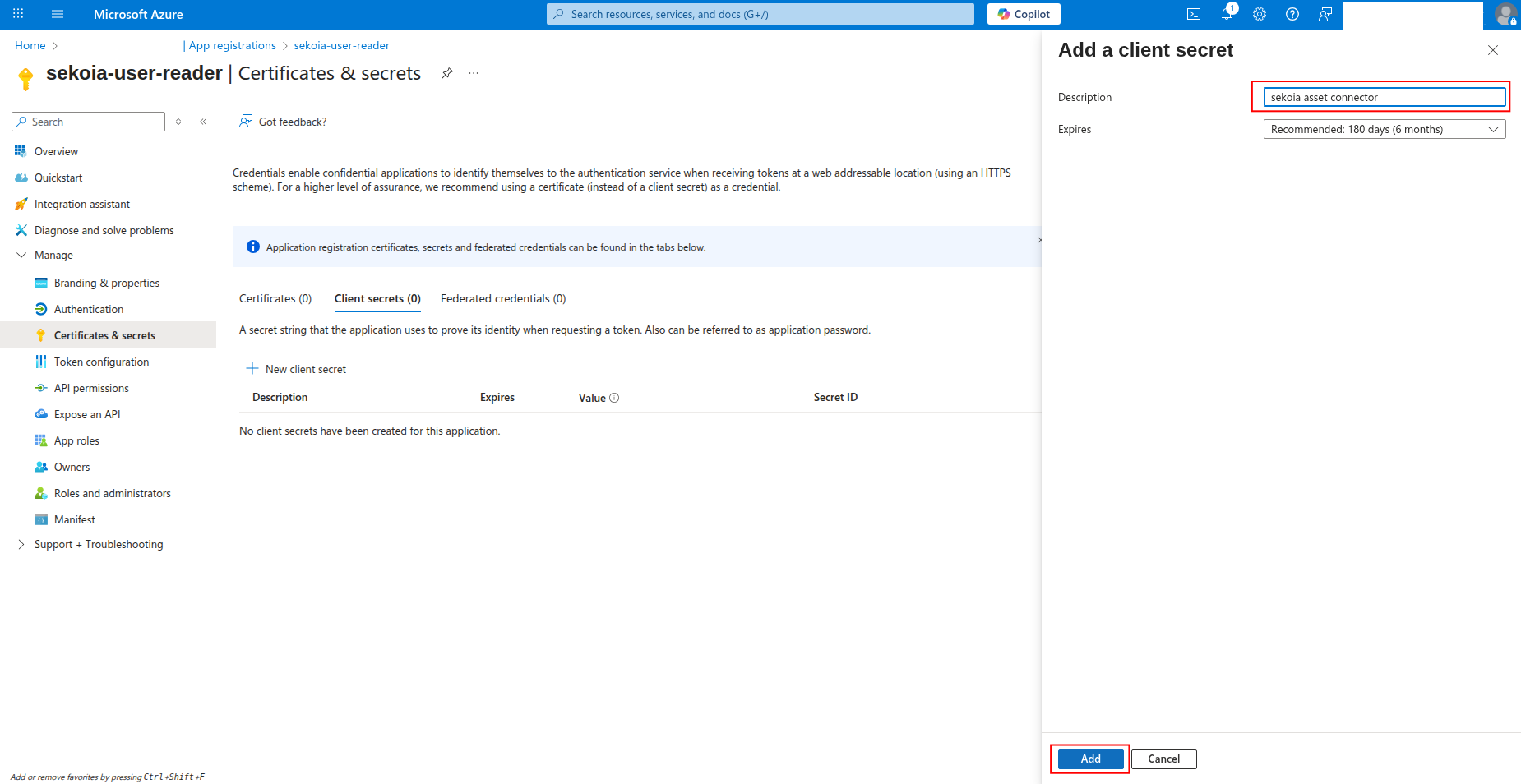
-
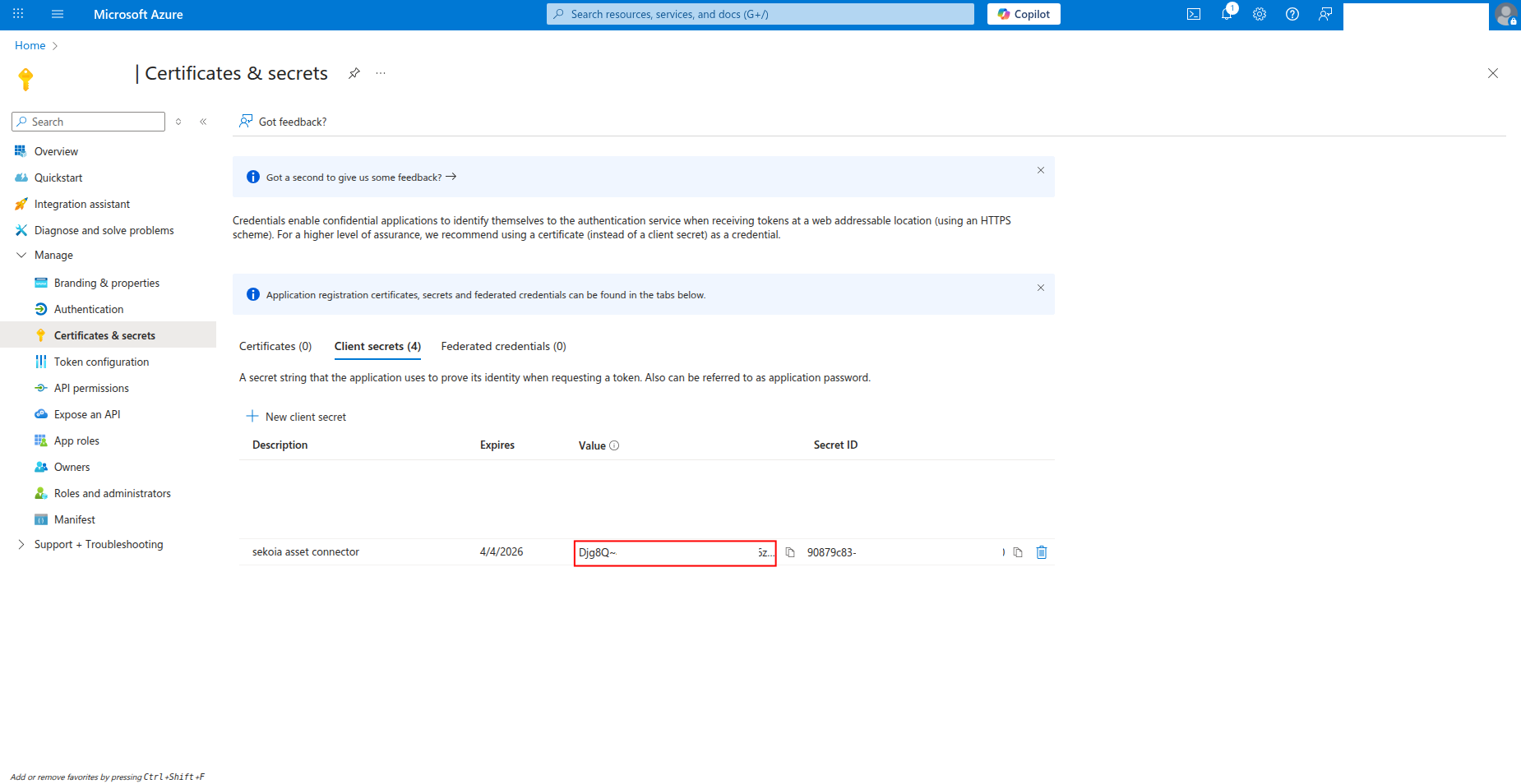
Copy the Value of the client secret to a safe location. You'll need this secret to configure the connector in Sekoia.io.
Warning
- The client secret value is only shown when you create it. If you lose it, you must create a new client secret.
- Store this secret securely and never share it publicly.
- Consider rotating client secrets regularly for security best practices.
Required API permissions
The app registration must have the following application permissions:
| API | Permission | Description |
|---|---|---|
| WindowsDefenderATP | Vulnerability.Read.All |
Read Threat and Vulnerability Management information (CVEs and machine-vulnerability relations) |
| WindowsDefenderATP | Machine.Read.All |
Read all machine information, used to enrich findings with the affected device details |
How to grant API permissions
To grant the required permissions to your app registration:
-
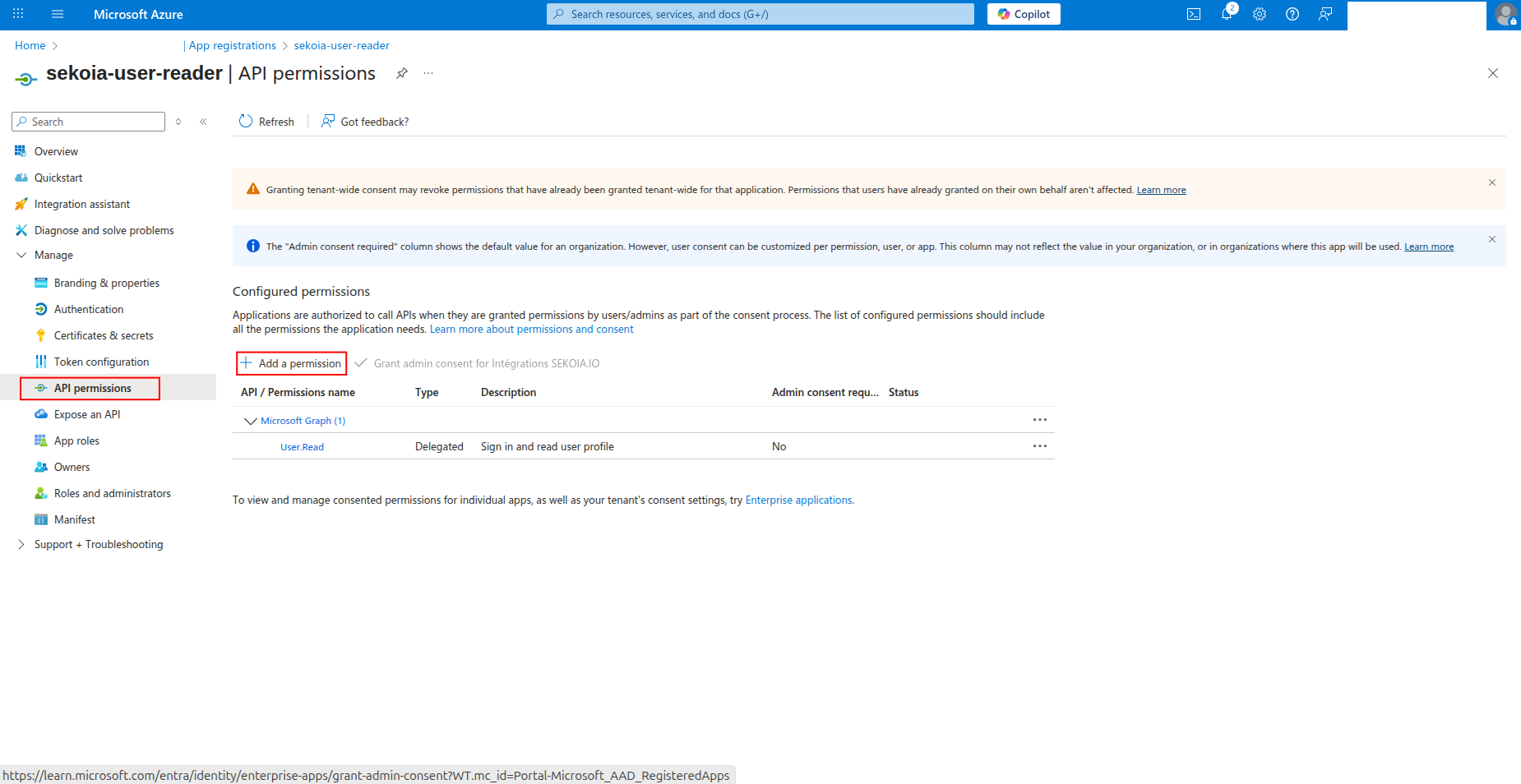
Click API permissions in the left navigation pane.
-
Click Add a permission to add new permissions.
-
Select APIs my organization uses, search for WindowsDefenderATP, and click on it.
-
Select Application permissions, check Vulnerability.Read.All and Machine.Read.All, then click Add permissions.
-
Click Grant admin consent to grant the permissions (requires admin privileges).
Create your asset connector
To start getting your Microsoft Defender for Endpoint vulnerabilities into Sekoia.io, you need to create an asset connector on the Assets page. To do so, follow these steps:
-
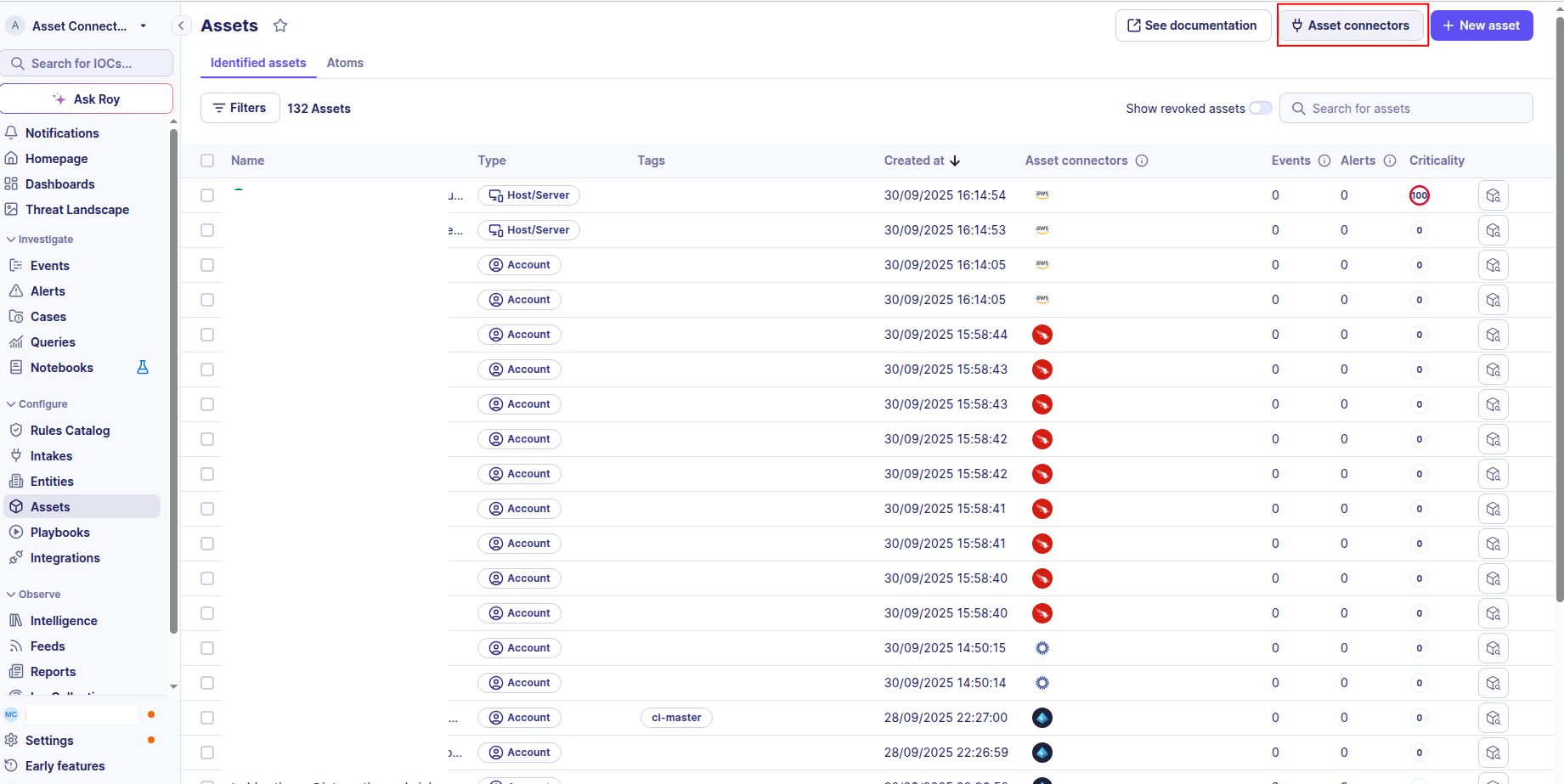
Click the Asset connectors button to create a new connector.
-
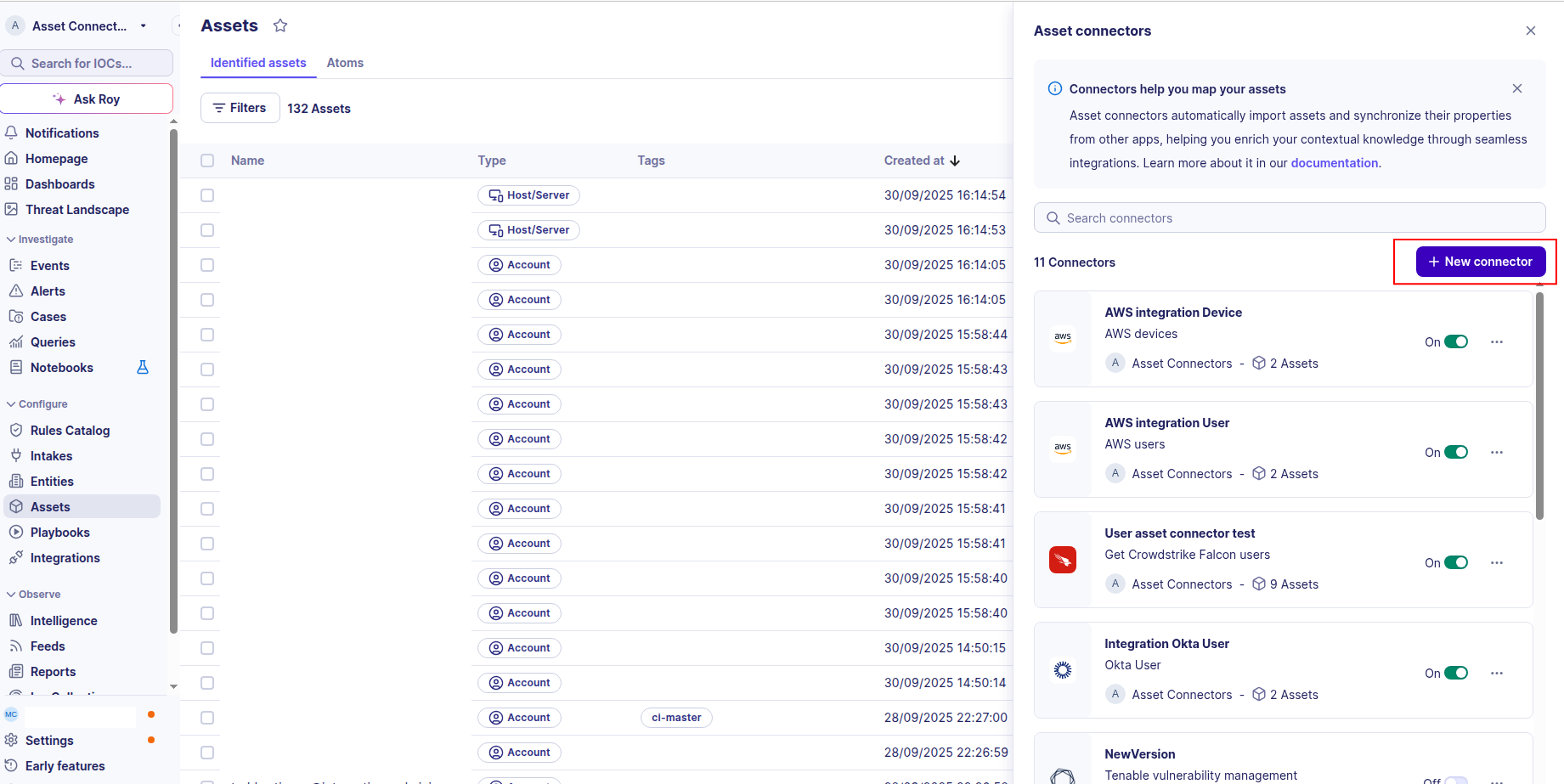
Click the + New connector button.
-
Choose Microsoft Defender Vulnerability, give it a name, and fill in the required fields:
- Tenant ID: Your Azure Directory (tenant) ID
- App ID: The Application (client) ID of your app registration
- App Secret: The client secret value you created
- Base URL: The Microsoft Defender for Endpoint API base URL (default:
https://api.securitycenter.microsoft.com). You can select a regional endpoint closer to your tenant data location (e.g.,https://eu.api.security.microsoft.com,https://us.api.security.microsoft.com,https://uk.api.security.microsoft.com).
-
Test the connection by clicking the Test connector button.
-
Click the Create asset connector button.
Note
- The connector collects vulnerabilities incrementally: after the first run, only the machine-vulnerability relations updated since the last collection are retrieved.
- Each finding corresponds to a unique combination of device, CVE and vulnerable product.
OCSF Mapping for Microsoft Defender Vulnerability
OCSF Class: Vulnerability Finding
Class UID: 2002
OCSF Version: 1.8.0
Information Collected
The Microsoft Defender Vulnerability connector fetches comprehensive information and transforms it into the OCSF (Open Cybersecurity Schema Framework) format for standardized security monitoring and asset management
API Response Examples
Machine Vulnerability (primary)
A machine-vulnerability relation from /api/vulnerabilities/machinesVulnerabilities
{
  "id": "1e5bc9d7e413ddd7902c2932e418702b84d0cc07-_-CVE-2020-15992-_-microsoft-_-.net_core-_-3.1.0.0-_-",
  "cveId": "CVE-2020-15992",
  "machineId": "1e5bc9d7e413ddd7902c2932e418702b84d0cc07",
  "fixingKbId": null,
  "productName": ".net_core",
  "productVendor": "microsoft",
  "productVersion": "3.1.0.0",
  "severity": "High"
}
Machine (device enrichment)
Machine metadata matched on machineId
{
  "id": "1e5bc9d7e413ddd7902c2932e418702b84d0cc07",
  "computerDnsName": "mymachine1.contoso.com",
  "firstSeen": "2018-08-02T14:55:03.7791856Z",
  "lastSeen": "2024-12-01T10:00:00Z",
  "osPlatform": "Windows10",
  "osBuild": 18209,
  "lastIpAddress": "172.17.230.209",
  "aadDeviceId": "80fe8ff8-2624-418e-9591-41f0491218f9"
}
Vulnerability (CVE enrichment)
CVE details matched on cveId
{
  "id": "CVE-2020-15992",
  "name": "CVE-2020-15992",
  "description": "ASP.NET Core allows an attacker to ...",
  "severity": "High",
  "cvssV3": 7.5,
  "exposedMachines": 4,
  "publishedOn": "2020-10-20T00:00:00Z",
  "updatedOn": "2021-02-08T00:00:00Z",
  "publicExploit": false,
  "exploitVerified": false,
  "exploitUris": []
}
Data Mapping Table
The following table shows how source data is mapped to OCSF model fields:
| Source Field | OCSF Field Path | Description | Data Type | Logic |
|---|---|---|---|---|
static: 1 |
activity_id |
OCSF activity ID | integer |
Always 1 for 'Create' activity |
static: Create |
activity_name |
OCSF activity name | string |
Always 'Create' |
static: Findings |
category_name |
OCSF category name | string |
Always 'Findings' |
static: 2 |
category_uid |
OCSF category UID | integer |
Always 2 for Findings |
static: 2002 |
class_uid |
OCSF class UID | integer |
Vulnerability Finding class |
static: 200201 |
type_uid |
OCSF type UID | integer |
Vulnerability Finding: Create |
machineVulnerability.severity || vulnerability.severity |
severity / severity_id |
Finding severity | enum |
informational->1, low->2, medium->3, high->4, critical->5, else Other->99 |
machine.id || machineVulnerability.machineId |
device.uid |
Affected device unique ID | string |
Defender machine ID |
machine.computerDnsName |
device.hostname |
Affected device hostname | string |
Direct mapping (empty string if machine not enriched) |
machine.lastIpAddress |
device.ip |
Last known local IP address | string |
Direct mapping |
machine.osPlatform + machine.osBuild |
device.os.name / device.os.type / device.os.type_id |
Operating system of the affected device | string |
Map osPlatform to OCSF OSTypeStr/OSTypeId |
machine.aadDeviceId |
device.uid_alt |
Azure AD / Entra device ID | string |
Direct mapping |
machine.firstSeen / machine.lastSeen |
device.first_seen_time / device.last_seen_time |
Device first/last seen times | timestamp |
Convert ISO 8601 to Unix epoch |
machineVulnerability.id |
finding_info.uid |
Unique finding identifier | string |
Direct mapping — unique per (machine, cve, product) tuple |
machineVulnerability.cveId || vulnerability.id |
finding_info.title |
Finding title (CVE id) | string |
CVE identifier |
vulnerability.description |
finding_info.desc |
CVE description | string |
From CVE enrichment |
vulnerability.firstDetected |
finding_info.first_seen_time |
First time the CVE was detected | timestamp |
Convert ISO 8601 to Unix epoch |
vulnerability.publishedOn |
finding_info.created_time |
CVE publication time | timestamp |
Convert ISO 8601 to Unix epoch |
vulnerability.updatedOn |
finding_info.last_seen_time |
CVE last update time | timestamp |
Convert ISO 8601 to Unix epoch (also used as checkpoint) |
machineVulnerability.cveId || vulnerability.id |
vulnerabilities[].cve.uid |
CVE identifier | string |
Direct mapping |
vulnerability.cvssV3 |
vulnerabilities[].cve.cvss[].base_score |
CVSS v3 base score | float |
Wrapped as CVSS(version='3.x', base_score=cvssV3) |
vulnerability.description |
vulnerabilities[].cve.desc |
CVE description | string |
From CVE enrichment |
machineVulnerability.productName |
vulnerabilities[].title |
Vulnerable product | string |
Affected product name |
machineVulnerability.productVendor |
vulnerabilities[].vendor_name |
Vendor of the vulnerable product | string |
Direct mapping |
vulnerability.exploitUris |
vulnerabilities[].references |
Known exploit references | list |
Copied when present |
vulnerability.updatedOn || vulnerability.publishedOn |
time |
OCSF event timestamp | timestamp |
Use updatedOn, fallback to publishedOn, then current time |
OCSF Model Structure
Transformed Vulnerability Finding Output
OCSF VulnerabilityOCSFModel after merging machinesVulnerabilities + machines + vulnerabilities
{
  "activity_id": 1,
  "activity_name": "Create",
  "category_name": "Findings",
  "category_uid": 2,
  "class_name": "Vulnerability Finding",
  "class_uid": 2002,
  "type_name": "Vulnerability Finding: Create",
  "type_uid": 200201,
  "severity": "High",
  "severity_id": 4,
  "time": 1612742400.0,
  "metadata": {
    "product": {
      "name": "Microsoft Defender for Endpoint",
      "vendor_name": "Microsoft",
      "version": "1.0"
    },
    "version": "1.8.0"
  },
  "device": {
    "type_id": 2,
    "type": "Desktop",
    "uid": "1e5bc9d7e413ddd7902c2932e418702b84d0cc07",
    "uid_alt": "80fe8ff8-2624-418e-9591-41f0491218f9",
    "hostname": "mymachine1.contoso.com",
    "ip": "172.17.230.209",
    "os": {
      "name": "Windows10 (Build 18209)",
      "type": "windows",
      "type_id": 100
    },
    "first_seen_time": 1533221703.0,
    "last_seen_time": 1733047200.0,
    "is_managed": true
  },
  "finding_info": {
    "uid": "1e5bc9d7e413ddd7902c2932e418702b84d0cc07-_-CVE-2020-15992-_-microsoft-_-.net_core-_-3.1.0.0-_-",
    "title": "CVE-2020-15992",
    "desc": "ASP.NET Core allows an attacker to ...",
    "types": ["Vulnerability"],
    "created_time": 1603152000,
    "last_seen_time": 1612742400,
    "data_sources": ["Microsoft Defender for Endpoint"],
    "product": {
      "name": "Microsoft Defender for Endpoint",
      "vendor_name": "Microsoft",
      "version": "1.0"
    }
  },
  "vulnerabilities": [
    {
      "title": ".net_core",
      "desc": "ASP.NET Core allows an attacker to ...",
      "cve": {
        "uid": "CVE-2020-15992",
        "cvss": [{"version": "3.x", "base_score": 7.5}],
        "desc": "ASP.NET Core allows an attacker to ...",
        "title": "CVE-2020-15992"
      },
      "severity": "High",
      "vendor_name": "microsoft"
    }
  ]
}