Akamai Datastream2 Delivery
Overview
Akamai DataStream 2 Delivery logs capture web request and response metadata from Akamai's edge delivery platform, including client IP, endpoint, HTTP status, TLS, cache, and EdgeWorker details.
This integration allows you to ingest Akamai DataStream 2 delivery telemetry into Sekoia.io for monitoring, investigation, and detection use cases. It is especially useful for tracking edge traffic patterns, diagnosing delivery issues, and identifying suspicious activity across web and application traffic.
- Vendor: Akamai
- Supported environment: Cloud
- Detection based on: Telemetry
- Supported application or feature: see section below
Warning
Important note - This format is currently in beta. We highly value your feedback to improve its performance.
Configure
Create your intake
- Go to the intake page and create a new intake from the
Akamai Datastream2 Deliveryformat. - Copy the intake key: it will be used as the password of the Akamai stream destination.
Create a DataStream 2 stream in Akamai
- Log in to Akamai Control Center with an account that has DataStream access.
-
Open the main menu, then select
Analytics & monitor>DataStream.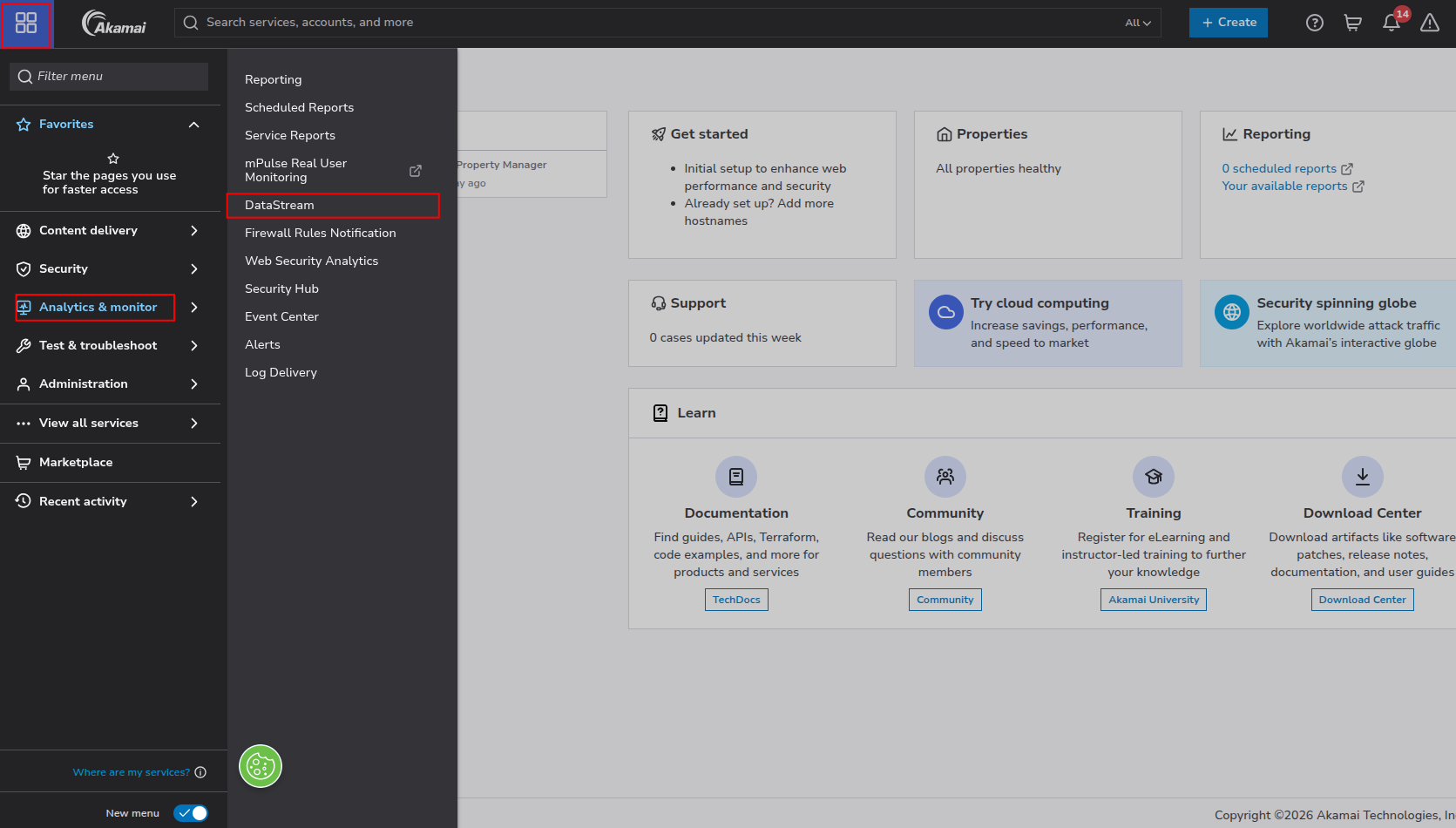
-
On the
Stream listpage, clickCreate streamand selectDelivery Products.
-
In the
Configurationstep:- Display Name: enter a name for the stream (for example,
Sekoia). - Latency profile: keep
Optimized for faster latency(default) for near real-time detection. - Include groups: select the groups that contain the properties to monitor.
- Include properties: select the properties to monitor. Only properties active on staging or production are listed, and all selected properties must belong to the same product.
Click
Next.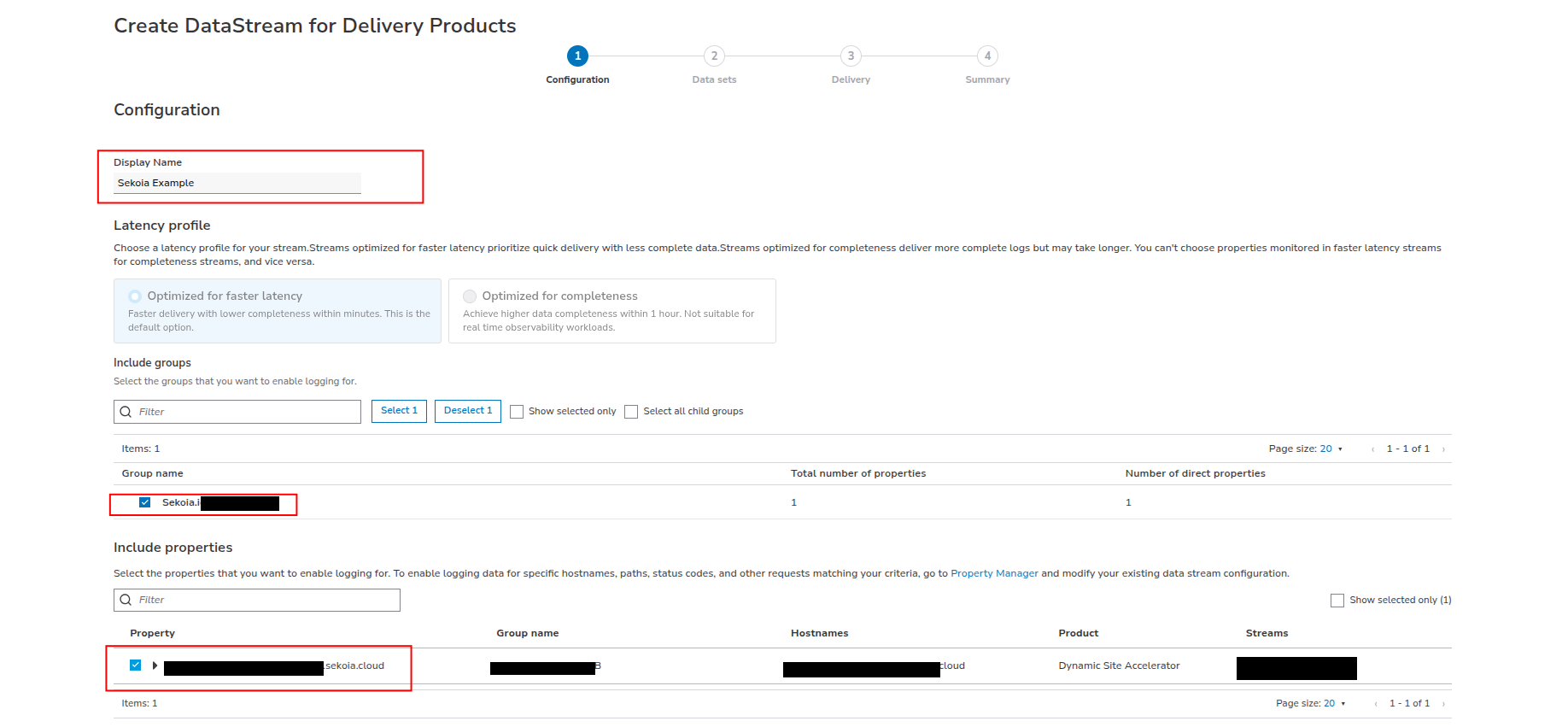
- Display Name: enter a name for the stream (for example,
-
In the
Data setsstep, select the data set fields to log (client and request metadata, response metadata, TLS, cache, EdgeWorker…). Then, in theLog filesection, setLog formattoJsonand clickNext.
-
In the
Deliverystep, configure the destination:- Destination:
Custom HTTPS - Display Name: a name for the destination (for example,
Sekoia-endpoint) - Authentication:
BASIC - Endpoint URL:
https://intake.sekoia.io/plain/batch - Username: any value (for example,
Sekoia) - Password: your Sekoia.io intake key
- Send compressed data: checked
Click
Validate & Save. Akamai sends a test request to the endpoint and only saves the destination if the validation succeeds.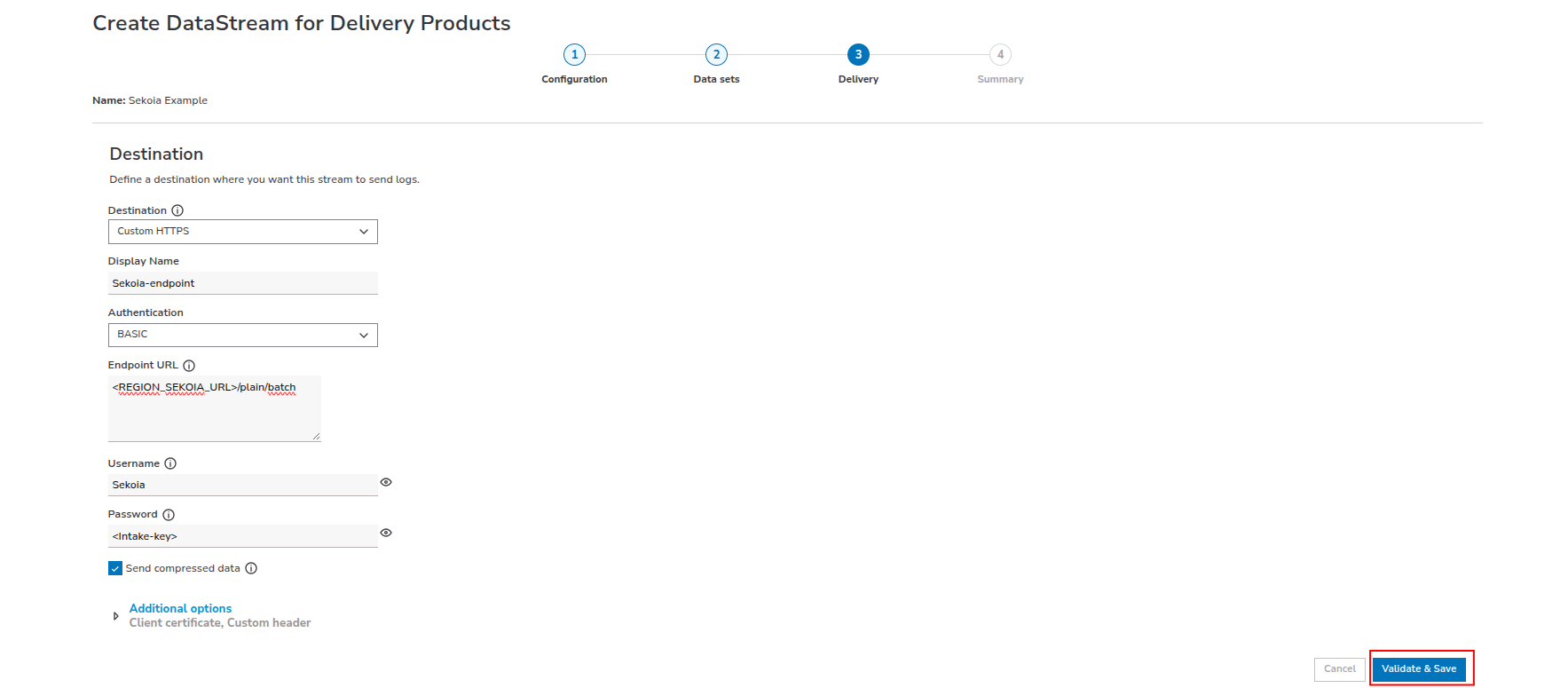
Warning
The URL above works for the FRA1 region. For any other region, replace
https://intake.sekoia.iowith the HTTP intake endpoint of your region, listed on the Regions page. - Destination:
-
In the
Summarystep, review the configuration, checkActivate stream upon saving, and save the stream.
Note
Activating a stream takes about 60 minutes. For streams that rely on Property Manager (not DataStream managed streams), you must also enable the DataStream behavior on each monitored property before logs are sent.
Enjoy your events on the Events page
Further readings
Specification
Delivery telemetry scope
This format focuses on Akamai DataStream 2 delivery logs generated by Akamai edge properties during normal web traffic handling. It captures the request and response metadata used to monitor delivery performance, investigate suspicious activity, and analyze traffic patterns across protected applications.
Typical fields included in the delivery stream:
- Client and request metadata: client IP, geolocation, hostname, requested URL, HTTP method, user agent, and transaction details
- Response metadata: HTTP status code, protocol version, response size, cache status, and timing information
- TLS and edge processing: TLS version, cipher details, cache behavior, and EdgeWorker processing details
- Property and platform context: Akamai property, edge location, origin behavior, and delivery path information
Prerequisites
- Akamai account and entitlement:
- An Akamai Control Center account with DataStream 2 entitlement on the contract.
- Property configuration:
- A property (Ion, Adaptive Media Delivery, Download Delivery, DSA, API Acceleration…) active on staging or production.
- Stream configuration:
- A stream configured with a custom HTTPS endpoint destination pointing to the Sekoia HTTP intake.
- Network:
- Outbound HTTPS access from Akamai to the Sekoia.io intake endpoint.
- Permissions:
- Control Center role allowing stream creation and activation (for example, the DataStream role).
- Sekoia.io access to the relevant intake configuration and credentials.
Event Categories
The following table lists the data source offered by this integration.
| Data Source | Description |
|---|---|
Web application firewall logs |
Akamai edge and CDN logs for web request delivery, response metadata, and protection decisions. |
In details, the following table denotes the type of events produced by this integration.
| Name | Values |
|---|---|
| Kind | event |
| Category | web |
| Type | access |
Transformed Events Samples after Ingestion
This section demonstrates how the raw logs will be transformed by our parsers. It shows the extracted fields that will be available for use in the built-in detection rules and hunting activities in the events page. Understanding these transformations is essential for analysts to create effective detection mechanisms with custom detection rules and to leverage the full potential of the collected data.
{
    "message": "{\"version\":\"1\",\"streamId\":\"12345\",\"cp\":\"123456\",\"reqId\":\"1239f220\",\"reqTimeSec\":\"1573840000\",\"bytes\":\"4995\",\"cliIP\":\"192.0.2.30\",\"statusCode\":\"206\",\"proto\":\"HTTPS\",\"reqHost\":\"integration.test.com\",\"reqMethod\":\"GET\",\"reqPath\":\"/path1/path2/file.ext\",\"reqPort\":\"443\",\"rspContentLen\":\"5000\",\"rspContentType\":\"text/html\",\"UA\":\"Mozilla%2F5.0+%28Macintosh%3B+Intel+Mac+OS+X+10_14_3%29\",\"tlsOverheadTimeMSec\":\"0\",\"tlsVersion\":\"TLSv1\",\"objSize\":\"484\",\"uncompressedSize\":\"484\",\"overheadBytes\":\"232\",\"totalBytes\":\"0\",\"queryStr\":\"param=value\",\"breadcrumbs\":\"//BC/%5Ba=23.33.41.20,c=g,k=0,l=1%5D\",\"accLang\":\"en-US\",\"cookie\":\"cookie-content\",\"range\":\"37334-42356\",\"referer\":\"https%3A%2F%2Freferrer.example.net%2Fen-US%2Fdocs%2FWeb%2Ftest\",\"xForwardedFor\":\"192.0.2.10\",\"maxAgeSec\":\"3600\",\"reqEndTimeMSec\":\"3\",\"errorCode\":\"ERR_ACCESS_DENIED|fwd_acl\",\"turnAroundTimeMSec\":\"11\",\"transferTimeMSec\":\"125\",\"dnsLookupTimeMSec\":\"50\",\"lastByte\":\"1\",\"edgeIP\":\"192.0.2.20\",\"country\":\"IN\",\"state\":\"Virginia\",\"city\":\"HERNDON\",\"serverCountry\":\"SG\",\"billingRegion\":\"8\",\"cacheStatus\":\"1\",\"securityRules\":\"ULnR_28976|3900000:3900001:3900005:3900006:BOT-ANOMALY-HEADER|\",\"ewUsageInfo\":\"//4380/4.0/1/-/0/4/#1,2\\\\\\\\//4380/4.0/4/-/0/4/#0,0\\\\\\\\//4380/4.0/5/-/1/1/#0,0\",\"ewExecutionInfo\":\"c:4380:7:161:162:161:n:::12473:200|C:4380:3:0:4:0:n:::6967:200|R:4380:20:99:99:1:n:::35982:200\",\"customField\":\"any-custom-value\"}",
    "event": {
        "category": [
            "web"
        ],
        "dataset": "akamai.datastream2_delivery",
        "kind": "event",
        "outcome": "success",
        "type": [
            "access"
        ]
    },
    "@timestamp": "2019-11-15T17:46:40Z",
    "akamai": {
        "datastream2": {
            "accept_language": "en-US",
            "billing_region": 8,
            "breadcrumbs": "//BC/%5Ba=23.33.41.20,c=g,k=0,l=1%5D",
            "cache_status": 1,
            "cookie": "cookie-content",
            "cp_code": "123456",
            "dns_lookup_time_ms": 50,
            "edgeworkers_execution": "c:4380:7:161:162:161:n:::12473:200|C:4380:3:0:4:0:n:::6967:200|R:4380:20:99:99:1:n:::35982:200",
            "edgeworkers_usage": "//4380/4.0/1/-/0/4/#1,2\\\\//4380/4.0/4/-/0/4/#0,0\\\\//4380/4.0/5/-/1/1/#0,0",
            "last_byte": 1,
            "max_age_sec": 3600,
            "object_size": 484,
            "overhead_bytes": 232,
            "range": "37334-42356",
            "request_end_time_ms": 3,
            "security_rules": "ULnR_28976|3900000:3900001:3900005:3900006:BOT-ANOMALY-HEADER|",
            "stream_id": "12345",
            "tls_overhead_time_ms": 0,
            "transfer_time_ms": 125,
            "turn_around_time_ms": 11,
            "uncompressed_size": 484,
            "version": 1
        }
    },
    "error": {
        "code": "ERR_ACCESS_DENIED|fwd_acl"
    },
    "http": {
        "request": {
            "id": "1239f220",
            "method": "GET",
            "referrer": "https://referrer.example.net/en-US/docs/Web/test"
        },
        "response": {
            "body": {
                "bytes": 5000
            },
            "bytes": 4995,
            "mime_type": "text/html",
            "status_code": 206
        }
    },
    "network": {
        "bytes": 0,
        "forwarded_ip": "192.0.2.10",
        "protocol": "https"
    },
    "observer": {
        "geo": {
            "country_iso_code": "SG"
        },
        "ip": "192.0.2.20",
        "product": "DataStream 2",
        "type": "cdn",
        "vendor": "Akamai"
    },
    "related": {
        "hosts": [
            "integration.test.com"
        ],
        "ip": [
            "192.0.2.20",
            "192.0.2.30"
        ]
    },
    "source": {
        "address": "192.0.2.30",
        "geo": {
            "city_name": "HERNDON",
            "country_iso_code": "IN",
            "region_name": "Virginia"
        },
        "ip": "192.0.2.30"
    },
    "tls": {
        "version": "1"
    },
    "url": {
        "domain": "integration.test.com",
        "path": "/path1/path2/file.ext",
        "port": 443,
        "query": "param=value",
        "registered_domain": "test.com",
        "subdomain": "integration",
        "top_level_domain": "com"
    },
    "user_agent": {
        "device": {
            "name": "Mac"
        },
        "name": "Other",
        "original": "Mozilla/5.0 (Macintosh; Intel Mac OS X 10_14_3)",
        "os": {
            "name": "Mac OS X",
            "version": "10.14.3"
        }
    }
}
{
    "message": "{\"version\": \"1\", \"streamId\": \"12345\", \"cp\": \"123456\", \"reqId\": \"1239f221\", \"reqTimeSec\": \"1573840100\", \"bytes\": \"0\", \"cliIP\": \"198.51.100.7\", \"statusCode\": \"503\", \"proto\": \"HTTP/2\", \"reqHost\": \"www.example.com\", \"reqMethod\": \"POST\", \"reqPath\": \"/api/login\", \"reqPort\": \"443\", \"tlsVersion\": \"TLSv1.3\", \"cacheStatus\": \"0\", \"securityRules\": \"\", \"edgeIP\": \"192.0.2.20\", \"country\": \"US\", \"referer\": \"https%3A%2F%2Fwww.example.com%2Fsearch%3Fq%3Da%2Bb%26x%3D100%25\", \"UA\": \"curl%2F8.4.0+%28test%3B+x%2Cy%29\"}",
    "event": {
        "category": [
            "web"
        ],
        "dataset": "akamai.datastream2_delivery",
        "kind": "event",
        "outcome": "failure",
        "type": [
            "access"
        ]
    },
    "@timestamp": "2019-11-15T17:48:20Z",
    "akamai": {
        "datastream2": {
            "cache_status": 0,
            "cp_code": "123456",
            "stream_id": "12345",
            "version": 1
        }
    },
    "http": {
        "request": {
            "id": "1239f221",
            "method": "POST",
            "referrer": "https://www.example.com/search?q=a+b&x=100%"
        },
        "response": {
            "bytes": 0,
            "status_code": 503
        }
    },
    "network": {
        "protocol": "http/2"
    },
    "observer": {
        "ip": "192.0.2.20",
        "product": "DataStream 2",
        "type": "cdn",
        "vendor": "Akamai"
    },
    "related": {
        "hosts": [
            "www.example.com"
        ],
        "ip": [
            "192.0.2.20",
            "198.51.100.7"
        ]
    },
    "source": {
        "address": "198.51.100.7",
        "geo": {
            "country_iso_code": "US"
        },
        "ip": "198.51.100.7"
    },
    "tls": {
        "version": "1.3"
    },
    "url": {
        "domain": "www.example.com",
        "path": "/api/login",
        "port": 443,
        "registered_domain": "example.com",
        "subdomain": "www",
        "top_level_domain": "com"
    },
    "user_agent": {
        "device": {
            "name": "Other"
        },
        "name": "curl",
        "original": "curl/8.4.0 (test; x,y)",
        "os": {
            "name": "Other"
        },
        "version": "8.4.0"
    }
}
Extracted Fields
The following table lists the fields that are extracted, normalized under the ECS format, analyzed and indexed by the parser. It should be noted that infered fields are not listed.
| Name | Type | Description |
|---|---|---|
@timestamp |
date |
Date/time when the event originated. |
akamai.datastream2.accept_language |
keyword |
Accept-Language header |
akamai.datastream2.billing_region |
long |
Akamai price zone. |
akamai.datastream2.breadcrumbs |
keyword |
Request-response breadcrumbs. |
akamai.datastream2.cache_status |
long |
Edge cache status (0/1). |
akamai.datastream2.cookie |
keyword |
Request cookies |
akamai.datastream2.cp_code |
keyword |
Content Provider (CP) code. |
akamai.datastream2.dns_lookup_time_ms |
long |
DNS lookup time (ms). |
akamai.datastream2.edgeworkers_execution |
keyword |
EdgeWorker execution info. |
akamai.datastream2.edgeworkers_usage |
keyword |
EdgeWorkers usage info. |
akamai.datastream2.last_byte |
long |
Last-byte flag. |
akamai.datastream2.max_age_sec |
long |
Positive-cache TTL. |
akamai.datastream2.object_size |
long |
Object size in bytes. |
akamai.datastream2.overhead_bytes |
long |
TCP overhead bytes. |
akamai.datastream2.range |
keyword |
Requested byte range. |
akamai.datastream2.request_end_time_ms |
long |
Time to fully read the request (ms). |
akamai.datastream2.security_rules |
keyword |
WAF/Bot rule string (policyId |
akamai.datastream2.stream_id |
keyword |
Stream identifier. |
akamai.datastream2.tls_overhead_time_ms |
long |
TLS handshake overhead (ms). |
akamai.datastream2.transfer_time_ms |
long |
Transfert time (ms). |
akamai.datastream2.turn_around_time_ms |
long |
Turnaround time (ms). |
akamai.datastream2.uncompressed_size |
long |
Uncompressed payload size. |
akamai.datastream2.version |
long |
Log line format version. |
error.code |
keyword |
Error code describing the error. |
event.category |
keyword |
Event category. The second categorization field in the hierarchy. |
event.dataset |
keyword |
Name of the dataset. |
event.kind |
keyword |
The kind of the event. The highest categorization field in the hierarchy. |
event.outcome |
keyword |
The outcome of the event. The lowest level categorization field in the hierarchy. |
event.type |
keyword |
Event type. The third categorization field in the hierarchy. |
http.request.id |
keyword |
HTTP request ID. |
http.request.method |
keyword |
HTTP request method. |
http.request.referrer |
keyword |
Referrer for this HTTP request. |
http.response.body.bytes |
long |
Size in bytes of the response body. |
http.response.bytes |
long |
Total size in bytes of the response (body and headers). |
http.response.mime_type |
keyword |
Mime type of the body of the response. |
http.response.status_code |
long |
HTTP response status code. |
network.bytes |
long |
Total bytes transferred in both directions. |
network.forwarded_ip |
ip |
Host IP address when the source IP address is the proxy. |
network.protocol |
keyword |
Application protocol name. |
observer.geo.country_iso_code |
keyword |
Country ISO code. |
observer.ip |
ip |
IP addresses of the observer. |
observer.product |
keyword |
The product name of the observer. |
observer.type |
keyword |
The type of the observer the data is coming from. |
observer.vendor |
keyword |
Vendor name of the observer. |
source.geo.city_name |
keyword |
City name. |
source.geo.country_iso_code |
keyword |
Country ISO code. |
source.geo.region_name |
keyword |
Region name. |
source.ip |
ip |
IP address of the source. |
tls.version |
keyword |
Numeric part of the version parsed from the original string. |
url.domain |
keyword |
Domain of the url. |
url.path |
wildcard |
Path of the request, such as "/search". |
url.port |
long |
Port of the request, such as 443. |
url.query |
keyword |
Query string of the request. |
user_agent.original |
keyword |
Unparsed user_agent string. |
For more information on the Intake Format, please find the code of the Parser, Smart Descriptions, and Supported Events here.
Detection section
The following section provides information for those who wish to learn more about the detection capabilities enabled by collecting this intake. It includes details about the built-in rule catalog, event categories, and ECS fields extracted from raw events. This is essential for users aiming to create custom detection rules, perform hunting activities, or pivot in the events page.