Nozomi Networks
Reveal module — This feature requires the Reveal add-on module.
Overview
Nozomi Networks provides visibility and threat detection for operational technology, IoT, and IT environments. Its Guardian sensors and Central Management Console (CMC) passively discover every asset communicating on the industrial network, such as PLCs, HMIs, controllers, switches, and workstations, and enrich them with vendor, firmware, protocol, and zone information. This setup guide shows how to forward the device assets discovered by Nozomi Networks to Sekoia.io.
- Vendor: Nozomi Networks
- Product: Nozomi Networks Guardian / Central Management Console (CMC)
- Supported environment: On Premise, Cloud
Configure
Prerequisites
- A Nozomi Networks Guardian or CMC instance reachable over HTTPS from Sekoia.io.
- A Nozomi user account allowed to read assets. The API key inherits the permissions of the user who creates it.
How to create an API key
To connect Nozomi Networks to Sekoia.io, you need an Open API key in the Guardian or CMC web console. Follow these steps:
-
Sign in to the Guardian or CMC web console with the user whose permissions the connector will use.
-
In the top navigation bar, open your Profile menu and select API Keys.
-
Click Add, give the key a description (e.g.,
sekoia-asset-connector), and optionally restrict the allowed source IP addresses. -
Click Generate, then copy the Key name and the Key token to a safe place. You will use both in Sekoia.io.
Warning
- The key token is displayed only once upon creation. Store it securely; if lost, you will need to generate a new key.
- If you restrict the allowed IP addresses of the key, make sure the Sekoia.io outbound IP addresses are allowed.
More details are available in the Nozomi Networks documentation: Open API keys.
Create your asset
To start getting your Nozomi Networks assets into Sekoia.io, you need to create an asset connector on the Assets page. To do so, follow these steps:
-
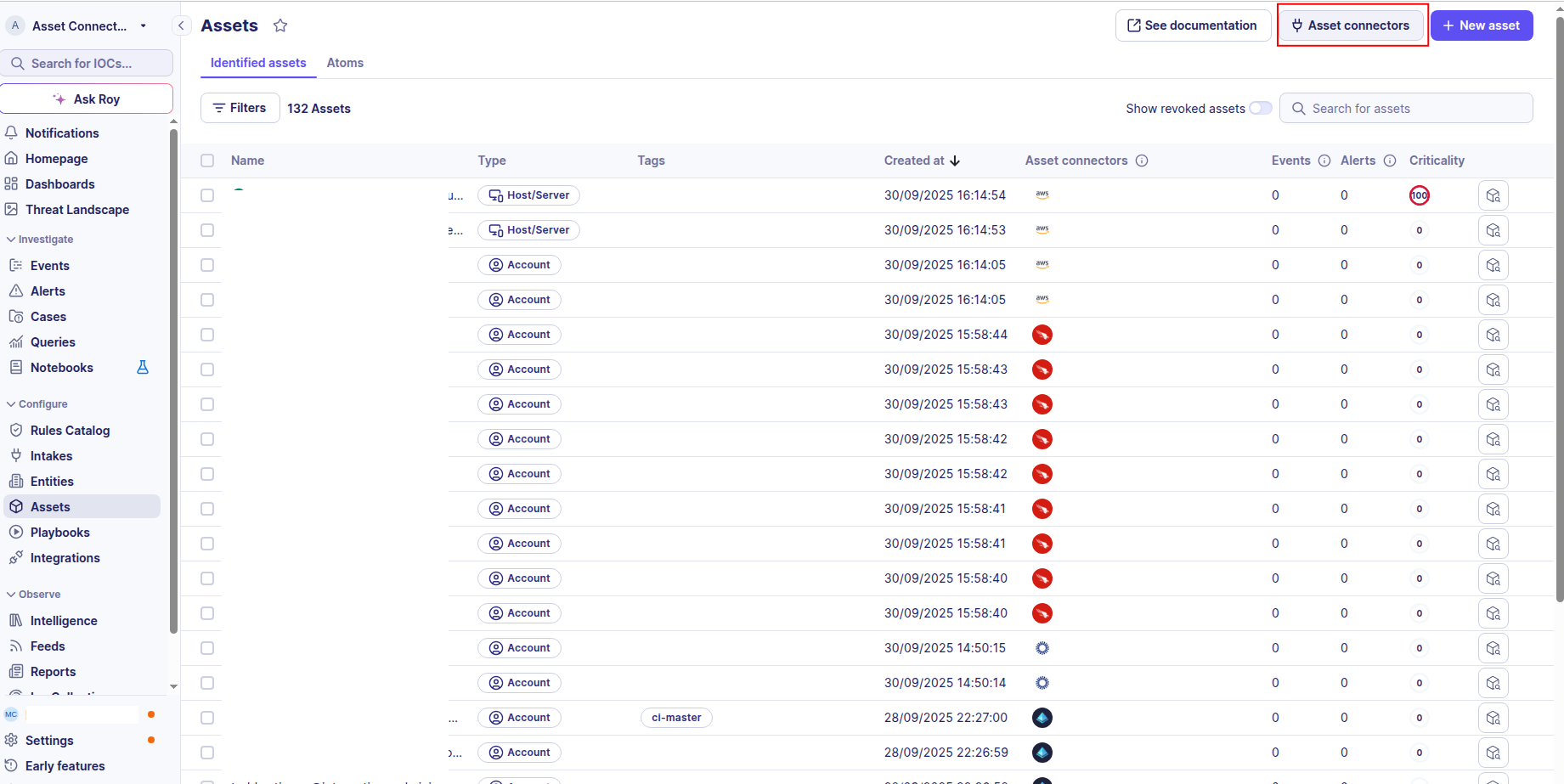
Click the Asset connectors button to create a new connector.
-
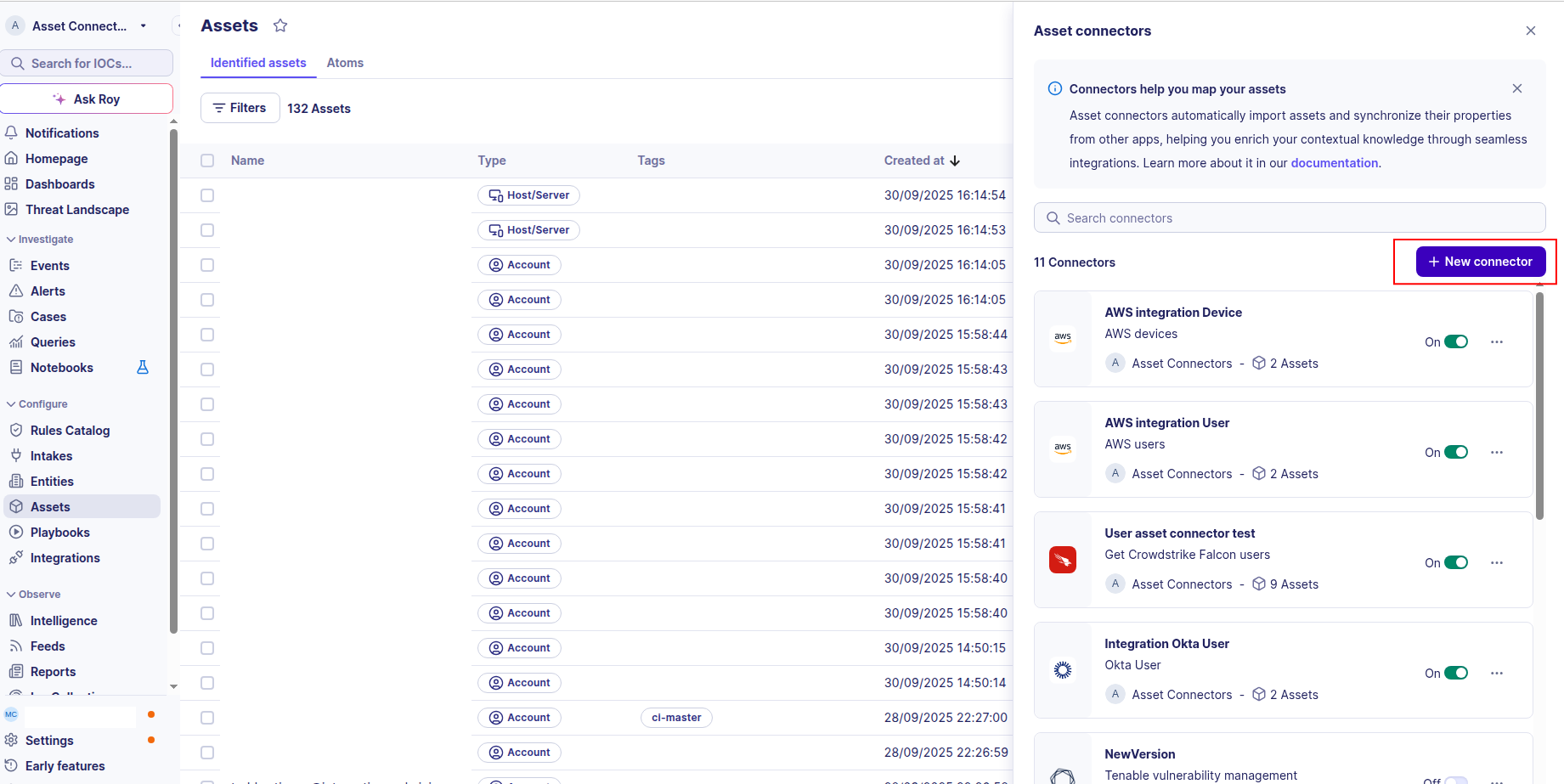
Click the + New connector button.
-
Choose Nozomi Devices, give it a name, and fill the required fields:
base_url: the URL of your Guardian or CMC instance (e.g.,https://guardian.example.com).key_name: the key name generated in the previous section.key_token: the key token generated in the previous section.
-
Test the connection by clicking the Test connector button. The test signs in to the Open API with the provided key.
-
Click the Create asset connector button.
OCSF Mapping for Nozomi Devices
OCSF Class: Device Inventory Info
Class UID: 5001
OCSF Version: 1.5.0
Information Collected
The Nozomi Devices connector fetches comprehensive information and transforms it into the OCSF (Open Cybersecurity Schema Framework) format for standardized security monitoring and asset management.
API Response Examples
Nozomi Guardian asset (controller)
Raw asset returned by the Guardian/CMC query API (query=assets)
{
  "name": "plc-01",
  "id": "00000000-0000-4000-8000-000000000001",
  "ip": ["192.0.2.10"],
  "mac_address": ["00:00:5e:00:53:01"],
  "mac_vendor": ["ABB"],
  "os": "",
  "roles": ["producer"],
  "vendor": "ABB",
  "firmware_version": "5.1.100.13",
  "product_name": "AC 800M PM851",
  "serial_number": "",
  "type": "controller",
  "protocols": ["cotp", "mms"],
  "zones": ["Production_B"],
  "levels": ["2"],
  "created_at": "1724888822710",
  "last_activity_time": "1789542303500",
  "device_id": "00000000-0000-4000-8000-0000000000d1"
}
Data Mapping Table
The following table shows how source data is mapped to OCSF model fields:
| Source Field | OCSF Field Path | Description | Data Type | Logic |
|---|---|---|---|---|
static: 2 |
activity_id |
OCSF activity ID | integer |
Always 2 for the 'Collect' activity |
static: Collect |
activity_name |
OCSF activity name | string |
Constant |
static: Discovery |
category_name |
OCSF category name | string |
Constant |
static: 5 |
category_uid |
OCSF category UID | integer |
Constant |
static: Device Inventory Info |
class_name |
OCSF class name | string |
Constant |
static: 5001 |
class_uid |
OCSF class UID | integer |
Constant |
static: Device Inventory Info: Collect |
type_name |
OCSF type name | string |
Constant |
static: 500102 |
type_uid |
OCSF type UID | integer |
Constant |
asset.created_at |
time |
OCSF event timestamp | timestamp |
Convert epoch-milliseconds string to Unix epoch seconds; falls back to now() if missing |
asset.id |
device.uid |
Unique device identifier | string |
Direct mapping |
asset.name || asset.id |
device.hostname |
Device hostname | string |
Use asset name, fall back to id (hostname is required) |
asset.name |
device.name |
Device name | string |
Direct mapping |
asset.type |
device.type / device.type_id |
OCSF device type | string |
Map Nozomi asset type to OCSF DeviceTypeId (server->1, desktop/workstation->2, mobile->5, virtual->6, firewall->9, switch->10, unknown type->OTHER 99, missing->UNKNOWN 0) |
asset.os |
device.os.name / device.os.type / device.os.type_id |
Operating system | string |
Normalize os string to OCSF OSTypeStr/OSTypeId; unknown value->OTHER; empty->os omitted |
asset.ip[0] |
device.ip |
Primary IP address | string |
First IP address of the asset |
asset.ip[] + asset.mac_address[] |
device.network_interfaces[] |
Network interfaces | object |
The API gives no IP/MAC relationship. Single MAC: one wired interface per IP, each with that MAC (MAC-only interface if no IP). No MAC or several MACs: one IP-only interface per IP plus one MAC-only interface per MAC, so no MAC is dropped and no pairing is invented. Duplicates and empty values are removed |
asset.vendor || asset.mac_vendor[0] |
device.vendor_name |
Device vendor | string |
Use vendor, fall back to first mac_vendor |
asset.product_name |
device.model |
Device model / product name | string |
Direct mapping |
asset.created_at |
device.created_time / device.first_seen_time |
Creation / first seen time | timestamp |
Convert epoch-milliseconds string to Unix epoch seconds |
asset.last_activity_time |
device.last_seen_time |
Last seen time | timestamp |
Convert epoch-milliseconds string to Unix epoch seconds |
asset.firmware_version |
enrichments[] (name=firmware_version) |
Firmware version enrichment | string |
Added as enrichment when present |
asset.serial_number |
enrichments[] (name=serial_number) |
Serial number enrichment | string |
Added as enrichment when present |
asset.zones / asset.roles / asset.protocols / asset.levels |
enrichments[] |
OT context enrichments | string |
Each non-empty list is joined with ', ' and added as a named enrichment |
OCSF Model Structure
Transformed OCSF Device
The OCSF Device inventory output after transformation
{
  "activity_id": 2,
  "activity_name": "Collect",
  "category_name": "Discovery",
  "category_uid": 5,
  "class_name": "Device Inventory Info",
  "class_uid": 5001,
  "type_name": "Device Inventory Info: Collect",
  "type_uid": 500102,
  "time": 1724888822.71,
  "metadata": {
    "product": {"name": "Nozomi Networks", "version": "1.0.0"},
    "version": "1.5.0"
  },
  "device": {
    "type": "Other",
    "type_id": 99,
    "uid": "00000000-0000-4000-8000-000000000001",
    "hostname": "plc-01",
    "name": "plc-01",
    "ip": "192.0.2.10",
    "network_interfaces": [
      {
        "hostname": "plc-01",
        "ip": "192.0.2.10",
        "mac": "00:00:5e:00:53:01",
        "type": "Wired",
        "type_id": 1
      }
    ],
    "vendor_name": "ABB",
    "model": "AC 800M PM851",
    "created_time": 1724888822.71,
    "first_seen_time": 1724888822.71,
    "last_seen_time": 1789542303.5
  },
  "enrichments": [
    {"name": "firmware_version", "value": "5.1.100.13"},
    {"name": "zones", "value": "Production_B"},
    {"name": "roles", "value": "producer"},
    {"name": "protocols", "value": "cotp, mms"},
    {"name": "levels", "value": "2"}
  ]
}