PolySwarm

Look up, scan and detonate indicators against PolySwarm's marketplace of detection engines. Search reads what PolySwarm already holds and spends no scanning quota. Scan submits to the engines and returns a fresh multi-engine verdict. Sandbox detonates and returns where the report can be fetched. Accepts SHA256, SHA1 and MD5 hashes, files, URLs, domains and IP addresses, and searches by malware family, tag and other metadata. A trigger starts a playbook when a detonation finishes. Verdicts come from the engine detection counts, and an engine that abstained is never counted as benign.
Configuration
| Name | Type | Description |
|---|---|---|
API_Key |
string |
Your PolySwarm API key. Every action in this module spends against the plan it carries, so the search actions are read only while the scan and sandbox actions cost quota. |
community |
string |
The PolySwarm community the key is scoped to, which decides whose results you can read back. Leave this as default, the public community, unless PolySwarm gave you a private one. A key scoped to a private community cannot read public results, or the other way around, which is the usual reason a lookup returns nothing for an artifact you know exists. |
Triggers
Sandbox detonation completed
Start a playbook run whenever a PolySwarm sandbox detonation finishes. The trigger polls the sandbox tasks created by the configured PolySwarm account and emits one event per task that reaches a terminal status, carrying the hash, the sandbox provider, the status, the task identifier and where the report can be fetched. PolySwarm lists only the ten newest tasks and cannot page further, so a task that is still running when it leaves that page is followed by its own identifier until it finishes. A task that is created, finishes and leaves the page between two polls is never seen and produces no event; the trigger logs a warning when the page suggests this happened, and a shorter poll frequency narrows the gap. Identifiers already emitted are persisted, so a restart does not replay them. The first poll after a fresh start records the tasks that have already finished without emitting events for them. The report body itself is not embedded: call the Report action with the sha256 and sandbox from the event to retrieve it.
Arguments
| Name | Type | Description |
|---|---|---|
frequency |
integer |
Seconds to wait between two polls of the PolySwarm sandbox task list |
sandbox |
string |
Only emit events for this sandbox provider slug, for example 'cape' or 'triage'. Leave empty to emit for every provider. |
emit_failed |
boolean |
Emit an event for detonations that ended in FAILED as well as SUCCEEDED |
max_tasks_per_cycle |
integer |
How many still running sandbox tasks to look up by identifier on each poll, in addition to the newest page of ten. A task that is running when it falls off the newest page is followed here until it finishes. When more tasks than this are running at once, the ones not checked this poll are checked on the next, so those completions are late. |
Outputs
| Name | Type | Description |
|---|---|---|
sandbox_task_id |
string |
Identifier of the sandbox task |
sha256 |
string |
SHA256 of the detonated artifact |
sandbox |
string |
Sandbox provider that ran the detonation |
status |
string |
Terminal status of the task, SUCCEEDED or FAILED |
community |
['string', 'null'] |
PolySwarm community the task ran in |
instance_id |
['string', 'null'] |
Artifact instance the detonation belongs to |
created |
['string', 'null'] |
When the task was created, as reported by PolySwarm |
expiration |
['string', 'null'] |
When PolySwarm expires the task, if it reports one |
report_available |
boolean |
Whether a report can be fetched for this detonation. The event never carries the report itself: fetch it with the Report action using the sha256 and sandbox from this event |
report_url |
string |
PolySwarm API URL that returns this sandbox task and its report |
portal_url |
['string', 'null'] |
PolySwarm portal page for the artifact instance |
sandbox_artifact_count |
integer |
Number of artifacts the detonation produced |
detected_at |
string |
When the trigger observed the task as complete, UTC, ISO 8601 |
Actions
Get Account Usage
Reach for this when a playbook starts failing PolySwarm actions. Reports the account, plan and remaining quota behind the configured key, so you can tell whether it is a bad key, an unsupported feature, or spent quota. Never returns the API key.
Outputs
| Name | Type | Description |
|---|---|---|
account_name |
string |
Name of the account the API key belongs to |
account_number |
string |
PolySwarm account number |
account_type |
string |
Account type, for example user or team |
communities |
array |
Communities the account may query |
daily_api_limit |
['integer', 'null'] |
Daily API request allowance, or null when the plan does not meter daily requests |
daily_api_remaining |
['integer', 'null'] |
Daily API requests still available, or null when the plan does not meter daily requests |
exhausted_features |
array |
Names of the features whose remaining uses have reached zero, which is the usual reason a working playbook starts failing |
features |
array |
Per feature quota as the platform meters it. The plan decides what appears here, so scans, hunting and sandbox detonations are entries in this list rather than fields of their own |
has_stream_access |
boolean |
Whether the account may consume the PolySwarm stream |
is_trial |
boolean |
Whether the account is on a trial plan |
is_trial_expired |
boolean |
Whether the trial has ended |
plan_name |
string |
Name of the plan or tier the account is on |
plan_period_end |
string |
End of the current plan period, which is when metered quotas reset |
plan_period_start |
string |
Start of the current plan period |
tenant |
string |
Tenant the account belongs to, empty on accounts with no tenant |
Extract IOCs
Extract hashes, IPs, domains, URLs and email addresses from text or a file, refanging defanged forms such as hxxp and [.]. Unlike every other action here, this never calls the PolySwarm API: local only, costs nothing, spends no quota.
Arguments
| Name | Type | Description |
|---|---|---|
text |
string |
Text to extract indicators from, up to 5 MB. Supply this or a file, not both. Nothing is sent to PolySwarm: this runs locally and spends no quota. |
file |
string |
Name of a text file to extract indicators from, relative to the run data directory where Sekoia delivers it, up to 5 MB. Supply this or text, not both. Nothing is sent to PolySwarm: this runs locally and spends no quota. |
Outputs
| Name | Type | Description |
|---|---|---|
ipv4 |
array |
Routable IPv4 addresses found in the text |
ipv6 |
array |
Routable IPv6 addresses found in the text |
domain |
array |
Domain names found on their own, excluding those that only appear inside a URL or an email address |
url |
array |
URLs found in the text, refanged and with trailing sentence punctuation removed |
md5 |
array |
MD5 hashes found in the text |
sha1 |
array |
SHA1 hashes found in the text |
sha256 |
array |
SHA256 hashes found in the text |
email |
array |
Email addresses found in the text |
reserved_ip |
array |
Private, loopback, link local, multicast and other reserved addresses, reported separately from the routable ones rather than dropped |
skipped_filenames |
array |
Bare names that end in a top level domain and were not reported as domains because they look like a file. These labels (zip, mov, sh, py, md and others) are both real top level domains and common file extensions, so the action cannot tell report.zip the file from report.zip the domain, and it lists the name here instead of guessing. They are not counted in total_count. |
total_count |
integer |
Total number of indicators returned across every list, including the reserved addresses and excluding skipped_filenames |
Get Sandbox Report
Fetch the sandbox report already on file for a hash and provider. Reads only: it submits nothing and spends no detonation. If nothing has been detonated for this hash and provider yet, call SandboxFile, SandboxUrl or SandboxIp to submit one, then either wait here for it to finish or use the Sandbox detonation completed trigger to be notified instead of waiting.
Arguments
| Name | Type | Description |
|---|---|---|
sha256 |
string |
SHA256 hash of the artifact to fetch a sandbox report for |
sandbox |
string |
Sandbox provider slug (e.g. 'cape', 'triage') |
max_wait_seconds |
integer |
How long to wait for a detonation that is already running elsewhere to finish, in seconds, from 0 to 300. A larger value is rejected with a validation error. 0, the default, does not wait: this reads the task's current status and returns immediately. Polling backs off from a short first check up to a 60 second ceiling. This action never starts a detonation itself; submit one with SandboxFile, SandboxUrl or SandboxIp first. |
include_raw_report |
boolean |
Whether to return the raw sandbox report in the report field. False, the default, returns report as null, which keeps the response small: the verdict and the typed behavior fields are the same either way. Set it to true to get the report back unmodified, for a playbook that needs a field the typed behavior does not carry. A CAPE or Triage report commonly runs to several megabytes, so expect a much larger response. The report is never truncated: it is returned whole or not at all. |
Outputs
| Name | Type | Description |
|---|---|---|
sandbox_task_id |
string |
The sandbox task ID. Empty when no sandbox task has ever been created for this hash and provider |
sha256 |
string |
SHA256 hash of the artifact |
sandbox |
string |
Sandbox provider used |
status |
string |
Task status (e.g. SUCCEEDED, FAILED, RUNNING). NOT_FOUND means no sandbox task has ever been created for this hash and provider |
malicious |
['boolean', 'null'] |
Whether the sample behaved maliciously in this sandbox. This is the sandbox's behavioural verdict and not the engine consensus, and the two can disagree: a file every engine flags can behave inertly under detonation and score low here. Use a hash lookup for the engine view. Null when there is no verdict to report: nothing has been detonated yet, a detonation failed, a task is still processing, or the detonation succeeded but its report carries no score this action can read, which the unscored field marks. Never inferred to be false, since that would tell a playbook a sample is clean when nobody has looked at it. |
behavior |
object |
Typed slice of the report a playbook can read without knowing either sandbox provider's schema. Every field is read from the raw report underneath; anything a provider did not supply is absent or empty, never invented. |
report |
['object', 'null'] |
The raw sandbox analysis report data, unmodified, underneath the typed behavior field. Null unless include_raw_report is true, and also when there is no report to return. |
sandbox_artifacts |
array |
Artifacts produced by the sandbox run |
unscored |
boolean |
True when a detonation succeeded and returned a report, but the report carries no score this action can read and names no malware family, so there is nothing to judge it by. An unscored report is not a clean one. Set include_raw_report to true to have the raw report returned for a human to read. |
behavior_unreadable |
boolean |
True when the report came back but is not shaped the way its provider documents (for example a list where an object belongs), so the typed behavior could not be read and is empty for that reason, not because the sandbox saw nothing. The malicious verdict and the unscored flag are unaffected: a report can be unreadable and still carry a score. Set include_raw_report to true to inspect the report itself. |
Detonate File
Submit a file to PolySwarm for sandbox detonation and return the task identity immediately, without blocking for the result. PolySwarm's SandboxCompleted trigger already exists to start a playbook when a detonation finishes: submit here and let the trigger wake the next step, rather than holding this run open for the up to fifteen minutes a real detonation can take. An optional wait argument is available for interactive use, off by default and bounded to a short ceiling. Looks for an existing report for the same file and provider first, so a resubmission does not spend a duplicate detonation, unless force says otherwise.
Arguments
| Name | Type | Description |
|---|---|---|
file |
string |
Name of the file to detonate, relative to the run data directory. The upload to PolySwarm has no time limit of its own (a limitation of the PolySwarm client library), so a stalled network connection can hold the run until Sekoia's own action timeout stops it. |
sandbox |
string |
Sandbox provider slug (e.g. 'cape', 'triage') |
vm_slug |
string |
Sandbox image to detonate in. Leave empty and PolySwarm picks one that can take this kind of artifact, which is the safe choice because the available images change |
network_enabled |
boolean |
Whether the sandbox VM has internet access |
force |
boolean |
Skip the existing report lookup and submit a fresh detonation even when one is already available |
wait |
boolean |
Block until the detonation reaches a terminal status before returning, for interactive use. Off by default: the SandboxCompleted trigger already exists to start a playbook when a detonation finishes, so the normal path is to submit here and let the trigger wake the next step instead of holding this run open. |
max_wait_seconds |
integer |
Only used when wait is enabled. Upper bound on how long to block for a terminal status, in seconds, from 1 to 300. A larger value is rejected with a validation error. The wait can run past this by one status check, about a minute at worst |
Outputs
| Name | Type | Description |
|---|---|---|
sandbox_task_id |
string |
The sandbox task ID |
sha256 |
string |
SHA256 hash of the detonated file |
sandbox |
string |
Sandbox provider used |
vm_slug |
string |
VM slug requested for this detonation |
status |
string |
Task status at submission, or its terminal status when wait was enabled (e.g. PENDING, RUNNING, SUCCEEDED, FAILED) |
already_analysed |
boolean |
True when an existing report for this file and provider was found and reused instead of spending a new detonation |
report_url |
string |
PolySwarm API URL that returns this sandbox task and its report once it is finished. Fetch it with the Report action using the sha256 and sandbox from this response, or wait for the SandboxCompleted trigger |
Detonate IP Address
Detonate an IP address in PolySwarm's sandbox by converting it to a URL first, and return the task identity immediately, without blocking for the result. PolySwarm has no IP detonation: this action turns the address into http://
Arguments
| Name | Type | Description |
|---|---|---|
ip |
string |
The IP address to detonate |
sandbox |
string |
Sandbox provider slug (e.g. 'cape', 'triage') |
vm_slug |
string |
Sandbox image to detonate in. Leave empty and PolySwarm picks one that can take this kind of artifact, which is the safe choice because the available images change |
force |
boolean |
Skip the existing report lookup and submit a fresh detonation even when one is already available |
wait |
boolean |
Block until the detonation reaches a terminal status before returning, for interactive use. Off by default: the SandboxCompleted trigger already exists to start a playbook when a detonation finishes, so the normal path is to submit here and let the trigger wake the next step instead of holding this run open. |
max_wait_seconds |
integer |
Only used when wait is enabled. Upper bound on how long to block for a terminal status, in seconds, from 1 to 300. A larger value is rejected with a validation error. The wait can run past this by one status check, about a minute at worst |
Outputs
| Name | Type | Description |
|---|---|---|
sandbox_task_id |
string |
The sandbox task ID |
ip |
string |
The IP address that was requested |
target |
string |
The exact URL that was actually detonated, built from the requested IP |
sha256 |
string |
SHA256 hash PolySwarm assigned the target, when available |
sandbox |
string |
Sandbox provider used |
vm_slug |
string |
VM slug requested for this detonation |
status |
string |
Task status at submission, or its terminal status when wait was enabled (e.g. PENDING, RUNNING, SUCCEEDED, FAILED) |
already_analysed |
boolean |
True when an existing report for this target and provider was found and reused instead of spending a new detonation |
report_url |
string |
PolySwarm API URL that returns this sandbox task and its report once it is finished. Fetch it with the Report action using the sha256 and sandbox from this response, or wait for the SandboxCompleted trigger |
Detonate URL
Submit a URL to PolySwarm for sandbox detonation and return the task identity immediately, without blocking for the result. Only http and https URLs are accepted. PolySwarm's SandboxCompleted trigger already exists to start a playbook when a detonation finishes: submit here and let the trigger wake the next step, rather than holding this run open for the up to fifteen minutes a real detonation can take. An optional wait argument is available for interactive use, off by default and bounded to a short ceiling. Looks for an existing report for the same URL and provider first, so a resubmission does not spend a duplicate detonation, unless force says otherwise.
Arguments
| Name | Type | Description |
|---|---|---|
url |
string |
The URL to detonate |
sandbox |
string |
Sandbox provider slug (e.g. 'cape', 'triage') |
vm_slug |
string |
Sandbox image to detonate in. Leave empty and PolySwarm picks one that can take this kind of artifact, which is the safe choice because the available images change |
force |
boolean |
Skip the existing report lookup and submit a fresh detonation even when one is already available |
wait |
boolean |
Block until the detonation reaches a terminal status before returning, for interactive use. Off by default: the SandboxCompleted trigger already exists to start a playbook when a detonation finishes, so the normal path is to submit here and let the trigger wake the next step instead of holding this run open. |
max_wait_seconds |
integer |
Only used when wait is enabled. Upper bound on how long to block for a terminal status, in seconds, from 1 to 300. A larger value is rejected with a validation error. The wait can run past this by one status check, about a minute at worst |
Outputs
| Name | Type | Description |
|---|---|---|
sandbox_task_id |
string |
The sandbox task ID |
url |
string |
The URL that was detonated |
sha256 |
string |
SHA256 hash PolySwarm assigned the URL, when available |
sandbox |
string |
Sandbox provider used |
vm_slug |
string |
VM slug requested for this detonation |
status |
string |
Task status at submission, or its terminal status when wait was enabled (e.g. PENDING, RUNNING, SUCCEEDED, FAILED) |
already_analysed |
boolean |
True when an existing report for this URL and provider was found and reused instead of spending a new detonation |
report_url |
string |
PolySwarm API URL that returns this sandbox task and its report once it is finished. Fetch it with the Report action using the sha256 and sandbox from this response, or wait for the SandboxCompleted trigger |
Scan Domain
Submit a domain to PolySwarm's engine marketplace for a fresh multi-engine verdict, via the URL scanning endpoint since PolySwarm has no separate domain endpoint. Spends a scan and creates account activity; reuses an existing result unless force_rescan is set. Use ScanIp for IP addresses.
Arguments
| Name | Type | Description |
|---|---|---|
scan_config |
string |
How long PolySwarm waits for engines to answer before returning a verdict: 'default' is fastest; 'more-time' and 'most-time' wait longer so more engines can finish, at the cost of a slower playbook run. |
domain |
string |
The domain to scan, for example example.com. Submitted to PolySwarm's engine marketplace as a URL artifact, which spends a scan unless a matching result already exists. |
detect_threshold |
integer |
How many malicious engine detections activate the detected branch. Default of 1 flags on any single detection. |
force_rescan |
boolean |
Skip the check for an existing result and submit a new scan. This spends a scan even when PolySwarm already has a result for this domain, so leave it off unless you need a fresh verdict. A finished result that no engine answered does not count as an existing result, so an artifact that no engine covers is submitted again on every run even when this is off. |
max_wait_seconds |
integer |
How long to wait for the engines to finish a new scan, in seconds, from 30 to 600. A larger value is rejected with a validation error. Only applies when a new scan is submitted. If the engines have not finished by then the action stops with an error and the scan keeps running at PolySwarm, so look the result up again later. |
Outputs
| Name | Type | Description |
|---|---|---|
sha256 |
string |
SHA256 hash of the scan artifact |
permalink |
string |
Link to the PolySwarm scan result |
polyscore |
['number', 'null'] |
PolySwarm threat score (0.0 - 1.0). The score is built around file artifacts. For a URL, a domain or an address, branch on the detection counts rather than on this score. Null when PolySwarm returned no score. |
extended_type |
string |
Artifact type classification |
malicious_count |
integer |
Number of engines that flagged the domain as malicious |
benign_count |
integer |
Number of engines that flagged the domain as benign |
total_count |
integer |
Total number of engines that responded |
failed |
boolean |
Whether the scan failed |
cached |
boolean |
Whether the result came from an existing scan instead of a new submission |
assertions |
array |
Individual engine verdicts |
domain |
string |
The domain that was scanned |
Scan File
Submit a file to PolySwarm's engine marketplace for a fresh multi-engine verdict. Spends a scan and creates account activity; reuses an existing result unless force_rescan is set. Use SearchHash for a free, read-only lookup instead.
Arguments
| Name | Type | Description |
|---|---|---|
file |
string |
Name of the file to scan, relative to the run data directory where Sekoia delivers it. The file is uploaded to PolySwarm's engine marketplace, which spends a scan unless a matching result already exists. The upload to PolySwarm has no time limit of its own (a limitation of the PolySwarm client library), so a stalled network connection can hold the run until Sekoia's own action timeout stops it. |
scan_config |
string |
How long PolySwarm waits for engines to answer before returning a verdict: 'default' is fastest; 'more-time' and 'most-time' wait longer so more engines can finish, at the cost of a slower playbook run. See scan time windows for details. |
detect_threshold |
integer |
How many malicious engine detections activate the detected branch. Default of 1 flags on any single detection. |
force_rescan |
boolean |
Skip the check for an existing result and submit a new scan. This spends a scan even when PolySwarm already has a result for this file, so leave it off unless you need a fresh verdict. A finished result that no engine answered does not count as an existing result, so an artifact that no engine covers is submitted again on every run even when this is off. |
max_wait_seconds |
integer |
How long to wait for the engines to finish a new scan, in seconds, from 30 to 600. A larger value is rejected with a validation error. Only applies when a new scan is submitted. If the engines have not finished by then the action stops with an error and the scan keeps running at PolySwarm, so look the result up again later. |
Outputs
| Name | Type | Description |
|---|---|---|
sha256 |
string |
SHA256 hash of the scanned file |
sha1 |
string |
SHA1 hash of the scanned file |
md5 |
string |
MD5 hash of the scanned file |
extended_type |
string |
File type classification |
polyscore |
['number', 'null'] |
PolySwarm threat score (0.0 - 1.0). Null when PolySwarm returned no score. |
permalink |
string |
Link to the PolySwarm scan result |
malicious_count |
integer |
Number of engines that flagged the file as malicious |
benign_count |
integer |
Number of engines that flagged the file as benign |
total_count |
integer |
Total number of engines that responded |
failed |
boolean |
Whether the scan failed |
cached |
boolean |
Whether the result came from an existing scan instead of a new submission |
assertions |
array |
Individual engine verdicts |
Scan IP Address
Submit an IP address to PolySwarm's engine marketplace for a fresh multi-engine verdict, via the URL scanning endpoint since PolySwarm has no separate IP endpoint. Spends a scan and creates account activity; reuses an existing result unless force_rescan is set.
Arguments
| Name | Type | Description |
|---|---|---|
ip |
string |
The IP address to scan. Submitted to PolySwarm's engine marketplace as a URL artifact, which spends a scan unless a matching result already exists. Private, loopback, link-local and other internal addresses are refused rather than submitted. |
scan_config |
string |
How long PolySwarm waits for engines to answer before returning a verdict: 'default' is fastest; 'more-time' and 'most-time' wait longer so more engines can finish, at the cost of a slower playbook run. |
detect_threshold |
integer |
How many malicious engine detections activate the detected branch. Default of 1 flags on any single detection. |
force_rescan |
boolean |
Skip the check for an existing result and submit a new scan. This spends a scan even when PolySwarm already has a result for this IP address, so leave it off unless you need a fresh verdict. A finished result that no engine answered does not count as an existing result, so an artifact that no engine covers is submitted again on every run even when this is off. |
max_wait_seconds |
integer |
How long to wait for the engines to finish a new scan, in seconds, from 30 to 600. A larger value is rejected with a validation error. Only applies when a new scan is submitted. If the engines have not finished by then the action stops with an error and the scan keeps running at PolySwarm, so look the result up again later. |
Outputs
| Name | Type | Description |
|---|---|---|
ip |
string |
The scanned IP address |
sha256 |
string |
SHA256 hash of the scan artifact |
permalink |
string |
Link to the PolySwarm scan result |
polyscore |
['number', 'null'] |
PolySwarm threat score (0.0 - 1.0). The score is built around file artifacts. For a URL, a domain or an address, branch on the detection counts rather than on this score. Null when PolySwarm returned no score. |
extended_type |
string |
Artifact type classification |
malicious_count |
integer |
Number of engines that flagged the IP as malicious |
benign_count |
integer |
Number of engines that flagged the IP as benign |
total_count |
integer |
Total number of engines that responded |
failed |
boolean |
Whether the scan failed |
cached |
boolean |
Whether the result came from an existing scan instead of a new submission |
assertions |
array |
Individual engine verdicts |
Scan URL
Submit a URL to PolySwarm's engine marketplace for a fresh multi-engine verdict. Spends a scan and creates account activity; reuses an existing result unless force_rescan is set.
Arguments
| Name | Type | Description |
|---|---|---|
url |
string |
The URL to scan. Submitted to PolySwarm's engine marketplace, which spends a scan unless a matching result already exists. |
scan_config |
string |
How long PolySwarm waits for engines to answer before returning a verdict: 'default' is fastest; 'more-time' and 'most-time' wait longer so more engines can finish, at the cost of a slower playbook run. |
detect_threshold |
integer |
How many malicious engine detections activate the detected branch. Default of 1 flags on any single detection. |
force_rescan |
boolean |
Skip the check for an existing result and submit a new scan. This spends a scan even when PolySwarm already has a result for this URL, so leave it off unless you need a fresh verdict. A finished result that no engine answered does not count as an existing result, so an artifact that no engine covers is submitted again on every run even when this is off. |
max_wait_seconds |
integer |
How long to wait for the engines to finish a new scan, in seconds, from 30 to 600. A larger value is rejected with a validation error. Only applies when a new scan is submitted. If the engines have not finished by then the action stops with an error and the scan keeps running at PolySwarm, so look the result up again later. |
Outputs
| Name | Type | Description |
|---|---|---|
sha256 |
string |
SHA256 hash of the scanned URL artifact |
permalink |
string |
Link to the PolySwarm scan result |
polyscore |
['number', 'null'] |
PolySwarm threat score (0.0 - 1.0). The score is built around file artifacts. For a URL, a domain or an address, branch on the detection counts rather than on this score. Null when PolySwarm returned no score. |
extended_type |
string |
Artifact type classification |
malicious_count |
integer |
Number of engines that flagged the URL as malicious |
benign_count |
integer |
Number of engines that flagged the URL as benign |
total_count |
integer |
Total number of engines that responded |
failed |
boolean |
Whether the scan failed |
cached |
boolean |
Whether the result came from an existing scan instead of a new submission |
assertions |
array |
Individual engine verdicts |
Search Hash
Look up a hash against what PolySwarm already knows. Read-only: nothing is submitted, no scan quota is spent, and an unseen hash comes back as unknown rather than an error. Use ScanFile to submit a file for a fresh verdict instead.
Arguments
| Name | Type | Description |
|---|---|---|
query_hash |
string |
The hash (SHA256, SHA1, or MD5) to look up. Nothing is submitted to PolySwarm: this is a read-only search and spends no scan quota. |
detect_threshold |
integer |
How many malicious engine detections activate the detected branch. Default of 1 flags on any single detection. |
Outputs
| Name | Type | Description |
|---|---|---|
benign_detections |
integer |
Number of benign detections |
families |
array |
Every malware family PolySwarm associates with the artifact, from the normalised engine name and the tag link surface. Empty when PolySwarm carries no family. |
family |
string |
Malware family name, when the metadata carries one |
first_seen |
string |
First seen timestamp |
malicious_detections |
integer |
Number of malicious detections |
permalink |
string |
Link to the PolySwarm scan result |
polyscore |
['number', 'null'] |
PolySwarm threat score (0.0 - 1.0). Null when PolySwarm returned no score. |
tags |
array |
Tags associated with the artifact on the PolySwarm tag link surface. Empty when there are none or when the plan does not carry tag access. |
threat_actor |
string |
Threat actor named by an actor tag on the artifact. PolySwarm has no dedicated actor field, so this is only populated when a tag names one, and is an empty string otherwise. |
found |
boolean |
Whether PolySwarm has seen this artifact at all |
total_detections |
integer |
How many engines returned a verdict, malicious or benign, excluding those that abstained |
Search Multiple Hashes
Look up a list of hashes against what PolySwarm already knows: a read-only search that submits nothing, one API request per distinct hash. PolySwarm has no batch endpoint, so a list of fifty hashes costs fifty requests; duplicates are only paid for once, lookups run sequentially, and a usage limit, a refused key, an unreachable platform, three failures in a row or a ten minute time bound stops the run and returns what was already gathered. The run branches on a malicious count above zero with no detection threshold, unlike Search Hash. A hash that could not be checked, for any reason, routes the run to partial rather than to a clean answer.
Arguments
| Name | Type | Description |
|---|---|---|
hashes |
array |
Hashes (SHA256, SHA1 or MD5) to look up. Read-only: nothing is submitted to PolySwarm. At most 100 distinct hashes per call, and each distinct hash costs one PolySwarm API request. |
include_assertions |
boolean |
Include the individual engine verdicts for every hash. Off by default, because it makes the result much larger. |
Outputs
| Name | Type | Description |
|---|---|---|
results |
array |
One row per hash that PolySwarm returned a verdict for |
not_found |
array |
Hashes PolySwarm has never seen |
errors |
array |
Hashes that could not be looked up, with the reason for each |
requested_count |
integer |
Number of distinct hashes to look up after deduplication |
queried_count |
integer |
Number of PolySwarm API requests this call spent, one per hash looked up |
rate_limited |
boolean |
True when a usage limit stopped the run before every hash was looked up |
Search IOC
Pivot from an indicator of compromise (IP, domain, TTP or imphash) to the PolySwarm artifacts associated with it, the pivot capability the PolySwarm app for Splunk has and this integration otherwise lacks. Wraps api.search_by_ioc, which accepts exactly one of the four indicator types. This action only reads and spends no scanning quota.
Arguments
| Name | Type | Description |
|---|---|---|
ip |
string |
Pivot on this IP address: return the artifacts PolySwarm has seen communicate with it. This action only reads and spends no scanning quota. Supply exactly one of ip, domain, ttp or imphash. |
domain |
string |
Pivot on this domain: return the artifacts PolySwarm has seen communicate with it. This action only reads and spends no scanning quota. Supply exactly one of ip, domain, ttp or imphash. |
ttp |
string |
Pivot on this TTP identifier, as PolySwarm's sandbox analysis records it: return the artifacts associated with it. This action only reads and spends no scanning quota. Supply exactly one of ip, domain, ttp or imphash. |
imphash |
string |
Pivot on this import hash (imphash): return the artifacts PolySwarm has seen share it. This action only reads and spends no scanning quota. Supply exactly one of ip, domain, ttp or imphash. |
limit |
integer |
Maximum number of artifacts to return, from 1 up to a hard ceiling of 200 so a pivot on a common indicator cannot run away. Defaults to 20. |
Outputs
| Name | Type | Description |
|---|---|---|
found |
boolean |
Whether PolySwarm returned at least one artifact for the indicator |
indicator_type |
string |
Which of ip, domain, ttp or imphash was supplied |
indicator |
string |
The indicator value that was searched for |
results |
array |
Artifacts PolySwarm associates with the indicator. Each entry carries the artifact's sha256 and a permalink only, because this endpoint returns no verdict, score, family, tag or metadata: look an entry's sha256 up with the Search Hash action to enrich it. Empty when PolySwarm has never seen the indicator. |
returned_count |
integer |
Number of artifacts returned in results |
limit |
integer |
The limit this call ran with |
truncated |
boolean |
True when the answer is known to be incomplete, either because PolySwarm holds more artifacts for the indicator than limit allowed to be returned, or because paging stopped before every page was read. A truncated answer is not a complete one: raise limit to see more. |
Search IP Address
Look up any existing PolySwarm verdict for an IP address. This action only reads: it spends no scanning quota and creates no activity on the account. To submit the IP for a fresh scan instead, use ScanIp.
Arguments
| Name | Type | Description |
|---|---|---|
ip |
string |
The IP address to search for |
detect_threshold |
integer |
How many malicious engine detections activate the detected branch |
Outputs
| Name | Type | Description |
|---|---|---|
found |
boolean |
Whether PolySwarm has an existing, complete verdict for this IP address |
ip |
string |
The searched IP address |
sha256 |
string |
SHA256 hash of the recorded artifact |
permalink |
string |
Link to the PolySwarm scan result |
polyscore |
['number', 'null'] |
PolySwarm threat score (0.0 - 1.0). The score is built around file artifacts. For a URL, a domain or an address, branch on the detection counts rather than on this score. Null when PolySwarm returned no score. |
malicious_count |
integer |
Number of engines that flagged the IP as malicious |
benign_count |
integer |
Number of engines that flagged the IP as benign |
total_count |
integer |
Total number of engines that returned a verdict, excluding those that abstained |
last_scanned |
string |
When PolySwarm last scanned this IP address |
assertions |
array |
Individual engine verdicts |
Search Metadata
Run an operator supplied Lucene style query against the PolySwarm metadata index. Every other search action sends a fixed query shape for one kind of indicator; this one hands the query language itself to the playbook, so a query can combine a malware family, a tag, a polyscore threshold and a time window in whatever way the investigation needs. This action only reads the index and spends no scanning quota.
Arguments
| Name | Type | Description |
|---|---|---|
query |
string |
Lucene style query against the PolySwarm metadata search endpoint, for example 'scan.latest_scan.polyscore:>=0.9 AND tags:"ransomware"'. This action only reads the index and spends no scanning quota. |
limit |
integer |
Maximum number of matching artifacts to return, from 1 up to a hard ceiling of 200 so a broad query cannot run away. Defaults to 20. |
include |
array |
Fields to include in each returned document, wildcard suffixes accepted (for example 'scan.*'). Passed straight through to the PolySwarm metadata endpoint. Leave empty to let the endpoint decide what a document carries. |
exclude |
array |
Fields to exclude from each returned document, wildcard suffixes accepted. Passed straight through to the PolySwarm metadata endpoint. |
Outputs
| Name | Type | Description |
|---|---|---|
found |
boolean |
Whether the query matched at least one artifact |
results |
array |
Matching artifacts, up to limit. Empty when nothing matched. |
returned_count |
integer |
Number of artifacts actually returned in results |
limit |
integer |
The limit this call ran with |
truncated |
boolean |
True when the answer is known to be incomplete, either because more artifacts matched the query than limit allowed to be returned, or because paging stopped before every page was read. A truncated answer is not a complete one: raise limit or narrow the query to see the rest. |
incomplete |
boolean |
True when paging stopped before every matching page was read, so artifacts that matched the query are missing from results. The artifacts already collected are still returned, and the answer must not be read as the full set. |
Search URL
Look up any existing PolySwarm verdict for a URL. This action only reads: it spends no scanning quota and creates no activity on the account. To submit the URL for a fresh scan instead, use ScanUrl.
Arguments
| Name | Type | Description |
|---|---|---|
url |
string |
The URL to search for |
detect_threshold |
integer |
How many malicious engine detections activate the detected branch |
Outputs
| Name | Type | Description |
|---|---|---|
found |
boolean |
Whether PolySwarm has an existing, complete verdict for this URL |
sha256 |
string |
SHA256 hash of the recorded URL artifact |
permalink |
string |
Link to the PolySwarm scan result |
polyscore |
['number', 'null'] |
PolySwarm threat score (0.0 - 1.0). The score is built around file artifacts. For a URL, a domain or an address, branch on the detection counts rather than on this score. Null when PolySwarm returned no score. |
malicious_count |
integer |
Number of engines that flagged the URL as malicious |
benign_count |
integer |
Number of engines that flagged the URL as benign |
total_count |
integer |
Total number of engines that returned a verdict, excluding those that abstained |
last_scanned |
string |
When PolySwarm last scanned this URL |
assertions |
array |
Individual engine verdicts |
Set up
Configuration
PolySwarm answers one question: has anything in the industry seen this file, hash, URL, domain or address before, and what did it say. Several dozen engines assert on each artifact and this module reports what they found. It can also detonate a file or a URL in a sandbox and hand the report back to a playbook.
You need two things: an API key, and the name of the community that key belongs to.
In PolySwarm, find your API key
- Sign in at
polyswarm.network. - Click the gear icon in the top bar, then
Settings, then theAPI Keystab. - Keys issued to a team are listed under
Team Account API Keys, with the community each one is scoped to in theCommunitycolumn. Keys issued to you personally are underPersonal Account API Keys. -
Use the copy icon beside the key you want. The key stays masked on screen, so copy it rather than trying to read it.
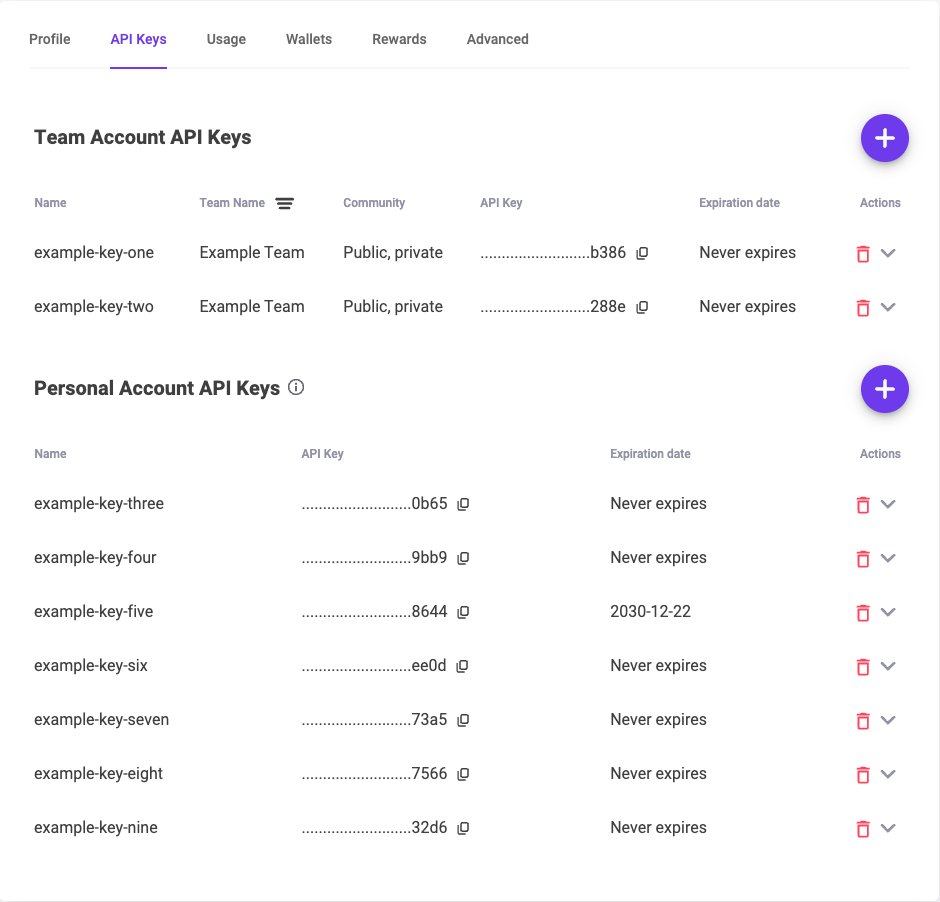
If you do not have a key, the round + button on either section creates one, or your PolySwarm contact can issue one for your team.
In Sekoia.io, connect the account
-
Go to
Configure, thenIntegrations, and search forPolySwarm.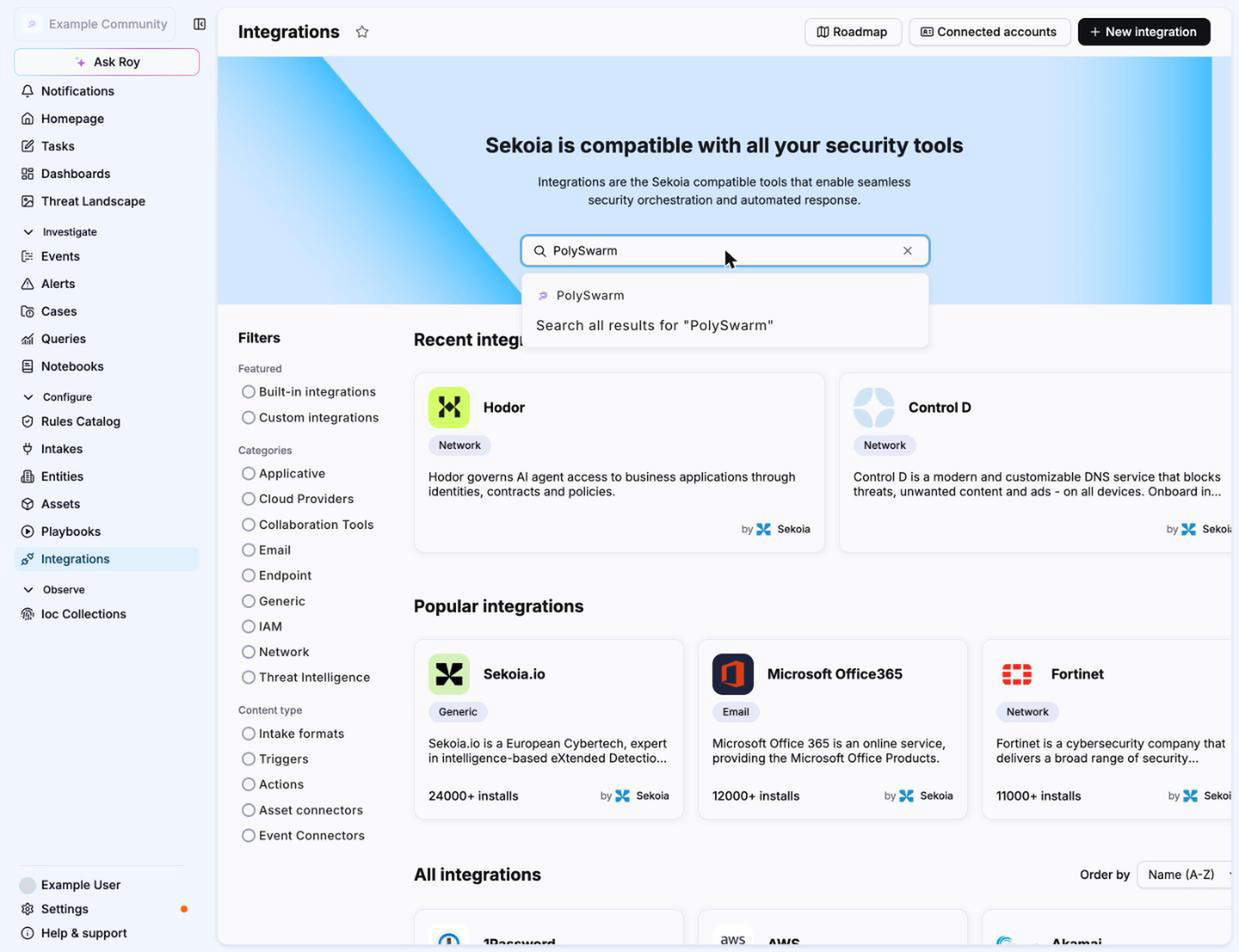 6. On the PolySwarm page, click
Show accounts, then+ Connect an account.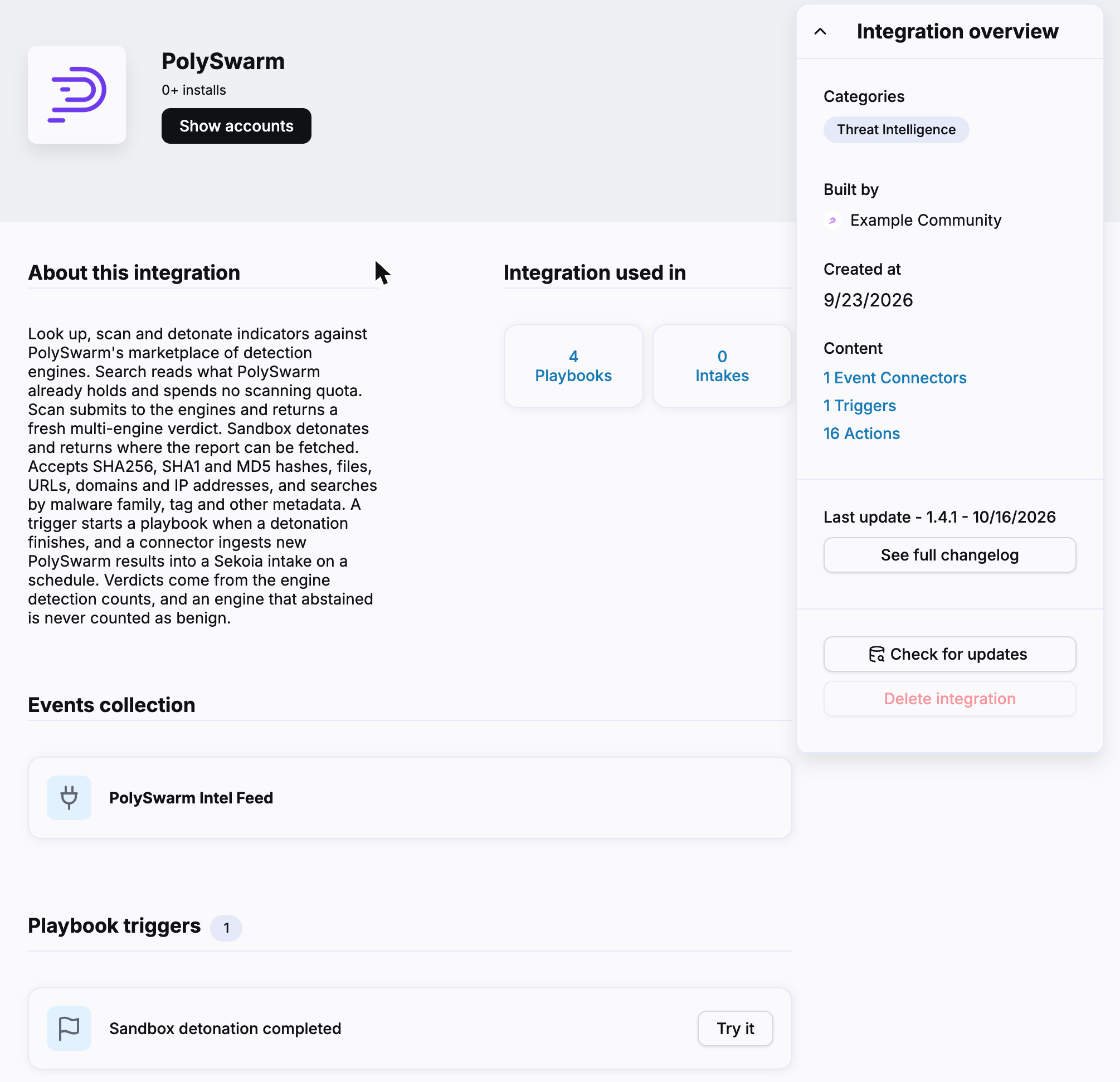 7. Give the account a name you will recognise in a playbook, for example the team the key belongs to.
8. Paste the key into
API Key. The field is declared as a secret, so the platform masks it. 9. SetCommunity. It is prefilled withdefault, which is the public community and is where most keys belong. If PolySwarm issued you a key for a private community, put that community's name here instead.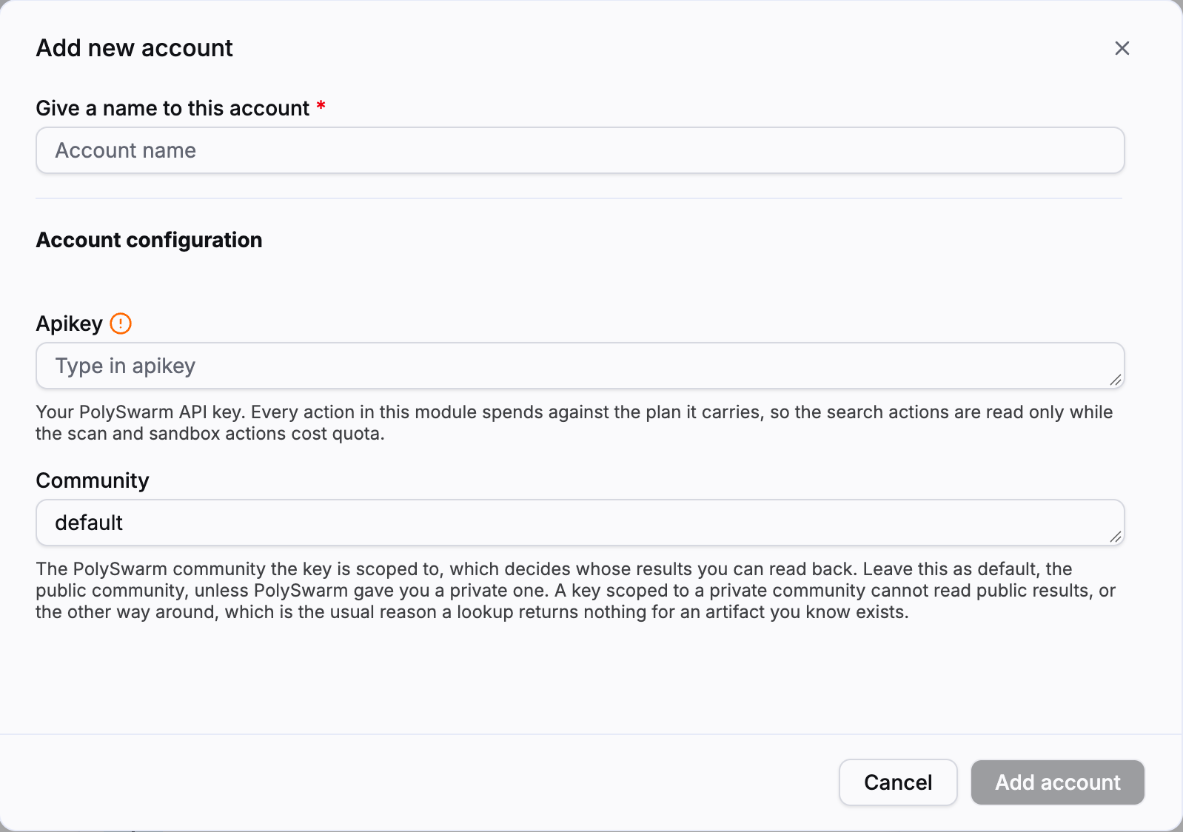 10. Click
Add account. It then appears underConnected accountsand can be selected by any PolySwarm action or trigger in a playbook.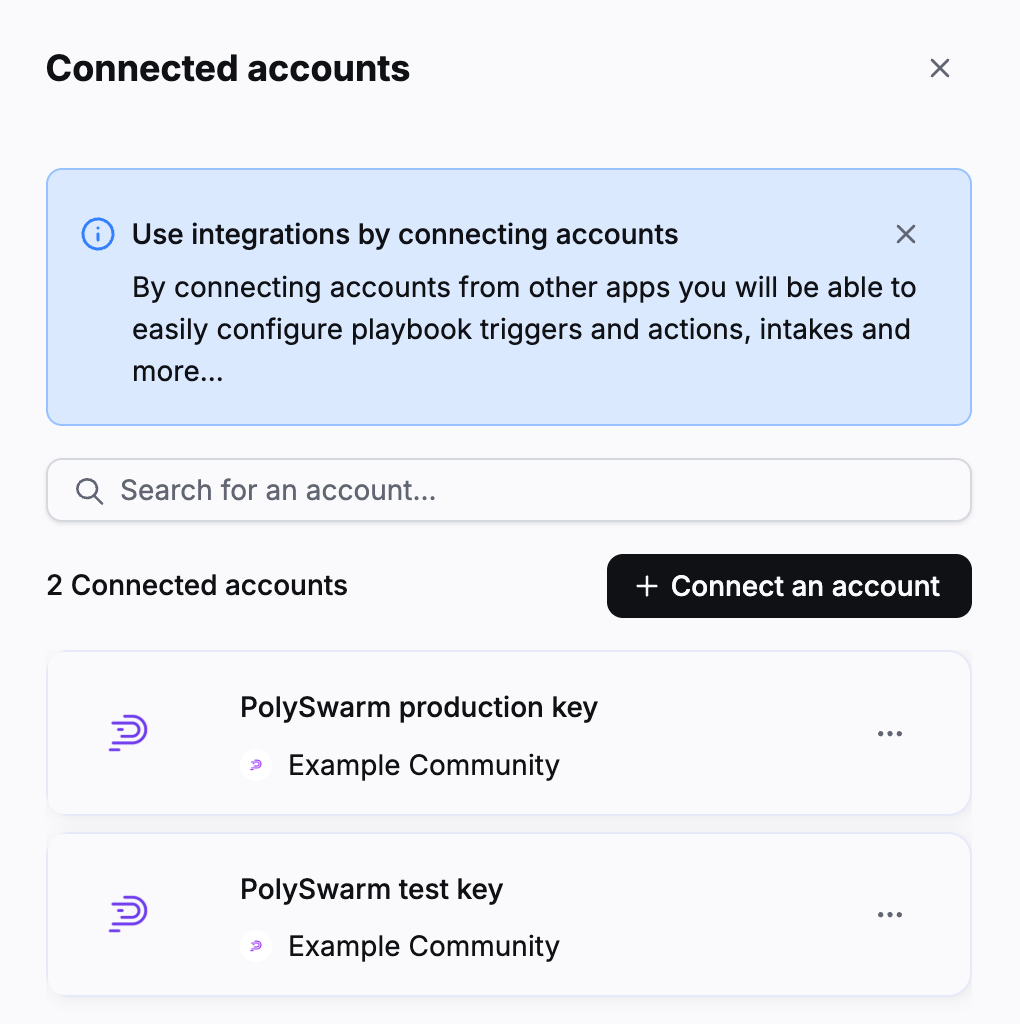
A word about the community field, because it is the one thing the two products do not line up on. The PolySwarm portal describes a key's community in words, as public or private, and never shows the exact name Sekoia wants typed here. If lookups come back empty for artifacts you are certain exist, this field is almost always the reason, and your PolySwarm contact can tell you the exact value.
Using it in a playbook
- Open a playbook under
Configure, thenPlaybooks, and click the+on the canvas. -
Search for
PolySwarm. TheActionstab lists every action, and theTriggerstab holdsSandbox detonation completed.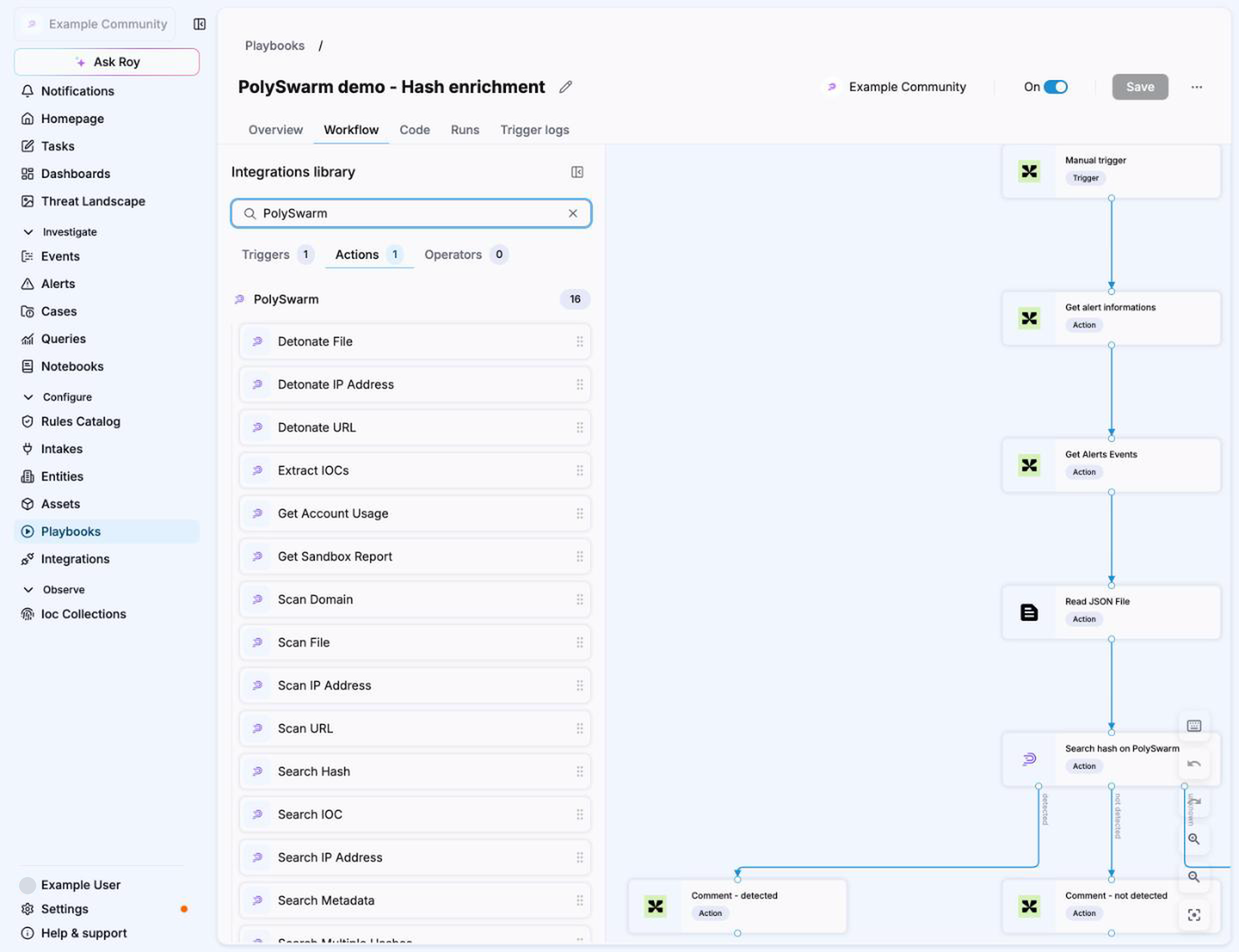
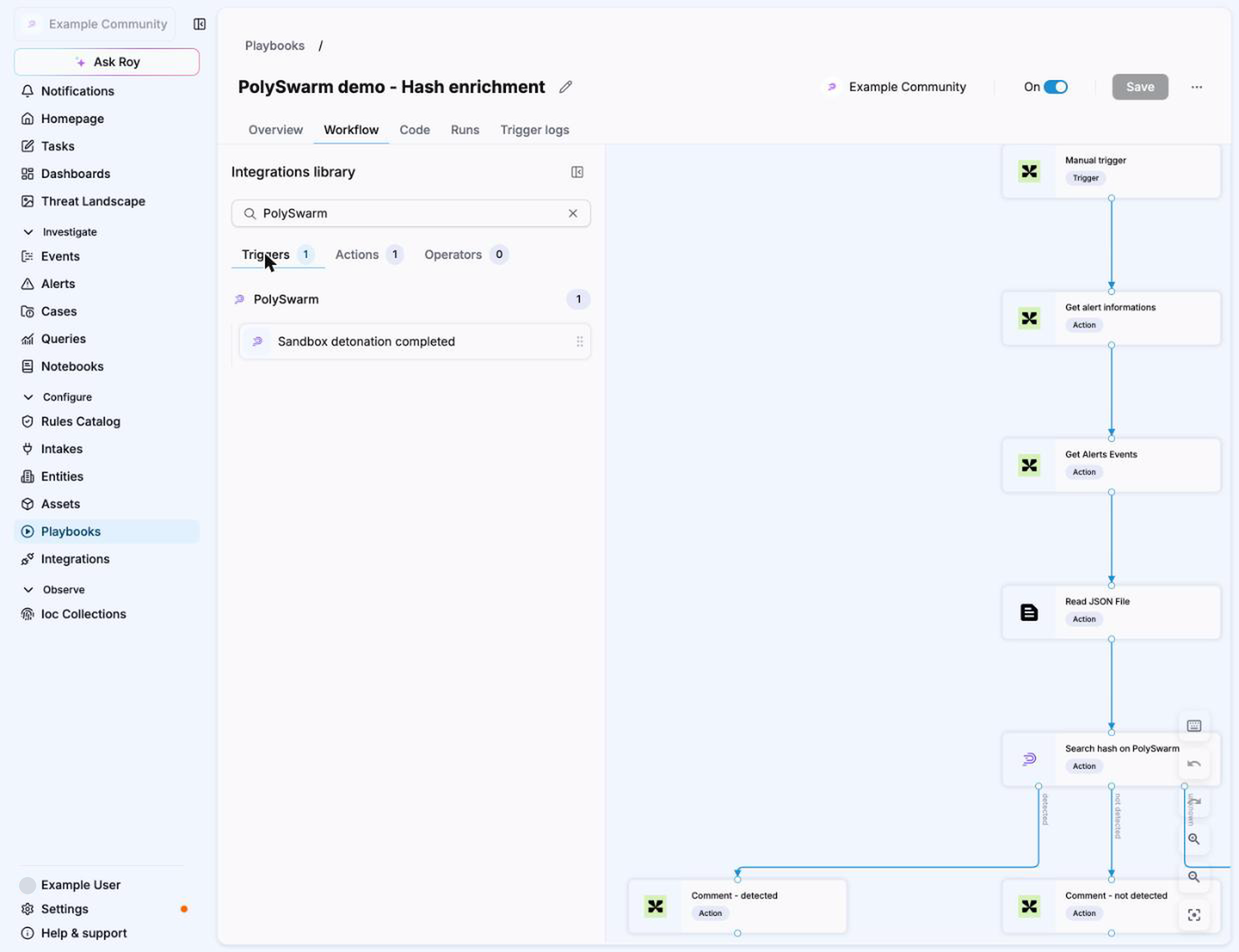
The search actions branch on their outcome, so a hash search leads to detected, not detected and unknown outputs you can wire to different steps. The unknown branch matters: it is what fires when PolySwarm has never seen the artifact, or when a scan has not finished, and it is deliberately not the same as not detected.
What leaves your environment
Every action except ExtractIocs sends something to PolySwarm, and the actions
differ in what that is. The short version: a lookup sends the indicator, a scan
or a detonation sends the artifact itself, and an artifact you send is shared.
- Nothing leaves.
ExtractIocsruns entirely inside Sekoia. It never calls PolySwarm, so text you hand it stays in your environment. - The API key only.
AccountUsagesends your key and asks what the account is entitled to. TheSandbox detonation completedtrigger polls the status of detonations your account already created. - The indicator you looked up.
SearchHash,SearchHashes,SearchUrl,SearchIp,SearchIocandReportsend the hash, URL, address or indicator you asked about, and nothing else.SearchMetadatasends the query string you wrote, so treat that string like any other field an analyst fills in. These are read-only lookups against what PolySwarm already holds. They do not add the indicator to PolySwarm as a submission. - The artifact itself, and it is shared.
ScanFileandSandboxFileupload the file's contents.ScanUrl,ScanIp,ScanDomain,SandboxUrlandSandboxIpsubmit the URL or the address as an artifact. Whatever you submit is visible to every engine in the community the key belongs to, and it cannot be withdrawn afterwards. On the default public community that means every participating vendor, not only PolySwarm. Decide deliberately before you send a customer file, an internal URL or anything else you would not publish.
The scan and detonate actions refuse a private, loopback, reserved or otherwise non-public address before anything is sent, so a host from your own network is not submitted by accident. A URL that two parsers read differently is refused for the same reason.
Before you wire this into something that runs on every alert
- The search actions are read only. They look up what is already known and cost almost nothing. The scan actions submit the artifact to the engines and the detonate actions run it in a sandbox. Those spend against your plan.
- Bulk lookup is a loop, not a batch. PolySwarm has no batch hash endpoint, so fifty hashes cost fifty requests. Duplicates are charged once. A usage limit stops the run and returns the rows already gathered rather than failing outright, and so does a refused key, an unreachable platform, several failures in a row or a ten minute time bound. A run stopped that way reports
partial, which must not be read as a clean answer for the hashes it never reached. - Getting an existing sandbox report is quick. Creating one is not. A fresh detonation can take roughly fifteen minutes. For anything time sensitive, submit the artifact and let the
Sandbox detonation completedtrigger start the playbook that handles the result, rather than blocking an action on it.
What a result does and does not mean
- An artifact nobody has seen is not an error. A hash search that finds nothing reports the artifact as not found, so a playbook can route it to a detonation step instead of failing.
- A scan with no verdict is never reported as clean. Three cases are kept away from the not detected branch rather than reported as zero detections: an assertion window still open, a failed scan, and a window that closed without a single engine returning a malicious or benign answer. The search actions send all three to the unknown branch. The scan actions stop with an error on the first two, because they were asked to produce a fresh verdict and did not, and send the third to unknown with the body still filled in. That third case is the one worth knowing about, because engines abstain routinely and coverage is thinnest on addresses and domains. Engines that abstained are counted as neither malicious nor benign. The opposite behaviour would tell a playbook a sample is clean when nobody has actually looked at it.
- A sandbox verdict and an engine verdict are different things and can disagree. A file that every engine flags can behave inertly under detonation and score low, so a low sandbox score means the sample did nothing in that sandbox, not that it is safe. Use a hash search for the engine view and a sandbox report for behaviour.
- For a URL, a domain or an address, use the detection counts rather than the score. The score carries little information for those. For files it is meaningful across its full range.
Checking it worked
The cheapest proof that the key and the community are both right is a hash search, because it is read only. Run Search Hash against a hash you know is malicious and confirm the engine detections come back. If it reports the artifact as not found for something the industry has certainly seen, go back to the community field.
Extra
Module PolySwarm v1.0.0